The Module Explorer of Pattern
You call up the Module Explorer of Pattern via the / menu.
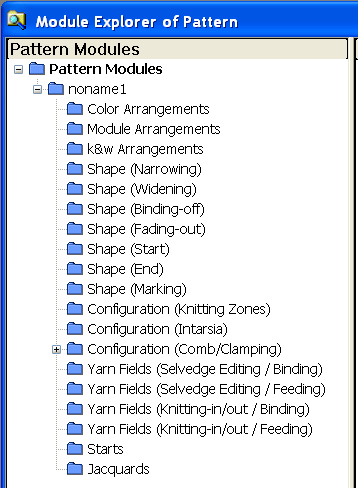
- All the modules used in the pattern are organized in module groups and will be displayed in the module tree.
- In the Module Explorer of Pattern you can edit all the modules directly.
- All changes that are made to these modules affect immediately the Configuration and Shape Attributes dialog boxes in which these modules appear.
- You can open and edit the elements of a container module.
It will not be saved as copy. - All the modules contained in the Module Explorer of Pattern will be saved with the pattern (.mdv file).
The changes of the modules of the Module Explorer of Pattern do not affect the modules of the Module Explorer of Database.
Behavior of structure modules:
- All modules of the Module Explorer of Database, inserted by the user into the pattern, will be saved as local module (copies) in the Module Explorer of Pattern.
- These modules are marked with an L.
- Modules are not write protected.
Behavior of Technical Modules:
- All Stoll Technical Modules used in the pattern, which are inserted by the technical processing or with the shape are saved as originals in the Module Explorer of Pattern.
- Original Stoll technical modules are not marked with an L.
- A Stoll technical module is marked with an L if you edit it.
It is a local module then. - All technical modules of your own, used in the pattern, inserted by the technical processing or with the shape are saved as local modules (copies) in the Module Explorer of Pattern.
- These modules are marked with an L.
- Modules are not write protected.