Staggering of yarn carriers at the fabric selvedge (YD/YDI)
I. Enter staggering of yarn carriers at the fabric selvedge (YD/YDI):
In the Configuration dialog box under / is activated by default for all patterns  Optimize YD per row (YDopt) and the specifications for calculating the distances are predefined.
-
 Design Pattern appears.
 - The
 Yarn carrier staggering (YD)/(YDI) control column is displayed.
 - Presetting of Configuration will be displayed: OPT (YD optimized)
- 1
- Open the Configuration tool window.
Home ribbon -> Configuration group -> Configuration
 - 2
- In the Configuration tool window at the left in the selection panel select the desired pattern via the selection list.
- 3
- Select the Optimizing tab.
- 4
- Deactivate the
 Optimize YD per row (YDopt) function under the Optimizing Strokes sector.
 - Working with YD / YDI in the control column is possible now.
- 5
- Close the tool window.
- 6
- Position the cursor on the control column.
- 7
- Open the context menu with the RMB.
- The context menu appears.
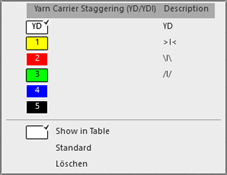
- 8
- Select the desired YDI index (color).
- 9
- Enter the selected index (color) in the desired pattern rows of the Yarn carrier staggering (YD)/(YDI)control column.
- or –
Select the Show in Table context menu to make the new entries in the Yarn carrier staggering (YD)/(YDI) tool window and enter them in the control column.
|
| ||
|
1 |
| |
|
4 |
|
Selecting the default value to enter in the control column |
|
|
Delete the entry from the control column
| |
|
5 |
Table with default tables for the yarn carrier staggering
| |
|
6 |
Table of the YDI indexes
YDIn: n = 1-20 | |
|
7 |
Display of the yarn carrier rails with the yarn carriers left / right and the allocated values for staggering
| |
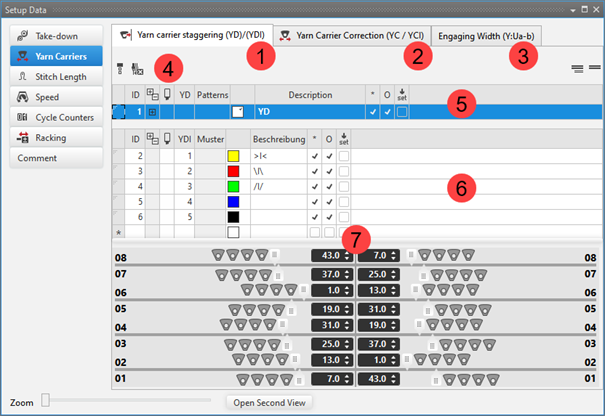


 : In a special case entries from knitting elements also can be entered.
 : In each table there can be defined other values for the staggering process of the yarn carriers.
Enter different indices (colors) in to areas of the control column if different distance tables are necessary in the pattern.
II. Create a pattern-related YD table:
- The Yarn carrier staggering (YD)/(YDI) tool window is open.
- The Optimize YD per row (YDopt) function is disabled for the desired pattern.
- 1
- Move cursor to the first column of the upper table (5).
- 2
- Open the context menu with the RMB.
- 3
- Select the desired pattern for the new YD table via Insert Row for Pattern-related Values
 .
. - Additional row will be inserted.
- 4
- Select additional row.
- The view of yarn carrier rails appears.
- 5
- Move the yarn carriers by the slider graphically.
- or –
Enter the values in the edit box. - 6
- Select a new entry in the
 column.
 - 7
- Make entry into the control column of the desired rows.
III. Working with YDI Indexes:
In the table with the YDI indexes (6) there are 3 STOLL templates which can be used directly.
- 1
- Select the existing YDI index and enter it in the control column.
- or -
Call-up the context menu in the * cell of the table. - 2
- Select Add Table Row....
- A new line is inserted.
- 3
- Enter an index number in the YDI column.
- 4
- If necessary, change the color of the YDI index.
- 5
- Select the row.
- The view of yarn carrier rails appears.
- 6
- Move the yarn carriers by the slider graphically.
- or –
Enter the values in the edit box. - 7
- Select an entry in the column.
- 8
- Enter the desired rows into the control column.
IV. Create a pattern-related YDI table:
- The Yarn carrier staggering (YD)/(YDI) tool window is open.
- The Optimize YD per row (YDopt) function is disabled for the desired pattern.
- 1
- Move cursor to the first column of the table (6).
- 2
- Open the context menu with the RMB.
- 3
- Select the desired pattern for the new YDI table via Insert Row for Pattern-related Values .
- Additional row will be inserted.
- 4
- Select additional row.
- The view of yarn carrier rails appears.
- 5
- Move the yarn carriers by the slider graphically.
- or –
Enter the values in the edit box. - 6
- Select an entry in the column.
- 7
- Enter the desired rows into the control column.