Quick Access Toolbar
In the quick access toolbar you have access at any time to the following commands:
 The quick access toolbar can be found at the left border of the title bar.

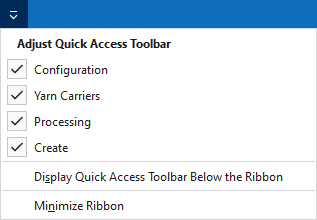
Using the drop-down menu you can display and hide some commands in the quick access toolbar.
Make settings for the presentation of the ribbon.
The following commands are always active in the quick access toolbar and cannot be hidden:
|
|
Create a new pattern project (*.spf). |
|
|
Opens the 'File Open' dialog box. |
|
|
Save |
|
|
Undoes the previous operation. |
|
|
Repeats the previous operation. |
|
|
Organize knitting elements, i.e. modules, CAs, MAs and pattern elements in the Knit Explorer. |


Adjust Quick Access Toolbar
The following commands can be displayed and hidden in the quick access toolbar:
|
|
Shows the Configuration dialog box. |
|
|
Opens the yarn carrier view of all pattern of the current order (sequence). See and edit the yarn carrier allocation and the color parameters here. |
|
|
Start the Technical Processing of the current pattern. |
|
|
Creates the knitting program (sin, set, and jac) of the current pattern after the technical processing. |


Make settings for the quick access toolbar and the ribbon:
|
Display Quick Access Toolbar Below the Ribbon |
Display the quick access toolbar under or above the ribbon. |
|
Minimize Ribbon |
Show or hide the ribbon. |