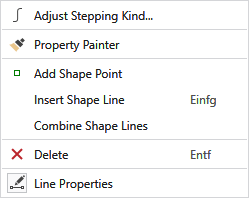
Context Menu of Shape Lines
|
|
Determine the properties of the curve. Clicking on it, opens the tool window where you select the stepping kind and make the corresponding settings.
|
|
|
Copies the properties of the object (shape line or marking point) by click on it and transfers it to the object you click on next. |
|
|
Adds a shape point. |
|
Insert Shape Line |
Insert Shape Line After |
|
Combine Shape Lines |
If several contiguous lines are selected, you can use this function to combine the selected lines into one main line. |
|
|
Deletes an object by click on it in the view. |
|
|
Opens the Line Properties dialog box. |

 Only available with lined shape


 Shape points can be moved with the left mouse button or with the cursor keys.
Multiple shape points can also be moved together by selecting them previously with a pressed CTRL key.