Context Menu of the Lined Shape
|
|
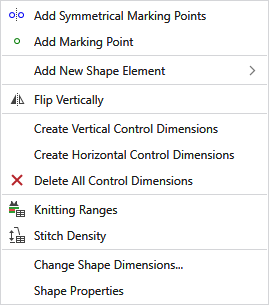
Adds a marking point and its mirrored point. |
|
|
Adds a marking point. |
|
Add New Shape Element |
Adds a new shape element.
|


|
|
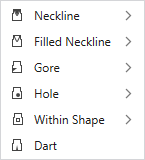
Inserts a neckline. Symmetrically or Asymmetrically |
|
|
Inserts a filled neckline. Symmetrically or Asymmetrically |
|
|
Inserts a gore area. Symmetrically or Asymmetrically |
|
|
Adds a hole. Symmetrically or Asymmetrically |
|
|
Inserts a dart. Symmetrically or Asymmetrically |
|
|
Inserts an area in the shape that can be filled with pattern color and with knitting element. Symmetrically or Asymmetrically |


|
|
Mirror Single Shape Vertically |
|
Create Vertical Control Dimensions |
Creates vertical control dimensions for this shape element. |
|
Create Horizontal Control Dimensions |
Creates horizontal control dimensions for this shape element. |
|
|
Deletes all control dimensions. |
|
|
Shows the table of the defined knitting ranges.
|
|
|
Shows the Stitch Density table. |
|
Change Shape Dimensions... |
Opens the dialog box to change the dimension of the shape. Not possible if the shape contains sections of different stitch densities. |
|
Shape Properties |
Opens the Shape Properties dialog box. |


