Color Parameters
You can make the desired presettings for the colors used in the pattern (color areas) within the color parameter table.
I. Open the color parameters tool window:
- The document window is enabled.
- The
 Guide-fil ribbon is enabled.
- 1
- Open the Guide-fil tool window via
 Afficher le guide-fil.
 - The tool window appears.
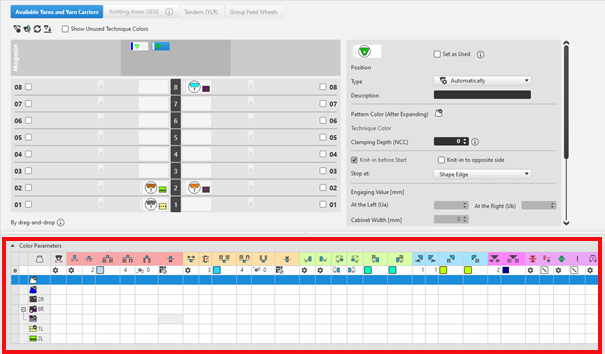
For each color in the pattern color tables used in the design pattern, a color area is created in the color parameter table. This means that you can make presettings only once for this color area.
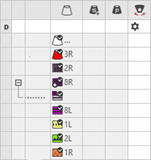
For pattern related, different changes of a color area sub-colors must be created. You have to draw them manually in the design pattern at the point to be changed. Then, other specifications can be set in the color parameter table.
- 2
- Make the desired presettings for the corresponding color:
- Knitting-in and out
- Change the starting direction of a color (yarn carrier)
- Knot or binding at start or end of a color
- Border Processing
- etc.
- 3
- Apply the changes of the Guide-fil tool window to the pattern.
Modifier group -> Accepter
- or -
Modifier group -> Accepter et fermer
|
|
Synchroniser |
Accepte les modifications du dessin de conception dans la vue Guide-fil ouverte et synchronise les deux vues sur l'état de dessin actuel. |
|
|
Accepter |
Accepte les modifications pour les guide-fils dans le dessin de conception. Les autres modifications (paramètres couleur par ex.) sont aussitôt effectives. |
|
|
Accepter et fermer |
Accepte les modifications pour les guide-fils dans le dessin de conception et ferme la vue. Les autres modifications (paramètres couleur par ex.) sont aussitôt effectives. |
|
|
Annuler et fermer |
Rejette les modifications et ferme la vue Guide-fils. Close with Annuler et fermer if you only opened the Yarn Carrier view for control. |


II. Change the display of the columns in the color parameter table:
- 1
- Move the cursor to the first row of the table header.
- 2
- Open the context menu with RMB.
- The context menu appears.
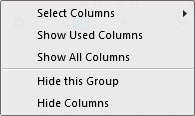
|
| |
|
Sélectionner les colonnes |
Adding or closing the desired columns in the selection list. |
|
Afficher les colonnes utilisées |
Display of the columns used in the pattern |
|
Afficher toutes les colonnes |
Display all of the columns |
|
| |
|
Masquer ce groupe |
Hide all columns allocated to a group (color coded) |
|
Masquer cette colonne |
Hide the individual column at cursor position |
III. Structure and column headers of the color parameter table:
Table header:
-
1st row:
All the symbols identifying the table columns -
2nd Row 'D'
Default settings for the respective column
Settings from the STOLL file - cannot be modified at the moment
Default settings are applied from a STOLL file and cannot be modified at the moment.
These default settings are automatically applied to all colors without specifications.
|
| ||
|
Group 1: General | ||
|
| ||
|
1. Column |
Entry D for the definition of the 2nd row of the table | |
|
2. Column |
Display for available sub-colors | |
|
|
Couleur |
Display of all the colors used in a project
|
|
|
Le guide-fil tricote une couleur multi-système |
Specifications with multi-system knitting |
|
|
Le guide-fil tricote une couleur de vanisage |
Specifications with plating |
|
|
Basculer |
Settings for the swivelling of intarsia yarn carriers or of autarkic yarn carriers |
|
|
Quantity of pattern rows for knitting-out, SEN edge and clamping
|
Specify the maximum distance between the color fields of the yarn carrier.
Clamp Yarn Carrier |


 : Visible and used within the design pattern.
 : The symbols are depending on the pattern color table they are origin.


|
Group 2: Knitting-in | ||
|
| ||
|
|
Direction de départ |
Specification of the knitting direction for the first row of a color (color area) |
|
|
Nombre de colonne sans tricotage en entrée |
Quantity of columns (wales) without knitting-in module |
|
|
Module pour le tricotage en entrée |
Specification of the knitting mode for knitting-in
|
|
|
Largeur de répétition pour le tricotage en entrée |
Presetting of the module width in total for the knitting mode of feeding-in the yarn carrier
|
|
|
Décalage des rangées pour le démaillage |
Column appears automatically if a module for knitting-in with casting-off is used |
|
|
Décalage de rangées pour le tricotage en entrée |
Knitting-in of the yarn carrier by x rows before the beginning of the color area
|
|
|
Nœud / entrelacement au début |
Presetting a module for knot / binding at start of a color area without knitting-in.
|
|
|
Décalage de colonne pour le tricotage en entrée avec nœud |
Move the position of a knot (module) by x columns to the left or right.
|
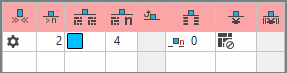


 :
:


The direction of knitting-in of a yarn carrier is always carried out from last position.
|
Group 3: Knitting-out | ||
|
| ||
|
|
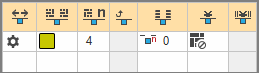
Direction de fin de tricotage |
Preset of the direction for knitting-out of the yarn carrier at the end of a color area |
|
|
Module pour la fin du tricotage |
Preset of the knitting mode (module) for knitting-out
|
|
|
Largeur de répétition pour la fin de tricotage |
Presetting of the module width in total for the knitting mode of feeding-in the yarn carrier
|
|
|
Décalage des rangées pour le démaillage |
Column appears automatically if a module for knitting-out with casting-off is used |
|
|
Décalage de rangées pour la fin du tricotage |
Knitting-out of the yarn carrier by x rows after the end of the color area
|
|
|
Nœud / entrelacement à la fin |
Presetting a module for knot / binding at end of a color area without knitting-out.
|
|
|
Décalage de colonne pour la fin du tricotage avec nœud |
Move the position of a knot (module) by x columns to the left or right.
|


|
Group 4 : Intarsia Binding | ||
|
| ||
|
|
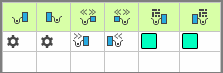
Entrelacement intarsia à gauche |
Presetting of a binding or no binding at the left border of the color area |
|
|
Entrelacement intarsia à droite |
Presetting of a binding or no binding at the right border of the color area |
|
|
Direction de l'entrelacement intarsia à gauche |
Specification for inserting the Binding module at the left border of the color area depending on the carriage direction
|
|
|
Direction de l'entrelacement intarsia à droite |
Specification for inserting the module Binding at the right border of the color are depending on the carriage direction
|
|
|
Module pour l'entrelacement intarsia à gauche |
Presetting of the knitting mode for binding at the left border of the color area |
|
|
Module pour l'entrelacement intarsia à droite |
Presetting of the knitting mode for binding at the right border of the color area |


|
Group 5: Border Processing | ||
|
| ||
|
|
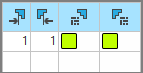
Gradation autorisée sans élaboration du bord, à gauche |
Maximum number of needles when widening at the left border of the color area without automatic border processing.
|
|
|
Gradation autorisée sans élaboration du bord, à droite |
Maximum number of needles when widening at the right border of the color area without automatic border processing.
|
|
|
Module pour l'élaboration du bord à gauche |
Presetting of the knitting mode for the border processing (feeding) in case of large widenings (stepping) of the color area
|
|
|
Module pour l'élaboration du bord à droite |
Presetting of the knitting mode for the border processing (feeding) in case of large widenings (stepping) of the color area
|


|
Group 6: multi gauge | ||
|
| ||
|
|
Escaliers autorisés des rangées de grosse multi-gauge |
Allowed number of needles when widening at the left and right border of the color area without automatic border processing.
|
|
|
Module pour le traitement du bord, passage de mg-gros à mg-fin |
Presetting of the knitting mode for the border processing (feeding) in case of large widenings (stepping) of the color area and as transition
|


|
Group 7: Miscellaneous | ||
|
| ||
|
|
Pince |
Presetting for the yarn carrier, when it is to be clamped after knitting its color area. |
|
|
Pince retardée |
|
|
|
ouvrir la pince |
|
|
|
SENBord |
Specifications for positioning the yarn carrier during the knitting
|
|
|
Système (selon la direction) |
Selection of a knitting system for the selected color area
|
|
Group 8 | ||
|
Description |
Remarque sur l'utilisation de l'entrée
Vous pouvez introduire ici un nouveau texte. | |