Working in the View of Yarn Carriers
I. Opening the Yarn Carrier View:
- The motive is already created in the
 Dessin de conception.
- 1
- Open Guide-fil.
Accueil ribbon -> Prévisualisation -> Guide-fil
 - An additional
 document window is opened as Yarn Carrier view and the Guide-fil ribbon appears.
 - 2
- Make the desired settings for the view of Guide-fil the status bar:
- Dessin de conception is displayed by yarn colors or magazine colors.
II. Opening the Color Parameter Table:
- The New Pattern xx document window is enabled.
- The Guide-fil ribbon is enabled.
- 1
- Open the Guide-fil tool window via
 Afficher le guide-fil.
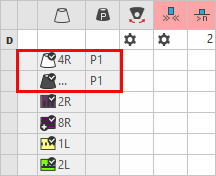
 - The Paramètres de couleurs table appears inside of the tool window.
- Plating colors are displayed.
- 2
- Make the desired presettings.
For each color in the pattern color tables used in the design pattern, a color area is created in the color parameter table. This means that you can make presettings only once for this color area.
For pattern related, different changes of a color area sub-colors must be created. You have to draw them manually in the design pattern at the point to be changed. Then, other specifications can be set in the color parameter table.
III. Presettings of the Yarn Carrier Tool Window:
- The New Pattern xx document window is enabled.
- The Guide-fil ribbon is enabled.
- 1
- Open the Guide-fil tool window via Afficher le guide-fil.
- The Guide-fil tool window appears and the yarn carriers for the plating color P1 are displayed undefined in the magazine (center).
- 2
- Allocate the yarn carriers to the yarn carrier bars by the
 Occuper les barres button.
 - 3
- Then select the desired yarn carrier type for the yarn carriers.
- 4
- Select the yarn carrier.
- 5
- In the right area of the tool window select the desired yarn carrier type via the selection list under .
- 6
- For the yarn carrier with the allocation of the type
 Largeur de prise variable +/- (Ua/b) under Valeur de prise [mm]enter the values À gauche (Ua) and À droite (Ub).
 - 7
- Close the Guide-fil tool window with
 .
.
- or -
Select Accepter et fermer in the Modifier group.
- The New Pattern xx document window will be closed and the presettings applied.