Quick access toolbar for lined shape projects
In the quick access toolbar you have access at any time to the following commands:
 The quick access toolbar can be found at the left border of the title bar.

Using the drop-down menu you can display and hide the commands in the quick access toolbar and make settings.
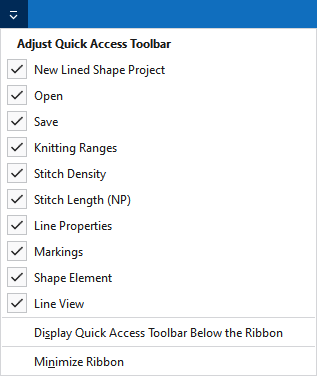
|
|
Créer un nouveau projet de coupe de ligne (*.slsf). |
|
|
Ouvrir un fichier (dessin, élément de tricotage, coupe). |
|
|
Enregistrer |
|
|
Annuler l'opération précédente. |
|
|
Répère l'opération précédente. |
|
|
Affiche le tableau avec les zones de tricotage définies. |
|
|
Affiche la tableau de la densité des mailles. |
|
|
Afficher le tableau avec les valeurs NP. |
|
|
Show Propriétés des lignes. |
|
|
Affiche la fenêtre Outils avec les caractéristiques du point de marquage choisi. |
|
|
Show Shape Element Properties. |
|
|
Show Vue de la ligne. |
|
Autres ordres... |
Add more commands to the quick access toolbar. |
|
Afficher la barre d'outils Accès rapide en-dessous du ruban |
Display the quick access toolbar under or above the ribbon. |
|
Réduire le ruban du menu |
Show or hide the ribbon. |


