Context Menu on a Marking Point
|
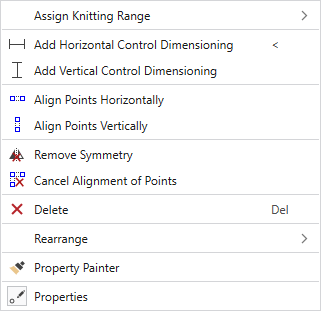
Attribuer la zone de tricotage |
Adds a knitting area to the marking point. |
|
|
Ajoute une cote de contrôle horizontale. Control dimensions can be defined between any two markings in the shape. The measure is entered in cm. |
|
|
Ajoute une cote de contrôle verticale. Control dimensions can be defined between any two markings in the shape. The measure is entered in cm. |
|
|
Retiens deux points ou plus horizontalement à la même hauteur. Suivez les instructions ! |
|
|
Retiens deux points ou plus verticalement à la même hauteur. Suivez les instructions ! |
|
|
Annule la symétrie pour le point sur lequel vous cliquez. Not available with marking points of a shape line. |
|
|
Annuler l'alignement vertical ou horizontal Cliquer sur les points souhaités. |
|
|
Supprime l'objet sur lequel vous cliquez dans l'affichage. |
|
Aligner à nouveau |
Select a new arrangement of the marking point from the offered options. Not available with marking points of a shape line. |
|
|
Copie les propriétés de l'objet (ligne de coupe ou point de marquage) sur lequel vous cliquez et les reporte sur l'objet sur lequel vous cliquez ensuite. Not available with marking points of a shape line. |
|
|
Affiche la fenêtre Outils avec les caractéristiques du point de marquage choisi. Not available with marking points of a shape line. |


