FlexPly Patterning
Create FlexPly Pattern
-
CREATE PLUS version V2.4. – 04/2023
or higher.
- ADF machine E 7.2 with cam box conversion for FlexPly
- 1
- Open a new pattern.
- 2
- Select an ADF machine E 7.2 with cam box conversion for FlexPly.
- 3
- Open the Attributs de machine tab.
- 4
- Select FlexPly setting in the Fonctions système section under Conversion de la chute.
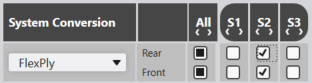
- In the Fonctions système section, the system functions are automatically adjusted.
- 5
- Confirm the prompt with OK.
La modification de la chute pour "FlexPly" est activée !
- 6
- Open the Couleurs de vanisage tool window.
 Couleurs de vanisage
- 7
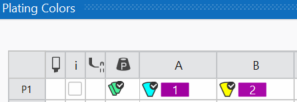
- Define a plating color by Couleurs des guide-fils.
Plating Color P1:
Column A: Yarn carrier color 8 for the binding thread
Column B: Yarn carrier color 7 for the motif thread
- 8
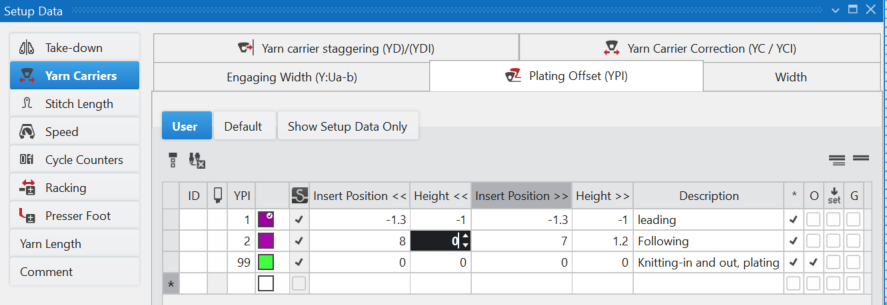
- Allocate the necessary plating index to the yarn carrier colors.
- 9
- Draw pattern.
The FlexPly motif can be done on the rear, front or on both needle beds.
Draw with plating color and the following needle action e.g:
Enter  Maille arrière only.
- Resulting "Stitch-Float"

- 10
- Or enter
 Fil du motif arrière
and Maille arrière.
Fil du motif arrière
and Maille arrière.
- Resulting "Stitch-Stitch"
 for motif thread and binding thread.
 - E.g. for the rear needle bed:
- 11
- Entry the FlexPly avant et arrière function in the
 Fonction système control column.
- 12
- Execute
 Élaboration
technique.
Élaboration
technique.
- 13
- Check the knitting program with the Contrôle du Sintral Check.
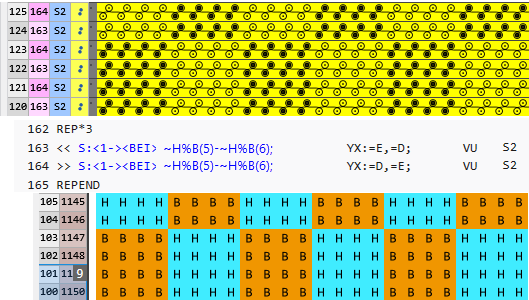
Recommandations pour Dévoré (1 système) :
- Utiliser les pistes de guide-fil au milieu.
Exemple pour ADF 32 : - Guide-fil 8 pour le fil d'entrelacement
- Guide-fil 7 pour le fil du motif
- Régler l'index à vaniser (YPI) dans le Éditeur de Setup.
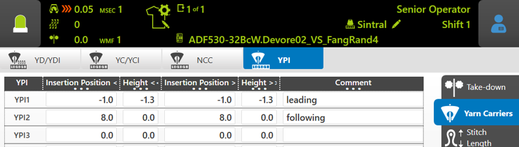
- Précédente (fil d'entrelacement)
Position d'insertion : -1.0
Hauteur: -1.3 - Suivante (fil du motif)
Position d'insertion : 8.0
Hauteur: 0
- Longueur de flottage
Pas plus de 1/2 pouce