New Dimensioned Shape (dialog box)
Create new shapes with dimensionings and formulas by this dialog box.
How to open the dialog box:
- Click the icon in the quick access toolbar
- or -
- 1
- Call up Nouveau menu in the Accueil ribbon.
- 2
- Click Nouveau projet de coupe à dimension in the tab.
Before starting:
- 1
- Analyze the order.
How to Analyze the Order - 2
- Knit a knitting sample with the following features.
Basic structure and structures
Gauge of the machine
Yarn and Yarn Quality - 3
- Determine the stitch density based on the knitting sample.
Make the following settings in this dialog box:
Detailed Column in the Center
- 1
- Specify the properties and dependencies of the dimensions.
 Set-in Sleeve with Shoulder Gore

- Crew Neck
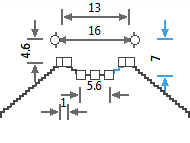
Stepping kind in the neckline J-curve
 - V-neck
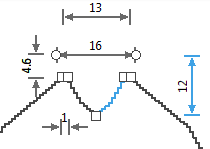
Stepping kind in the neckline: Angled to Inside
- Crew Neck as Cardigan with opening at the center axis
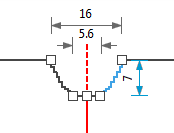
Stepping kind in the necklineJ-curve - V-neck as Cardigan with opening at the center axis
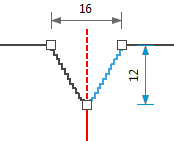
Stepping kind in the neckline: Angled to Inside
- Polo Collar
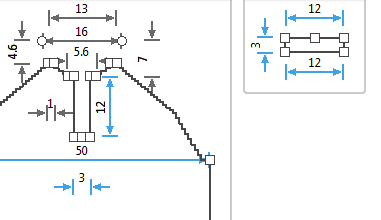
Stepping kind of the placket height: Straight Line
- 255
- How to choose the Neckline Variants
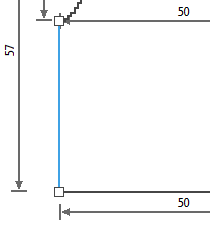
Stepping kind up to the armhole narrowing: Straight Line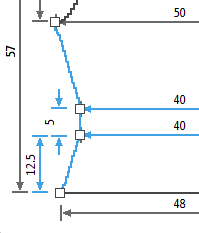
Three-step stepping kind up to the armhole narrowing:- Narrowing, Angled to Inside
- without, Angled to Inside
- Widening, Angled to Inside
For example widening only: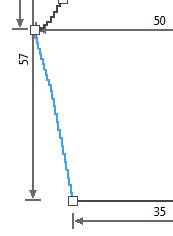
Stepping kind up to the armhole narrowing: Angled to Inside
- 257
- How to choose the Waist Variants
- Upright to the Shoulder
- Diagonally up to the Shoulder
- Diagonally up to Body Center
- Upright to Body Center
- 258
- How to choose the Armhole Dimensionings
- Up to the Start of the Shoulder
- Up to the End of the Shoulder
- Up to Body Center
- Inner Sleeve Length
- 259
- How to choose the Sleeve Length Dimensionings
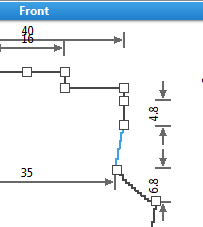
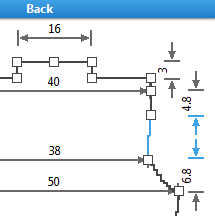
 Set-in Sleeve with French Shoulder
- Crew Neck
Stepping kind in the necklineJ-curve - V-neck
Stepping kind in the neckline: Angled to Inside
- Crew Neck as Cardigan with opening at the center axis
Stepping kind in the necklineJ-curve - V-neck as Cardigan with opening at the center axis
Stepping kind in the neckline: Angled to Inside
- Polo Collar
Stepping kind of the placket height: Straight Line
- Turtleneck Collar
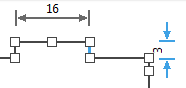
Stepping kind of the turtleneck collar: Straight Line
-
Stepping kind up to the armhole narrowing: Straight Line -
Three-step stepping kind up to the armhole narrowing: - Narrowing, Angled to Inside
- without, Angled to Inside
- Widening, Angled to Inside
-
For example widening only:
Stepping kind up to the armhole narrowing: Angled to Inside
- 260
- How to choose the Waist Variants
- Upright to the Shoulder
- Diagonally up to the Shoulder
- Diagonally up to Body Center
- Upright to Body Center
- 261
- How to choose the Armhole Dimensionings
- Up to the Start of the Shoulder
- Up to the End of the Shoulder
- Up to Body Center
- Inner Sleeve Length
- 262
- How to choose the Sleeve Length Dimensionings
 Raglan
- Crew Neck
Stepping kind in the necklineJ-curve - V-neck
Stepping kind in the neckline: Angled to Inside
- Crew Neck as Cardigan with opening at the center axis
Stepping kind in the necklineJ-curve - V-neck as Cardigan with opening at the center axis
Stepping kind in the neckline: Angled to Inside
- Polo Collar
Stepping kind of the placket height: Straight Line
- 263
- How to choose the Neckline Variants
-
Stepping kind up to the armhole narrowing: Straight Line -
Three-step stepping kind up to the armhole narrowing: - Narrowing, Angled to Inside
- without, Angled to Inside
- Widening, Angled to Inside
-
For example widening only:
Stepping kind up to the armhole narrowing: Angled to Inside
- 265
- How to choose the Waist Variants
- Upright to the Shoulder
- Diagonally up to the Shoulder
- Diagonally up to Body Center
- Upright to Body Center
- 266
- How to choose the Armhole Dimensionings
- Up to the Start of the Shoulder
- Up to the End of the Shoulder
- Up to Body Center
- Inner Sleeve Length
- 267
- How to choose the Sleeve Length Dimensionings
 Saddle Shoulder
- Crew Neck
Stepping kind in the necklineJ-curve - V-neck
Stepping kind in the neckline: Angled to Inside
- Crew Neck as Cardigan with opening at the center axis
Stepping kind in the necklineJ-curve - V-neck as Cardigan with opening at the center axis
Stepping kind in the neckline: Angled to Inside
- Polo Collar
Stepping kind of the placket height: Straight Line
- 268
- How to choose the Neckline Variants
-
Stepping kind up to the armhole narrowing: Straight Line -
Three-step stepping kind up to the armhole narrowing: - Narrowing, Angled to Inside
- without, Angled to Inside
- Widening, Angled to Inside
-
For example widening only:
Stepping kind up to the armhole narrowing: Angled to Inside
- 270
- How to choose the Waist Variants
- Upright to the Shoulder
- Diagonally up to the Shoulder
- Diagonally up to Body Center
- Upright to Body Center
- 271
- How to choose the Armhole Dimensionings
- Up to the Start of the Shoulder
- Up to the End of the Shoulder
- Up to Body Center
- Inner Sleeve Length
- 272
- How to choose the Sleeve Length Dimensionings
 Top
Top
- Crew Neck
Stepping kind in the necklineJ-curve - V-neck
Stepping kind in the neckline: Angled to Inside
-
Stepping kind up to the armhole narrowing: Straight Line -
Three-step stepping kind up to the armhole narrowing: - Narrowing, Angled to Inside
- without, Angled to Inside
- Widening, Angled to Inside
-
For example widening only:
Stepping kind up to the armhole narrowing: Angled to Inside
- 274
- How to choose the Waist Variants
- Upright to the Shoulder
- Diagonally up to the Shoulder
- Diagonally up to Body Center
- Upright to Body Center
- 275
- How to choose the Armhole Dimensionings
 Slipover
- Crew Neck
Stepping kind in the necklineJ-curve - V-neck
Stepping kind in the neckline: Angled to Inside
- Crew Neck as Cardigan with opening at the center axis
Stepping kind in the necklineJ-curve - V-neck as Cardigan with opening at the center axis
Stepping kind in the neckline: Angled to Inside
- Polo Collar
Stepping kind of the placket height: Straight Line
- Turtleneck Collar
Stepping kind of the turtleneck collar: Straight Line
-
Stepping kind up to the armhole narrowing: Straight Line -
Three-step stepping kind up to the armhole narrowing: - Narrowing, Angled to Inside
- without, Angled to Inside
- Widening, Angled to Inside
-
For example widening only:
Stepping kind up to the armhole narrowing: Angled to Inside
- 277
- How to choose the Waist Variants
- Upright to the Shoulder
- Diagonally up to the Shoulder
- Diagonally up to Body Center
- Upright to Body Center
- 278
- How to choose the Armhole Dimensionings
 Trousers
Select one or two fabric pieces for each trouser leg
Each trouser leg consists of one fabric piece with one seam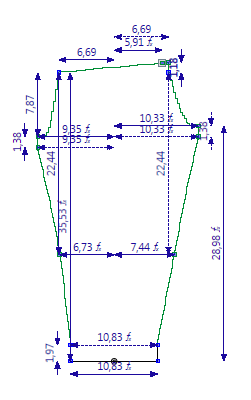
Each trouser leg consists of two fabric piece with two seams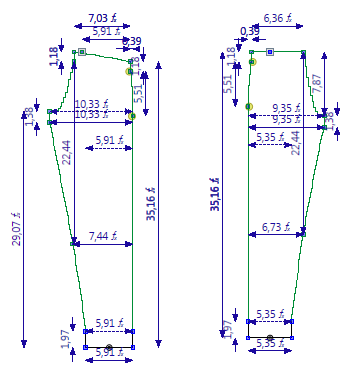

When choosing the Private shape template, no detailed column will be displayed in the center.
Choose a different shape type in case you need the corresponding presettings.
Detailed Column at the Right
- 1
- Specify basic pattern properties.
Stitch Density section
- Width

Enter quantity of columns. - Height
Enter quantity of pattern rows. 
Displays the stitch density index with color coding.
You can change the values of this index via the entry in the Width and Height.
The reference value for the stitch density is displayed after the title of this section.
[* cm] or [* inch]

Select knitting element for the start.
Depending on the selected knitting element there will appear further options.
Specify the number of systems for the fabric start.
Specify with or without elastic thread and the insertion of the elastic thread.
Specify with or without protection thread.
Specify the type of transition between the fabrics.