Getting started with CREATE PLUS
Start the CREATE PLUS and create a new pattern project anlegen:
- 1
- Start the program double-clicking
 .
. - The start page appears with the following options.
-
 Nuovo progetto per disegni
 -
 Nuovo elemento di lavoro
Creating knitting elements and modules -
 Nuovo progetto per taglio lineare
Creating new shape -
 Nuovo progetto per taglio di dimensionamento
Creating shapes with grading
You can select the desired language under  Opzioni in the Generale tab at Interfaccia utente.
- 1
- Create a new project by click on Nuovo progetto per disegni.
- or -
Select and open an existing project via Apri.
Apri.
- or -
Select and open a project in the list under Usato di recente. - 2
- CREATE PLUS starts and Nuovo progetto per disegni dialog box appears.
- 3
- Make the required settings in the Progetto sector:
- Enter a project under Nome.
- Change machine type and gauge via the Cambia macchina button if necessary.
- 1
- Select the desired knitting mode in the Tecnica di lavoro a maglia sector.

- Design Pattern by All Needles
- Design Pattern by 1x1 Technique
- 1
- Make the required settings in the Elementi di riempimento sector:
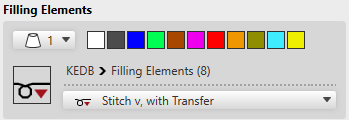
- Select yarn colors / magazine colors / yarn carrier colors for the design pattern
- Yarn colors by direct selection or via the
 selection list
 - Magazine colors / yarn carrier colors via the selection list
- Desired knitting mode for the design pattern
- Via selection list
- Via the
 button:
Position the cursor on the button, whereby it changes to  -> click LMB to open the STOLL Knit Explorer ->
Select the desired directory -> Select a knitting element and allocate it with drag-and-drop.
- 1
- Enter the desired size of the design pattern in the Dimensione sector by width and height.

- 2
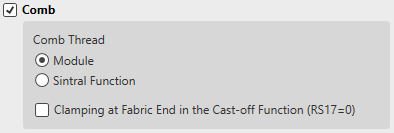
- Make the required settings in the Pettine sector:
|
| ||||
|
|
Pettine |
Working with comb is enabled | ||
|
Comb Thread | ||||
|
|
Modulo |
A comb thread technical module is used | ||
|
|
Funzione Sintral |
Comb thread will be inserted as a Sintral function | ||
|
Clamping at Fabric End in the Cast-off Function (RS17=0) | ||||
|
|
Each fabric piece is started with the comb and casted-off at the end. | |||
|
|
The first fabric piece will be started with comb and the following fabric pieces will knit continuously with draw thread due to RS17=1. Last fabric piece is casted-off with piece counter =0 and RS17 =0 is set. | |||
|
|
Pinzatura/taglio |
Clamping / cutting is automatically enabled | ||
|
| ||||
|
|
Pettine |
Working with comb is disabled
| ||
|
|
Pinzatura/taglio |
|
Clamping / cutting is disabled | |
|
|
Clamping / cutting is enabled | |||


 : The fabric pieces are knitted together separated by the draw thread.
- 1
- Make the desired settings in the Inizio sector.
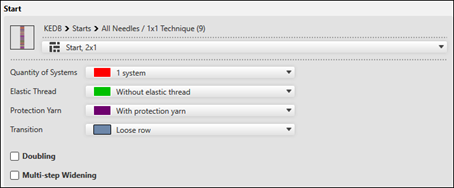
-
 shows the path to the directory and the selected start of the Knit Explorer.
Change selection: - Via selection list from the selected directory
- Via the button:
Position the cursor on the button, whereby it changes to -> click LMB to open the STOLL Knit Explorer ->
Select the desired directory -> Select a knitting element and allocate it with drag-and-drop. - Via path specification
Open the selection list via the button and select the desired directory.
 - Specify the desired Numero di sistemi.
- Select the desired setting in the selection list.
- Filo elastico at the start
- Select the desired setting in the selection list
- Filato di protezione
- With protection yarn: A separate yarn carrier is used for technique color #205
- Without protection yarn: protection rows are knit by the rib yarn carrier #201
- Transizione
- Select the desired setting in the selection list
|
Binaggio |
|
No multi-step narrowing module is entered for the transition after the start. |
|
|
Multi-step narrowing module is entered for the transition after the start. | |
|
Aumento a più gradini |
|
No multi-step widening module is entered for the transition after the start. |
|
|
Multi-step widening module is entered for the transition after the start. |
- 1
- Confirm the dialog box with the OK button.
- The new pattern project appears in the symbol view of the main window with one order and one pattern.