Multi-piece knitting with CMS 822
Overview of the operating modes with CMS 822:
|
Possibilities of the operating modes | ||
|---|---|---|
|
Operating Mode |
Using the comb |
Number of possible fabric pieces |
|
Without tandem: |
Without Comb |
1 - 4 |
|
With Comb |
1 or 2 | |
|
With tandem |
Without Comb |
1-4 per carriage |
|
With Comb |
2 | |
I. Without Tandem - Multi-piece knitting with and without comb:
|
Possibilities with normal operation (without tandem) | |
|---|---|
|
System allocation per knitting area |
|
|
Start |
Configuration: |
|
Without Comb |
1 - 4 SEN |
|
With Comb |
1 SEN = 2 Fabrics |
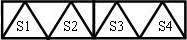
II. With Tandem - Multi-piece knitting with and without comb:
La procedura per CMS 822 corrisponde alla procedura per CMS 933/922/422TC/433TC con tandem.
Il programma di lavorazione viene creato per il carro sinistro con le cadute di lavoro S1 e S2.
La selezione aghi viene calcolata internamente per il telo sinistro e trasferita sul telo destro con le cadute di lavoro S3 e S4.
- 1
- Generate new pattern.
- or -
Load the existing pattern as basic pattern. - 2
- Activate
 Funzionamento tandem and select the coupling width when selecting the machine.
|
Tandem operation without comb | ||
|---|---|---|
|
System allocation |
| |
|
Start |
Coupling width |
Working width |
|
Without Comb |
42 " |
42 " |
|
| ||
|
| ||
|
Start |
Coupling width |
Working width |
|
Without Comb |
44 " |
40 " |
|
| ||

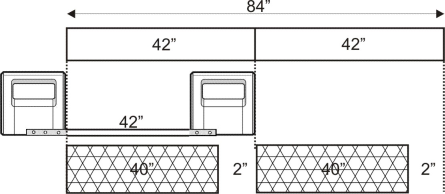
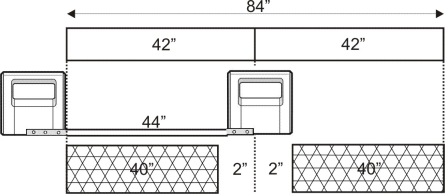
|
Tandem operation with comb | ||
|---|---|---|
|
System allocation |
| |
|
Start |
Coupling width |
Working width |
|
With Comb |
42 " |
42 " |
|
| ||
|
Possible positions of the working width and the intermediate space | ||
|
| ||
|
Start |
Coupling width |
Working width |
|
With Comb |
44 " |
40 " |
|
| ||
|
Possible positions of the working width and the intermediate space | ||
|
| ||

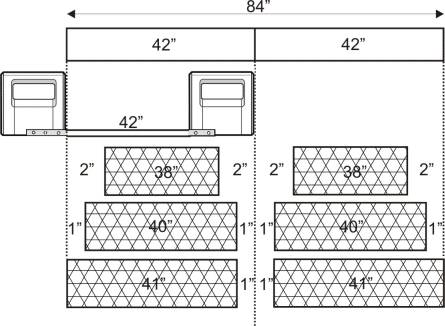
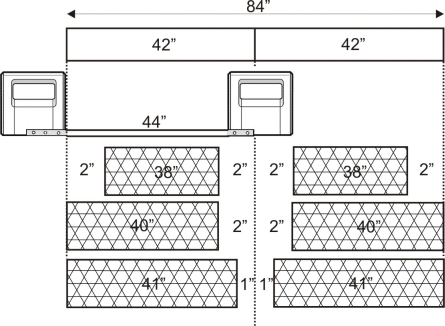

La distanza tra entrambe le zone di lavoro deve essere sufficiente al posizionamento dei guidafili utilizzati.
Osservare la doppia occupazione delle barre dei guidafili.
- 1
- Call up the Zone di lavoro tab in the Configurazione tool window.
- 2
- Position the Posizione iniziale SEN1 to the left in case of a great working width.
- 3
- Activate Lavorazione di più teli in the Lavorazione di più teli section and set
 Distanza dal centro del telo (larghezza di accoppiamento) or Distanza intermedia.
 - 4
- Start the Elaborazione tecnica .