Border Processing for Intarsia Jacquard
- Correction of the border of the motif depending on the carriage direction
- Correction of the Jacquard at its end - net ending
I. The ways of border processing with Intarsia Jacquards (yarn bridges):
Border Processing
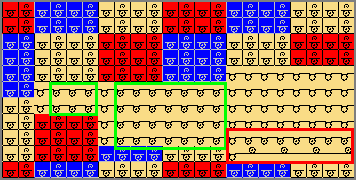
Due to the motif and the inserted jacquard back, adjustments to the back of the jacquard may be necessary at the border regarding the carriage direction.
Example:

- The border processing depends on the carriage direction
- The borders of the left and right will be corrected according to the carriage direction.
- The inserted jacquard back is repeatedly inserted up to the quantity of needles, which is entered under allowed stepping.
Steps of Processing
- A Jacquard back is applied to the a selected Jacquard area.
- 1
- Open the context menu in the pattern area.
- 2
- Select Processamento de ourelas para Jacquard em intarsia....
- The Processamento de ourelas para Jacquard em intarsia dialog box appears.
We recommend to do the border processing and the net end following each other as the pattern will be modified by the border processing.
This change may require inserting a Net ending module.
|
| |||
|
Processamento de ourelas para Jacquard em intarsia - pattern name | |||
|
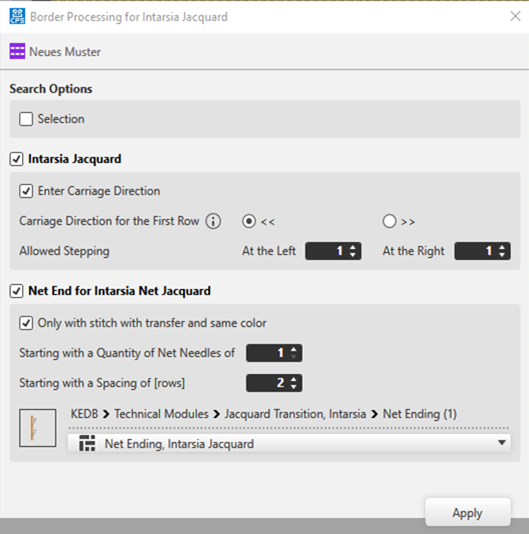
Search Options | |||
|
|
Edit the border processing of the Jacquard areas within the whole pattern. | ||
|
|
Border processing only of the Jacquard fields within a selected area | ||
|
Jacquard em intarsia | |||
|
|
Default Setting: | ||
|
|
The border processing of the Intarsia Jacquard motif will not be carried out. | ||
|
|
Introduzir direção do carro | ||
|
|
The carriage directions will be applied to the control column of the pattern. | ||
|
|
The carriage directions will be not applied to the control column of the pattern. | ||
|
Direção do carro da primeira fileira | |||
|
|
Carriage direction to the left for the first row of the Jacquard area | ||
|
|
Carriage direction to the right for the first row of the Jacquard area | ||
|
Escalonamento permitido | |||
|
Esquerda |
|
Preset of allowed stepping by needles at the left border | |
|
Direita |
|
Preset of allowed stepping by needles at the right border | |
|
| |||

 : Multiple selection is possible.
 <<
<<

|
Fim de rede para intarsia com Jacquard de rede | |||
|
|
Default Setting: | ||
|
|
No Net ending module will be inserted at the end of the inserted Jacquard back. | ||
|
|
| ||
|
|
The following requirements have to be fulfilled:
| ||
|
| |||
|
| |||
|
|
|
A partir dum número de agulhas de rede de Net Stitches |
Specify the quantity of net stitches at the Jacquard back from which the selected module is to be inserted.
|
|
|
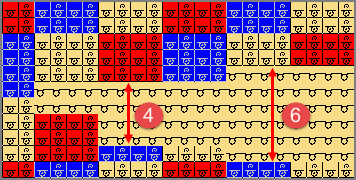
A partir dum intervalo de [fileiras] |
Quantity of SJ rows interrupting the Jacquard (space)
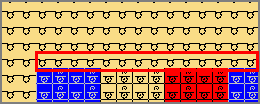
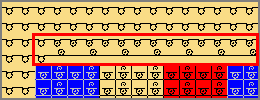
Example: without net ending
Example:Preset 5 [rows]
| |
|
Selection of the module for net ending
| |||

- 3
- Make the desired settings under
 Jacquard em intarsia.
 - 4
- Disable the
 Fim de rede para intarsia com Jacquard de rede function.
 - 5
- Apply the settings to the pattern with the Aceitar button.
- The dialog box will not be closed.
- 6
- Disable the Jacquard em intarsia function.
- 7
- Make the desired settings under Fim de rede para intarsia com Jacquard de rede.
- 8
- Apply the settings to the pattern with the Aceitar button.
- The dialog box will not be closed.
- 9
- Close the dialog box with X.
Inserting the module for the net ending avoids the transferred stitches to shine through.