Step by Step to 'Pattern-7'
Selective Plating Combined With Inverse Plating
Several yarn carriers are used within on area with selective plating. Meaning all yarn carriers has to be placed optimally to knitting rows during knitting. This requests a border processing / correction of the motif.
- A pattern project with one pattern and the desired settings is created.
- 1
- To draw select any desired drawing tool under the Desenhar group.
- 2
- In the Cores da amostra tool window, select the desired pattern colors from the Cores de fio color palette to draw the motif:
- 3
- Draw the desired motif in the
 Amostra de desenho.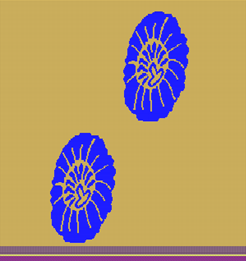
- 4
- Open the Cores de vanizagem dialog box with
 in the Cores da amostra tool window.
 - A total of 2 plating colors (2 colors for each area) are to be generated.
- 5
- Paste the used yarn colors into row P1:
#31 (yellow = basic color) into column A
#3 (blue) into column B - 6
- Paste both of the yarn colors in exchanged order into row P2.
- 7
- Open the Plating Offset (YPI) table and assign the desired values.
- YPI index 1: Leading yarn carrier
- YPI index 2: Following yarn carrier
Result: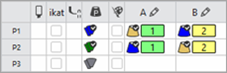
- 8
- Enter the settings for the selected YDI indices in the table.

- 9
- Draw the plating color P1 and P2 into the design pattern.
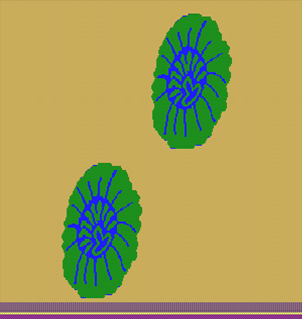
- 10
- Open the selection list in the ribbon under Dialogs with
 .
.
- or -
Open the context menu of the Design Pattern. - 11
-
Open
 Processamento de ourelas para vanizagem seletiva.
 - 12
- Make the desired settings and confirm with Apply.
 : Note:
- The border processing must be done in the design pattern and cannot be undone after
 technical processing of the pattern!
 - The existing and corresponding plating color will be used for border processing by the following processing of the motif border with selective plating
- 13
- Make the desired settings in the
 Guia-fios tool window.
- Entrar tecendo
- Sair tecendo
- Processamento de ourelas etc.
- 14
- Carry out all the steps of processing.
 : The extracted file "ADF530-32W.Pattern-7.zip" can be loaded onto the machine with an USB stick or via Ethernet.