Step by Step to 'Pattern-9'
- A pattern project with one pattern and the desired settings is created.
- 1
- To draw select any desired drawing tool under the Desenhar group.
- 2
- In the Cores da amostra tool window, select the desired pattern colors from the Cores de fio color palette to draw the motif:
- 3
- Draw the desired motif in the
 Amostra de desenho.
|
| |
|
1 |
1x1 Start |
|
2 |
Area of Stoll-Ikat-plating® |
|
3 |
Area of inverse plating |

- 4
- Open the Cores de vanizagem dialog box with
 in the Cores da amostra tool window.
 - 5
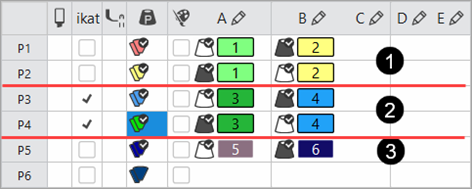
- Create the desired plating colors:
|
|
Quantity of Plating Colors |
Plating Offset | |
|---|---|---|---|
|
1 |
Inverse Plating |
2 |
YPI index 1 YPI index 2 |
|
2 |
Stoll-ikat plating ® |
2 |
YPI index 3 YPI index 4 |
|
3 |
Start |
1 |
YPI index 5 YPI index 6 |
|
| |||
- 6
- Paste the respective yarn colors of P1 and P3 in exchanged order into row P2 and P4.
- 7
- For the plating colors P3 + P4, that are used for Stoll-ikat plating ®, activate the selection in the 'ikat' column with
 .
. - 8
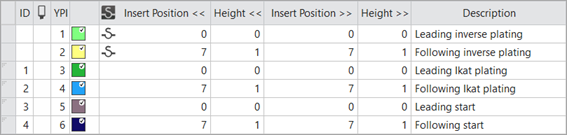
- Open the Plating Offset (YPI) table and assign the desired values.
- YPI index 1/3/5: Leading yarn carrier
- YPI index 2/4/6: Following yarn carrier
- 9
- Enter the settings for the selected YDI indices in the table.
- 10
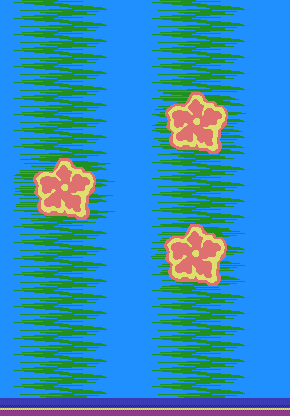
- Draw the plating color into the design pattern.
- 11
- Modify the knitting element Começo, 1x1 by the plating color P5.
- 12
- If necessary, make the desired settings in the
 Guia-fios tool window.
 - 13
- Carry out all the steps of processing.
|
Knitting process after technical processing | |
|
| |
|
1 |
Area of Stoll-ikat plating ® |
|
2 |
Area of inverse plating |
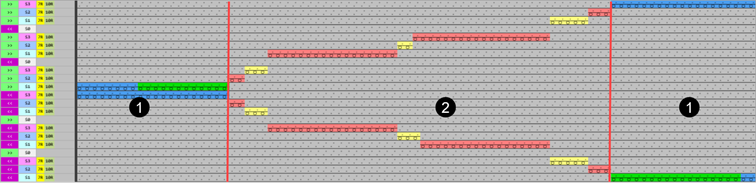
 : The extracted file "ADF530-32W.Pattern-9.zip" can be loaded onto the machine with an USB stick or via Ethernet.