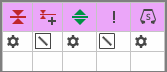
Color Parameters
You can make the desired presettings for the colors used in the pattern (color areas) within the color parameter table.
I. Open the color parameters tool window:
- The document window is enabled.
- The
 Mekikler ribbon is enabled.
- 1
- Open the Mekikler tool window via
 Mekikleri göster.
 - The tool window appears.
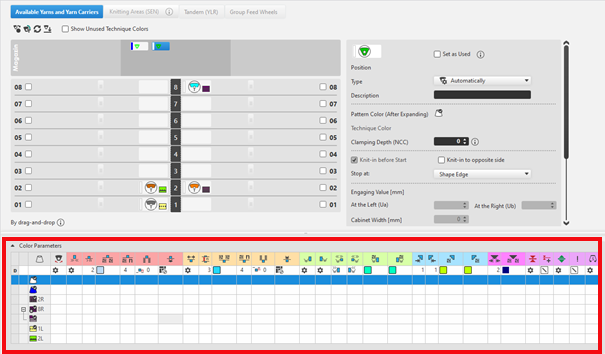
For each color in the pattern color tables used in the design pattern, a color area is created in the color parameter table. This means that you can make presettings only once for this color area.
For pattern related, different changes of a color area sub-colors must be created. You have to draw them manually in the design pattern at the point to be changed. Then, other specifications can be set in the color parameter table.
- 2
- Make the desired presettings for the corresponding color:
- Knitting-in and out
- Change the starting direction of a color (yarn carrier)
- Knot or binding at start or end of a color
- Border Processing
- etc.
- 3
- Apply the changes of the Mekikler tool window to the pattern.
Düzenle group -> Uygula
- or -
Düzenle group -> Uygula ve kapat
|
|
Senkronizasyon |
Tasarım desenindeki değişiklikleri açık mekik görünümüne uygular ve her iki görünümü güncel desen durumuna senkronize eder. |
|
|
Uygula |
Mekik değişikliklerini tasarım desenine alır. Diğer değişiklikler (örneğin renk parametreleri) hemen etkili olur. |
|
|
Uygula ve kapat |
Mekik değişikliklerini tasarım desenine alır ve görünümü kapatır. Diğer değişiklikler (örneğin renk parametreleri) hemen etkili olur. |
|
|
İptal |
Değişiklikleri siler ve mekik görünümünü kapatır. Close with İptal if you only opened the Yarn Carrier view for control. |


II. Change the display of the columns in the color parameter table:
- 1
- Move the cursor to the first row of the table header.
- 2
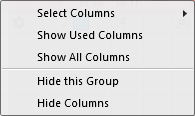
- Open the context menu with RMB.
- The context menu appears.
|
| |
|
Sütun seç |
Adding or closing the desired columns in the selection list. |
|
Kullanılan sütunlarını göster |
Display of the columns used in the pattern |
|
Tüm sütunları göster |
Display all of the columns |
|
| |
|
Bu grubu gizle |
Hide all columns allocated to a group (color coded) |
|
Bu sütunu gizle |
Hide the individual column at cursor position |
III. Structure and column headers of the color parameter table:
Table header:
-
1st row:
All the symbols identifying the table columns -
2nd Row 'D'
Default settings for the respective column
Settings from the STOLL file - cannot be modified at the moment
Default settings are applied from a STOLL file and cannot be modified at the moment.
These default settings are automatically applied to all colors without specifications.
|
| ||
|
Group 1: General | ||
|
| ||
|
1. Column |
Entry D for the definition of the 2nd row of the table | |
|
2. Column |
Display for available sub-colors | |
|
|
Renk |
Display of all the colors used in a project
|
|
|
Mekik çok sistem rengi örüyor. |
Specifications with multi-system knitting |
|
|
Mekik vanize rengi örüyor |
Specifications with plating |
|
|
Salınım |
Settings for the swivelling of intarsia yarn carriers or of autarkic yarn carriers |
|
|
Quantity of pattern rows for knitting-out, SEN edge and clamping
|
Specify the maximum distance between the color fields of the yarn carrier.
Clamp Yarn Carrier |

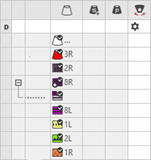

 : Visible and used within the design pattern.
 : The symbols are depending on the pattern color table they are origin.


|
Group 2: Knitting-in | ||
|
| ||
|
|
Başlangıç yönü |
Specification of the knitting direction for the first row of a color (color area) |
|
|
Örgüye giriş olmadan sütun sayısı |
Quantity of columns (wales) without knitting-in module |
|
|
Örgüye giriş için modül |
Specification of the knitting mode for knitting-in
|
|
|
Örgüye giriş için tekrar genişliği |
Presetting of the module width in total for the knitting mode of feeding-in the yarn carrier
|
|
|
İlmek kapama için sıra kaydırma |
Column appears automatically if a module for knitting-in with casting-off is used |
|
|
Örgüye giriş için Sıra-Ofseti |
Knitting-in of the yarn carrier by x rows before the beginning of the color area
|
|
|
Başlangıçta düğüm / bağlama |
Presetting a module for knot / binding at start of a color area without knitting-in.
|
|
|
Örgüye düğümlü giriş için Sütun-Ofseti |
Move the position of a knot (module) by x columns to the left or right.
|
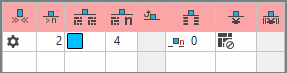


 :
:


The direction of knitting-in of a yarn carrier is always carried out from last position.
|
Group 3: Knitting-out | ||
|
| ||
|
|
Örgüden çıkış yönü |
Preset of the direction for knitting-out of the yarn carrier at the end of a color area |
|
|
Örgüden çıkış için modül |
Preset of the knitting mode (module) for knitting-out
|
|
|
Örgüden çıkış için tekrar genişliği |
Presetting of the module width in total for the knitting mode of feeding-in the yarn carrier
|
|
|
İlmek kapama için sıra kaydırma |
Column appears automatically if a module for knitting-out with casting-off is used |
|
|
Örgüden çıkış için Sıra Ofseti |
Knitting-out of the yarn carrier by x rows after the end of the color area
|
|
|
Sonda düğüm / bağlama |
Presetting a module for knot / binding at end of a color area without knitting-out.
|
|
|
Düğümlü örgüden çıkış için Sütun-Ofseti |
Move the position of a knot (module) by x columns to the left or right.
|
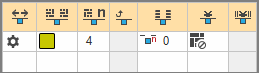


|
Group 4 : Intarsia Binding | ||
|
| ||
|
|
Sol İntersiya Bağlantısı |
Presetting of a binding or no binding at the left border of the color area |
|
|
Sağ İntersiya Bağlantısı |
Presetting of a binding or no binding at the right border of the color area |
|
|
Sol intersiya bağlantısının yönü |
Specification for inserting the Binding module at the left border of the color area depending on the carriage direction
|
|
|
Sağ intersiya bağlantısının yönü |
Specification for inserting the module Binding at the right border of the color are depending on the carriage direction
|
|
|
Sol intersiya bağlantısı için modül |
Presetting of the knitting mode for binding at the left border of the color area |
|
|
Sağ intersiya bağlantısı için modül |
Presetting of the knitting mode for binding at the right border of the color area |
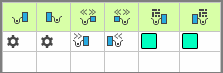


|
Group 5: Border Processing | ||
|
| ||
|
|
Kenar düzenlemesi olmadan izin verilen basamaklama, sol taraf |
Maximum number of needles when widening at the left border of the color area without automatic border processing.
|
|
|
Kenar düzenlemesi olmadan izin verilen basamaklama, sağ taraf |
Maximum number of needles when widening at the right border of the color area without automatic border processing.
|
|
|
Sol kenar düzenlemesi için modül |
Presetting of the knitting mode for the border processing (feeding) in case of large widenings (stepping) of the color area
|
|
|
Sağ kenar düzenlemesi için modül |
Presetting of the knitting mode for the border processing (feeding) in case of large widenings (stepping) of the color area
|
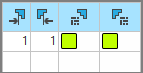


|
Group 6: multi gauge | ||
|
| ||
|
|
Kalın multi gauge sıralarının izin verilen basamaklaması |
Allowed number of needles when widening at the left and right border of the color area without automatic border processing.
|
|
|
Kenar düzenlemesi için modül, mg-kalından mg-inceye geçiş |
Presetting of the knitting mode for the border processing (feeding) in case of large widenings (stepping) of the color area and as transition
|


|
Group 7: Miscellaneous | ||
|
| ||
|
|
Tutma |
Presetting for the yarn carrier, when it is to be clamped after knitting its color area. |
|
|
Gecikmeli tutma |
|
|
|
Tutucuyu aç |
|
|
|
SEN kenarı |
Specifications for positioning the yarn carrier during the knitting
|
|
|
Sistem (yönden bağımsız) |
Selection of a knitting system for the selected color area
|
|
Group 8 | ||
|
Açıklama |
Girdinin kullanımı ile ilgili bilgi.
Buraya bir metin girebilirsiniz. | |