Show Yarn Carriers
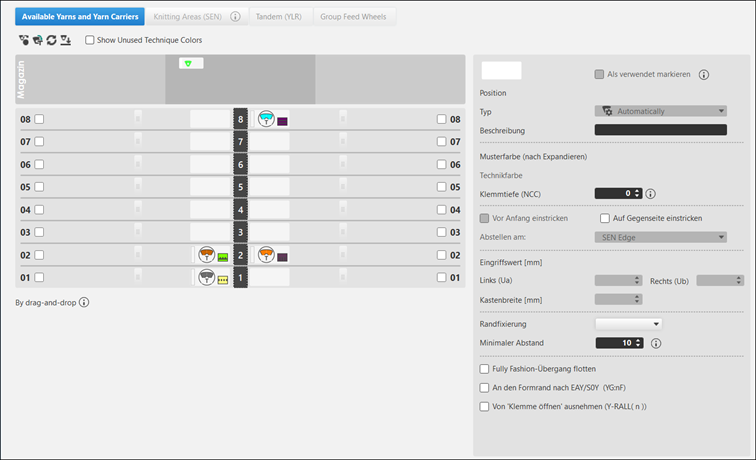
In the Yarn Carriers tool window, you can indicate the desired specifications regarding the yarn carriers and influence the yarn carrier home position.
I. Open the Yarn Carriers tool window:
- The
 document window is enabled.
 - Mekikler is enabled.
- 1
- Open the Mekikler tool window.
In Mekikler group -> Mekikleri göster
 - The Mekikler tool window appears with the Mevcut iplikler ve mekikler tab active.
- 2
- Select the yarn carrier.
- 3
- Make the desired changes in the Mevcut iplikler ve mekikler tab of the Mekikler tool window.
- 4
- Apply the modifications.
Düzenle group -> Uygula
- or -
Düzenle group -> Uygula ve kapat
| Senkronizasyon | Tasarım desenindeki değişiklikleri açık mekik görünümüne uygular ve her iki görünümü güncel desen durumuna senkronize eder. |
| Uygula | Mekik değişikliklerini tasarım desenine alır. Diğer değişiklikler (örneğin renk parametreleri) hemen etkili olur. |
| Uygula ve kapat | Mekik değişikliklerini tasarım desenine alır ve görünümü kapatır. Diğer değişiklikler (örneğin renk parametreleri) hemen etkili olur. |
| İptal | Değişiklikleri siler ve mekik görünümünü kapatır. Close with İptal if you only opened the Yarn Carrier view for control. |


II. Working with the Yarn Carrier tool window:
|
| ||
|
1 |
Mevcut iplikler ve mekikler tab | |
|
| ||
|
5 |
|
Returning yarn carriers to the magazine according to their position at the left or right side of the yarn carrier rails.
|
|
|
Allocating the yarn carriers for technique colors to the yarn carrier rails according to the standard preallocation. | |
|
|
Returning yarn carriers from the yarn carrier rails to the magazine as 'undefined'.
| |
|
|
Allocating the yarn carriers from the magazine to the yarn carrier rails. | |
|
Kullanılmayan teknik renklerini göster | ||
|
|
In the view of the yarn carrier rails, only the technique colors used in the pattern are displayed. | |
|
|
In the view of the yarn carrier rails, the technique colors not used in the pattern are displayed as well. | |
|
6 |
Display of the yarn carriers for yarn and magazine colors regarding the positioning on the left side during rail allocation.
| |
|
7 |
Display of the yarn carriers for yarn and magazine colors regarding the positioning on the right side during rail allocation.
| |
|
8 |
Display of the yarn carriers for yarn and magazine colors undefined.
| |
|
9 / 10 |
|
Release for allocation of the rail with a yarn carrier left / right |
|
|
No release for allocation of the rail with a yarn carrier left / right | |
|
10 / 11 |
Graphic presentation of the yarn carrier rails with the used yarn carrier types on the left / right side and specification of the corresponding colors. | |
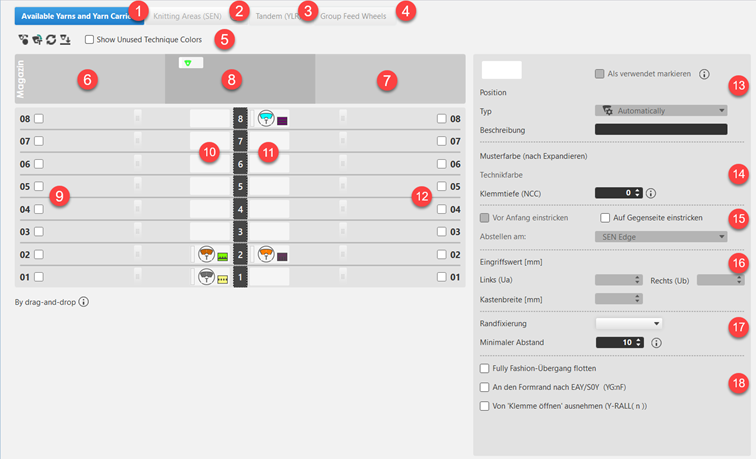

 : Yarn carriers of the pattern only - excepting the yarn carrier colors which are firmly allocated to a certain rail.


Input panel for the specifications for a selected yarn carrier
|
Input panel for the specifications for a selected yarn carrier | ||||
|
13 |
|
Set as Used | ||
|
|
Yarn carrier position is free for allocation | |||
|
|
Yarn carrier position is not free for allocation
| |||
|
Pozisyon |
Specification of the yarn carrier position of the yarn carrier color | |||
|
Tipi |
| |||
|
Açıklama |
Comment on a yarn carrier
| |||
|
14 |
Pattern Color (After Expanding) |
Display of the pattern color of the selected yarn carrier | ||
|
Technique Color |
Display of the technique color of a selected technical yarn carrier | |||
|
Tutma derinliği |
Needle sinking of clamping and cutting needle | |||
|
15 |
Knit-in before Start |
|
Selected yarn carrier is not knit-in in the Knitting-in before start function. | |
|
|
Selected yarn carrier is knit-in in the Knitting-in before start function. | |||
|
Knit-in to opposite side |
|
A yarn carrier remains on the corresponding side based on its home position. | ||
|
|
A yarn carrier is knitted before the start to the opposite side of its home position.
| |||
|
Stop at: |
| |||
|
16 |
Engaging Value [mm] | |||
|
At the Left (Ua) |
Engaging width for the left side | |||
|
At the Right (Ub) |
Engaging width for the right side | |||
|
Takoz eni [mm] |
Specification depending on the yarn carrier type specified under Tipi
| |||
|
17 |
Border Fixation |
Selection of the knitting mode for the border fixation (module) | ||
|
Minimum Padding |
Distance for the border fixation in rows | |||
|
18 |
Fully Fashion geçini atla |
|
At the end a yarn carrier is moved to the home position according to the setting in the Yarn Field Allocation. | |
|
|
At the end a yarn carrier is moved to its home position without knitting.
| |||
|
EAY/S0Y sonrasında şekil kenarına (YG:nF) |
|
The yarn carrier will not be positioned at the counters #L and #R. | ||
|
|
The yarn carrier will be positioned at the counters #L and #R and follows the shape. | |||
|
'Tutucuyu aç''tan çıkart (Y-RALL( n )) |
|
Selected yarn carrier is controlled by the Y-RALL function. | ||
|
|
Selected yarn carrier will be excluded from the Y-RALL function and can be defined differently by the value (rows) at | |||
|
| ||||

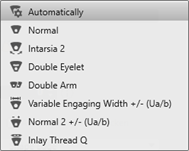
 : Use:
 Color Parameters under
  .
.Additional tabs:
|
2 |
Örgü alanları (SEN) |
Working with several SEN areas:
|
|
| ||
|
3 |
Tandem (YLR) |
Change of the yarn carrier home position with tandem machines |
|
| ||
|
4 |
İplik besleme cihazlarını gruplandır |
Use when working with feed wheels
|
 : For the use of the feed wheels, they have to be defined in the