New lined shape project (dialog box)
The  Yeni çizgi kesimi projesi dialog box can be called up as follows:
In the Start window:
In the tab Dosya:
In the quick access toolbar of the lined shape project:
 Within a lined shape project, you can create, load and manage several lined shapes.
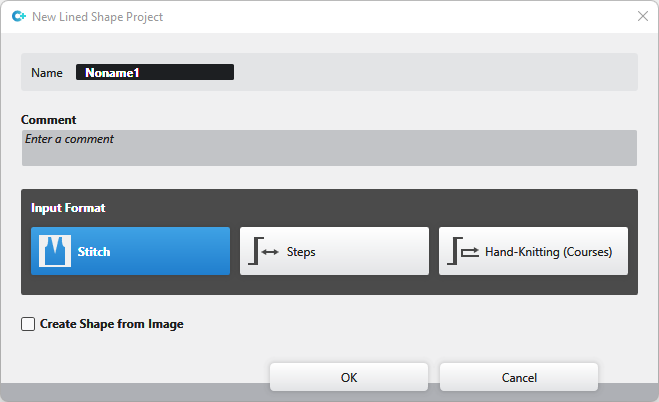
|
Ad |
Enter name of the lined shape project |
|
Yorum |
Enter a comment to the lined shape project |
Select the Giriş formatı:
|
|
You enter the line by İlmek. |
|
|
You enter the line by Aşamalar. |
|
|
You enter the line by courses as for hand knitting. |


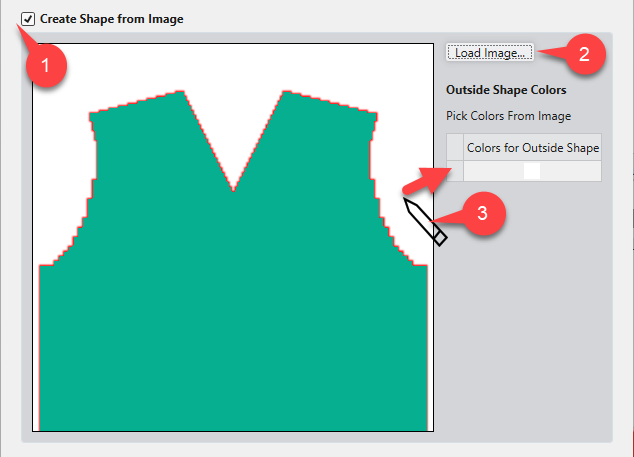
|
|
Create a lined shape from an existing image file.
|
|
Resim yükle... (2) |
Resim dosyası kesim için şablon olarak yüklenir. |
|
Outside Shape Colors (3) |
Click the desired color of the image with the cursor.
|

 Within a lined shape project you can manage several lined shapes together in the İlmek and Aşamalar input format.
Lined shapes in the El örgüsü (turlar) input format cannot be managed together with lined shapes in the İlmek or Aşamalar input format in the same lined shape project.
You can find examples to create lined shapes here:
- Fully Fashion-Pattern: Front with V-neck and Structure
- Fully Fashion-Pattern: Front with neckline and shoulder gore by types of shape elements
- Fully Fashion-Pattern: Front with V-neck and Knitting Ranges
- Fully Fashion-Pattern: Front with V-neck and dart type of shape element
- Fully Fashion-Pattern: Front with V-neck and Binding-off
- Fully Fashion-Pattern: Fabric Piece with Multi-step Widening and Multi-step Narrowing
- Fully Fashion-Pattern: Back with French Shoulder
- Working with Shapes