Quick access toolbar for lined shape projects
In the quick access toolbar you have access at any time to the following commands:
 The quick access toolbar can be found at the left border of the title bar.

Using the drop-down menu you can display and hide the commands in the quick access toolbar and make settings.
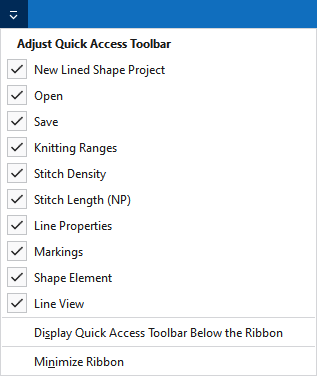
|
|
Yeni bir çizgi kesimi projesi oluşturun (*.slsf). |
|
|
Bir dosya (desen, örme elemanı, kesim) açın. |
|
|
Kaydet |
|
|
Önceki işlem geri alınır. |
|
|
Önceki işlemi yineler. |
|
|
Tanımlı örgü alanlarını içeren tabloyu gösterir. |
|
|
İlmek yoğunluk tablosunu gösterir. |
|
|
NP değerlerini içeren tablo gösterilir. |
|
|
Show Çizgi özellikleri. |
|
|
Seçilen işaret noktasının özelliklerini içeren araç penceresini gösterir. |
|
|
Show Kesim elemanı özellikleri. |
|
|
Show Çizgi görünümü. |
|
Diğer komutlar... |
Add more commands to the quick access toolbar. |
|
Hızlı erişim araç çubuğunu şerit çubuğunun altında göster |
Display the quick access toolbar under or above the ribbon. |
|
Menü şeridini simge durumuna küçült |
Show or hide the ribbon. |


