Context menu on the knitting elements
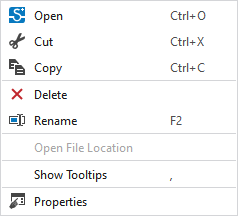
You make the following settings in the context menu on the knitting elements:
|
|
Open the selected knitting element. |
|
|
Cut-out the selected knitting element.
|
|
|
Copy the selected knitting element to the clipboard. |
|
|
Remove the selected knitting element or pattern element.
|
|
|
Rename the selected knitting element.
|
|
Dosya yolunu aç |
Open the folder via the Örme elemanı deposu path. |
|
HızlıBilgi göster |
Display ToolTip on the knitting elements. |
|
Özellikler |
Show Özellikler dialog box. |


 Only possible for privately generated knitting elements.

