Context Menu of the Lined Shape
|
|
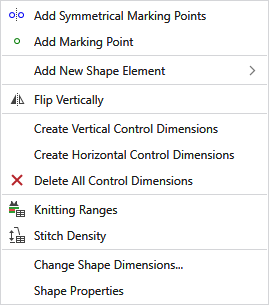
Bir işaretleme noktası ve yansıtılmış nokta ekler. |
|
|
Bir işaretleme noktası ekler. |
|
Yeni kesim elemanı ekle |
Adds a new shape element.
|


|
|
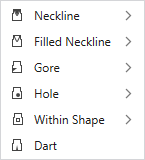
Inserts a neckline. Simetrik or Asimetrik |
|
|
Inserts a filled neckline. Simetrik or Asimetrik |
|
|
Inserts a gore area. Simetrik or Asimetrik |
|
|
Adds a hole. Simetrik or Asimetrik |
|
|
Inserts a dart. Simetrik or Asimetrik |
|
|
Inserts an area in the shape that can be filled with pattern color and with knitting element. Simetrik or Asimetrik |


|
|
Tek kesimi dikey yansıt |
|
Create Vertical Control Dimensions |
Creates vertical control dimensions for this shape element. |
|
Create Horizontal Control Dimensions |
Creates horizontal control dimensions for this shape element. |
|
|
Deletes all control dimensions. |
|
|
Tanımlı örgü alanlarını içeren tabloyu gösterir.
|
|
|
İlmek yoğunluk tablosunu gösterir. |
|
Kesim boyutunu değiştir... |
Kesim boyutunu değiştirmek için iletişim kutusunu açar. Kesimde farklı ilmek yoğunluklarına sahip alanlar varsa, bu mümkün değildir. |
|
Kesim özellikleri |
Opens the Kesim özellikleri dialog box. |


