Working with Presser Foot Corrections ESCI
The presser foot corrections are used to control the switching times of the weft yarn presser feet.
Command for machines with W presser foot
|
|
Control column for the presser feet correction
|
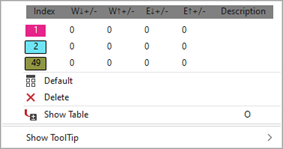
Selection menu of the control column
 Bastırıcı ayak düzeltmesi:
- In the design pattern
- In the Color Arrangement
 : The presets appear in the Pattern Parameters
tool window (Preset Setup Data) ->
: The presets appear in the Pattern Parameters
tool window (Preset Setup Data) ->  Bastırıcı ayak tab.
|
| |
|
|
Select the desired entry and enter it into the control column.
|
|
Note: ESCI50 is used automatically for inverse plating with weft yarn presser foot, whereby manually entered ESCI indices can be overwritten by ESCI50. | |
|
|
Set the setting to Varsayılan.
|
|
|
Deletes the entry. |
|
|
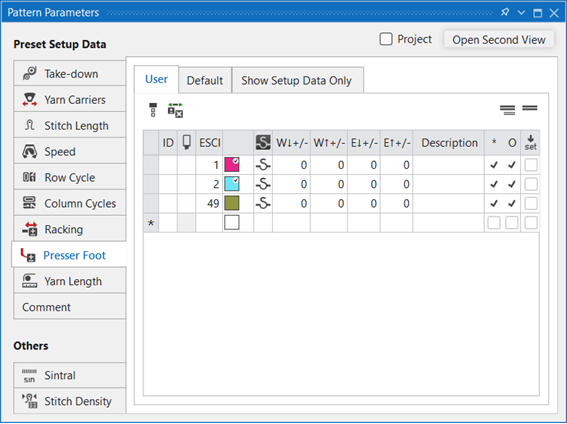
Open the presser foot correction table in the setup data.
|
 to
to 


Presser Foot tab
|
| |
|
Name |
ESCI commands in use |
|
Systems |
|
|
W ↓ +/- |
Correction of the shift-in point for the weft yarn presser foot
|
|
W ↑ +/- |
Correction of the shift-off point for the weft yarn presser foot
|
|
E ↓ +/- |
Correction of the shift-in point for the knitting-in presser foot
|
|
E ↑ +/- |
Correction of the shift-off point for the knitting-in presser foot
|
 Column is only displayed on the machine!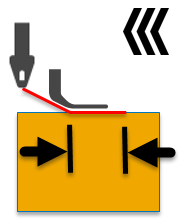
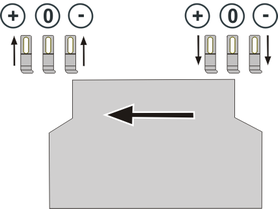
Effects on shifting on and off by presser foot correction values
|
| |
|
| |
|
|
Activating the Weft Yarn Presser Foot |
|
|
Deactivating the Weft Yarn Presser Foot |
|
0 |
Standard shift position |
|
+ |
Later shift position |
|
- |
Earlier shift position |


Enter the presser foot correction (ESCI) in the control column:
- Pattern is open e.g. Pattern-12.
- 1
- Display the Bastırıcı ayak düzeltmesi control column in the
 Tasarım deseni.
- or –
Show the Bastırıcı ayak düzeltmesi control column in the Color Arrangement editor. - 2
- Call up the context menu with the RMB on the control column.
- The context menu appears.
- 3
- Select the desired index (color).
- 4
- Enter the selected index into the technical row of the active weft yarn presser foot
 .
.
|
Example by the Color Arrangement: |
|
|
|
Recommendation:
|
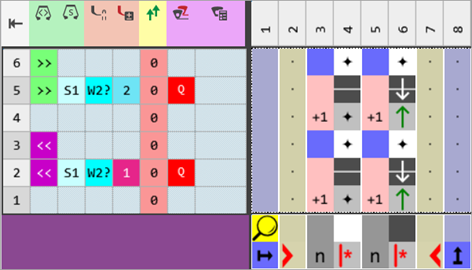
- 5
- Select Bastırıcı ayak düzeltmesi ->
 Tabloda göster via the context menu of the control column.
 - The 'Pattern Parameters' tool window is displayed.
- 6
- Allocate the desired values to the used ESCI indexes of the table.
- 7
- Complete the pattern.
CREATE PLUS:
- Correction values entered on CREATE PLUS will be applied by the technical processing in order to park the yarn carriers at the fabric selvedge.
- If necessary, yarn carriers in the area for activating and deactivating will be displaced or their path will be extended correspondingly.
- If you enter a too high value, the switch-on or switch-off area of the presser foot may be moved so far that the yarn carrier is in the active area of the presser foot.
The technical processing will be canceled and you have to change the presets.
Machine:
An error message and machine stop may occur if you only enter correction values in the Setup Editor of the machine.
- Modify the values then until no error message appears any more
- Or modify the knitting program already on CREATE PLUS.