Edit and modify inserted Jacquards
I. Edit the inserted Jacquards:
- In the pattern there are areas with inserted Jacquard modules.
- 1
- In the 起头 ribbon under
 工具窗口, open the
  提花 tool window.
- or -
Click on the 打开提花... in the context menu on the pattern. - The 提花 tool window is opened.
|
| |||
|
1 |
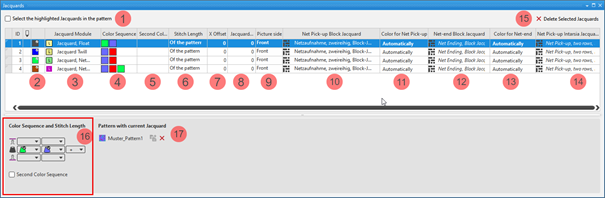
选择花型中所选表项 | ||
|
|
The Jacquards selected in the table are not displayed as selection in the pattern. | ||
|
|
The Jacquards selected in the table are displayed as selection in the pattern. | ||
|
ID |
Consecutive numbering of the Jacquard areas | ||
|
2 |
|
For drawing a Jacquard module in the pattern
| |
|
|
Index Color: Application in the search area of a Color Arrangement
| ||
|
3 |
提花模块
| ||
|
4 |
颜色顺序 Display for the color sequence for the first and second pattern row if | ||
|
5 |
第二颜色顺序 Display for the color sequence for the second pattern row if | ||
|
6 |
线圈长度 Specification for the stitch length which is to be used in the pattern:
| ||
|
7 |
X 偏移 水平移动提花背面的起始点 Value in needles for the horizontal offset of a Jacquard module | ||
|
8 |
提花背面缩减 提花背面相对正面缩减 n 针 Value in needles, regarding how much the Jacquard back side is to be narrower in relation to the picture side.
| ||
|
9 |
提花图
| ||
|
10 |
网眼起针,拼块提花 Display of the knitting elements in use for the net pick-up with continuous Jacquards | ||
|
11 |
网眼起针颜色 Specification of the color (yarn carrier) which is used for the net pick-up knitting element | ||
|
12 |
拼块提花网眼结束 Display of the knitting elements in use for the net ending with continuous Jacquards | ||
|
13 |
网眼结束颜色 Specification of the color (yarn carrier) which is used for the knitting element | ||
|
14 |
网眼起针,嵌花提花 Display of the knitting elements in use for the net pick-up with Intarsia with Jacquard back | ||
|
15 |
删除选中提花 |
The selected Jacquard is deleted in all the pattern where it is in use.
| |
|
16 |
颜色顺序和线圈长度 | ||
|
|
Display or edit box for the stitch length per color / system for rear needle bed
| ||
|
|
Display of the color sequence from the left for the Jacquard area selected in the table | ||
|
|
Display or edit box for the stitch length per color / system for front needle bed
| ||
|
|
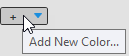
添加新颜色 | ||
|
第二颜色顺序 | |||
|
|
|
Default setting | |
|
|
Definition of the color sequence for the second pattern row is possible.
| ||
|
17 |
带有当前提花的花型 List of the patterns, where the Jacquard selected in the table is in use.
| ||
|
|
Ungroup the grouped Jacquard areas.
| ||
|
|
The Jacquard module inserted in the pattern will be removed from the area in the pattern.
Result:
| ||


 (
(
 :
:




- 2
- Select the Jacquard to be changed in the table.
- 3
- Make the desired changes in the tool window.
- 4
- Close the tool window with X.
- The changes will be applied to the pattern.
II. Direct selection of a Jacquard module in the pattern:
- In the pattern there are Jacquard modules in use.
- 1
- Position the cursor in a Jacquard area with an inserted Jacquard module.
- 2
- Apply the Jacquard module with the F5 key.
- 3
- Enter the selected Jacquard module via the control columns in the entire pattern width or only in an area within the pattern.
- The selected Jacquard module is inserted.
Pay attention whether the exact same colors are in use in the area to be entered or not!
- Exactly the same colors
The Jacquard areas will be grouped. - Different Colors
A new entry is added in the table.
III. Selection of a Jacquard module in the Jacquard table:
- In the pattern there are Jacquard modules in use.
- All the Jacquard modules in use are contained in the table.
- 1
- In the 起头 ribbon under 工具窗口, open the 提花 tool window.
- 2
- Select the desired Jacquard in the 提花 tool window in the
 column.
 : Pay attention to the Jacquard colors in use!
 - 3
- Enter the selected Jacquard module via the control columns in the entire pattern width or only in an area within the pattern.
- The following message appears:
在绘制区域内至少一个颜色不包含在提花表中。 区域将连接与一个匹配的提花相连。如果没有匹配提花可用,将生成一个新提花。 - 4
- Confirm message with:
-
确定
A new Jacquard with the missing color is created in the table. -
取消
No Jacquard module is inserted.
IV. Adding an extra color:
The colors identified with  knit only on the Jacquard back.
- In the pattern there are Jacquard modules in use.
- All the Jacquard modules in use are contained in the table.
- The 提花 tool window is open.
- 1
- Select a Jacquard in the first column of the 提花 tool window.
- The color sequence is displayed in the tool window under 颜色顺序和线圈长度.
- 2
- Select an additional color (additional color) in the empty edit box at the end of the displayed color sequence by the icon from the 花型颜色 tool window.
- The additional color is added to the color sequence and identified with .
V. Deleting an additional color marked with :
The colors identified with knit only on the Jacquard back.
- In the pattern there are Jacquard modules in use.
- All the Jacquard modules in use are contained in the table.
- The 提花 tool window is open.
- 1
- Select a Jacquard with additional colors in the first column of the 提花 tool window.
- The color sequence is displayed in the tool window under 颜色顺序和线圈长度.
- 2
- Position the cursor on the additional color -> click the 删除颜色 context menu.
- The additional color is removed from the color sequence.