Example 02: Fading-out of fabric selvedges
- Fading-out at the fabric selvedge - without shape
- Working on machines without comb / without using the comb
- Working on machines with comb
- Fading-out at the fabric selvedge - with shape
I. Generate the Color Arrangement: Fading-out at the fabric selvedge - without shape:
 设计花型 with the necessary colors is created.
- 1
- Select the desired rows in the 行 control column.
- 2
- Position the cursor in the pattern area.
- 3
- Open the context menu with RMB.
- 4
- Select 选择 / 颜色排列
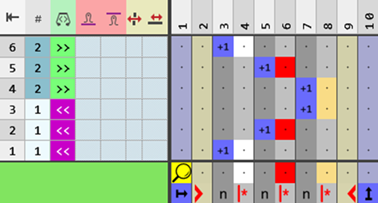
- The Color Arrangement Editor will be opened.
- 5
- Insert the desired quantity of columns for the fade-out width at the left and at the right.
- 6
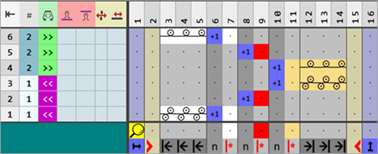
- Make the desired entries with the tools for Color Arrangement from the 颜色排列 and 织针动作 / 颜色 tabs.
- 7
- Check the generated Color Arrangement regarding its correctness with the
 检验 button.
 - 8
- Then apply the changes with the
 应用 button.
 - The Color Arrangement is saved locally under
 编织元素.
编织元素. - 9
- Enter the generated Color Arrangement in the desired rows in the design pattern.
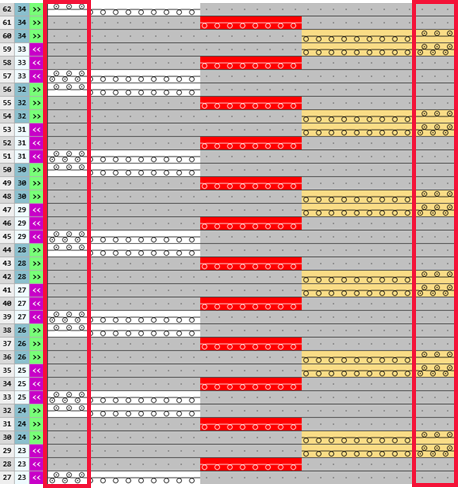
- The Color Arrangement is expanded by the technical processing.
II. Generate Color Arrangement: Fading-out the Shape Edges
- 设计花型 is created.
- A shape with separation or neck opening is created.
- 1
- Select the desired rows in the 行 control column.
- Select area by area.
For each individual area, create a selection and get a CA of it created. - Select the total height of the shape.
Based on the selection, a CA is automatically generated for each of the different areas.
- 2
- Open the context menu in the pattern area.
- 3
- Select 选择 / 颜色排列
- The Color Arrangement Editor will be opened.
-
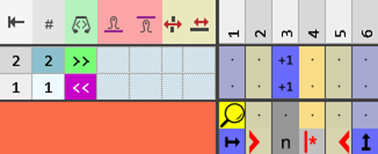
Area 1 until the separating line:
-
Area 2 starting with the separating line until the end of the shape:
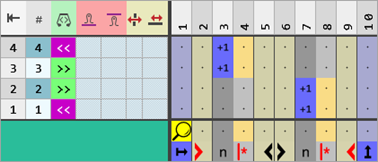
- 4
- Insert the desired quantity of columns for the fade-out width at the left and at the right.
- 5
- Make the desired entries with the tools for Color Arrangement from the 颜色排列 and 织针动作 / 颜色 tabs.
-
Area 1: Fading-out the shape edges without separation or neck opening

-
Area 2: Fading-out the shape edges with separation or neck opening
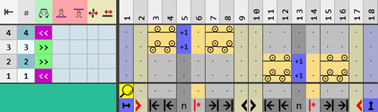
- 6
- Check the generated Color Arrangements regarding its correctness with the 检验 button.
- 7
- Apply the changes with the 应用 button.
- or –
Close the editor with the button and confirm the prompt with Save.
 - Color Arrangements are saved locally in the
 颜色排列 tool window.
 - 8
- If necessary, enter the generated Color Arrangements in the desired rows in the design pattern.
- The Color Arrangements are expanded by the technical processing.
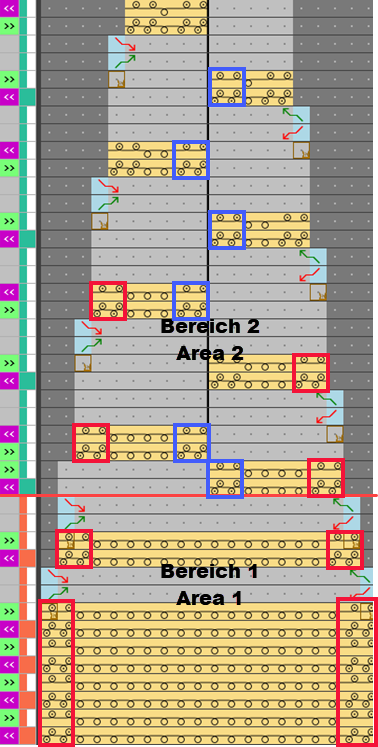
Attention:
If the fabric selvedges are faded-out with the help of the Color Arrangement, the fading-out in the shape must be observed!
The CA overwrites the fading-out of the shape.