Create a new pattern project with one pattern
Dialog Box: New Pattern Project
- 1
-
名称
Enter the desired name for the pattern project. : The first design pattern automatically receives the same name.
 - 2
- 机器
- Display of the selected machine type.
- Press the 更改机器 button, to change the machine type:
-
STOLL :
Selection of a STOLL standard machine -
个人 :
Selection of a machine created by yourself
: With private machines it is possible to allocate machine-specific 选项 and 系统功能.
- Open the STOLL tab.
- Select the desired machine in the selection list.

- Example: CMS 530HP, E 3,5.2, Classification 656
- Select the context menu 创建我的机器.
- Enter the machine name / specifications and confirm with OK.
- Select the created machine -> Open the context menu 属性.
- Make the desired entries.: IP address for the Ethernet connection to the machine.
- 3
- 编织工艺
-
满针:
Design pattern is knitted with all needles (example). -
1x1 方式 :
Design Pattern is knit in 1x1 Technique.
- 4
- 填充元素 :
- Select the yarn color for the design pattern.
- Select the structure element for the design pattern.
- 5
- 尺寸
- 6
-
宽度
Input of the pattern width: 200 stitches. - 7
-
高度
Input of the pattern height: 300 rows. - 8
-
 牵拉梳:
牵拉梳:
-
牵拉梳纱
 模块 :
模块 :
Usage of the 牵拉梳纱 technical module.: 在脱布功能 (RS17=0) 中织物结束处夹纱 : Is automatically enabled, when 牵拉梳 is selected.
- 9
- 起头:
- Selection of the module for the Start
Example: 起头,1x1 . -
系统数量:
Selection of the quantity of working Systems for the Start
Example: 一个系统 -
一个系统:
The Start is knitted with one system / 1 yarn carrier.
- or -
二系统 :
The Start is knitted with 2 systems / 2 yarn carriers. -
: The knitted structure becomes more even due to knitting the start with 1 system.
-
弹力纱:
Selection of the technical module for without / with elastic thread -
保护行纱 :
Selection of a technical module for without / with protection thread.
-
使安全行纱
:
Preparation rows are knitted with a separate yarn carrier (Technical Color #205). (recommended).
- or -
不使安全行纱 : Preparation rows are knitted with the same yarn carrier as the Start (Technical Color #201) (not recommendable).
: Working with protection thread saves thread because of the usage of cheaper thread as protection thread.
- The yarn carrier with the protection thread for the protection rows will be clamped after the start and knitted-in again at the fabric end.
-
Recommendation:
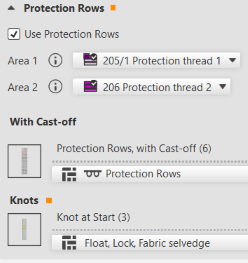
Use the knot module 浮线,锁定,织物边缘 for the knitting-in of the protection thread in the protection rows at the fabric end.
Result: This way it is avoided that the thread at the fabric selvedge does not lay-in. - Setting in 配置 -> 编织区域颜色 -> 保护行
-
过渡:
Selection of the kind of transition from the start to the basic pattern -
: An extra NP (NP4) index is assigned to this last row in the start, so that the stitch tension can be changed for a safe transfer.
- 10
- Confirm entries with the OK button.
- The pattern project appears.