Color Arrangements for Your Own Jacquard Backs
The color arrangement in a jacquard pattern area can determine the following:
- The Jacquard back
- The color sequence
Examples of Color Arrangements for Jacquard backs
- Jacquard back with float (CA1-Privat)
Knitting rear stitch and casting-off - Jacquard back with float (CA2-Privat)
Knit rear stitch and transfer to the front
Create the Color Arrangement CA1-Private and CA2-Private:
- 'CA_Jacquards' pattern project is created.
- CA_Jacquards-Privat design pattern exists.
- 1
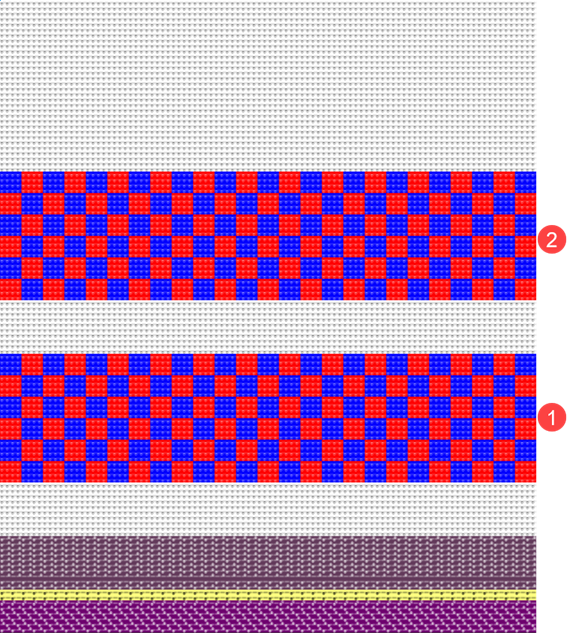
- Draw pattern areas (1) and (2) into the
 设计花型.
设计花型. : Colors from the 纱线颜色 table were used to draw the basic pattern.
|
| |
|
1 |
CA1-Private Pattern area of 2-color Jacquard Backing: |
|
2 |
CA2-Privat Pattern area of 2-color Jacquard Backing: 带向前翻针后板线圈 |
- 2
- Select the first 2 pattern rows of area (1) in the 花型行 control column.
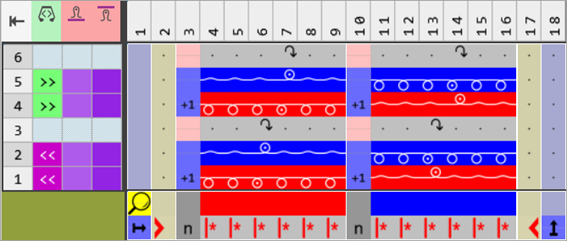
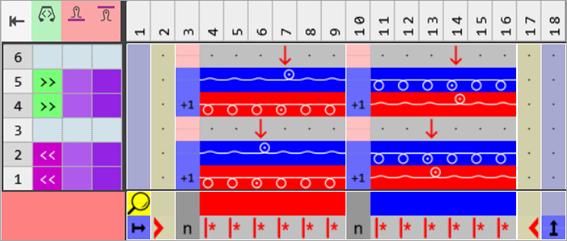
- 3
- Position the cursor in the pattern area.
- 4
- Call-up the context menu -> 选择 /
 颜色排列.
颜色排列.
- or -
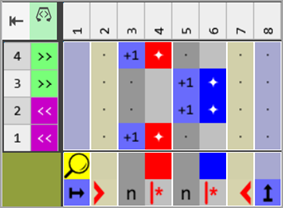
Click directly the button in the ribbon. - The Color Arrangement Editor with the original standard knitting process of the 2 selected pattern rows is opened.
|
Color Arrangement for area 1+2 |
|
|
- 5
- Select
 移动 drawing tool.
 - 6
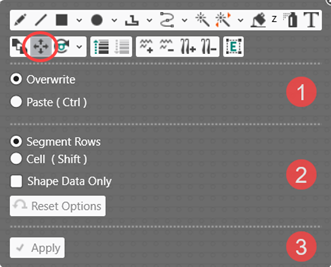
- Define the desired function in the ribbon
- or -
Open the pop-up window with CTRL + SPACEBAR. - The pop-up window appears.
- 7
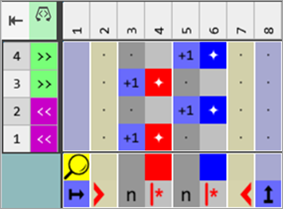
- With the 分段行 selection in the 改写 mode, move the entries in the processing area into the desired position.
- 8
- Add the missing colors #3 and #7 each to both color segments in the processing area.
- 9
- Set the missing or incorrect entries for the 基准号码:
-
For Reference Rows:
 保留基准行号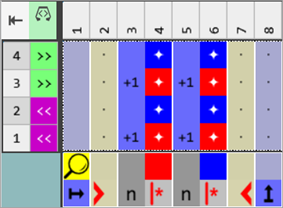
- 10
- Position the cursor on the column selection bar.
- 11
- Select the color column in the color segment of the yarn color #7 (red) with LMB.
- 12
- Open the context menu with RMB.
- The context menu appears.
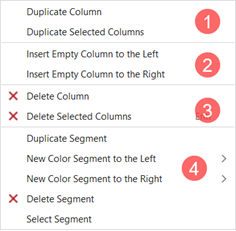
|
1 |
复制列 |
Copy content of the selected column | |
|
复制所选列 |
Copy content of the selected column(s)
| ||
|
2 |
左侧插入空列 |
Insertion of columns to the left of the selected column | |
|
右侧插入空列 |
Insertion of columns to the right of the selected column | ||
|
3 |
|
删除列 |
Without selection delete a column |
|
|
删除所选列 |
With selection delete a column
| |

|
4 |
Options to work with color segments | |||
|
复制区段 |
| |||
|
左侧新颜色段 |
>> |
Quantity of color segments to be inserted (1-10) to the left in relation to the selection | ||
|
右侧新颜色段 |
>> |
Quantity of color segments to be inserted (1-10) to the right in relation to the selection | ||
|
|
删除区段 |
| ||
|
选择片段 |
The color segment at the cursor position is selected | |||
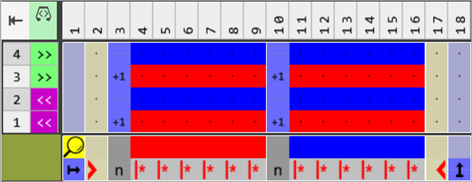
- 13
- Duplicate the desired number of columns for the yarn color #7, e.g. 5 column.: The number of columns depends on the cycle of the desired Jacquard back.
- 14
- Select the color column in the color segment of the yarn color #3 (blue).
- 15
- Open the context menu with RMB.
- The context menu appears.
- 16
- Duplicate the desired number of columns for the yarn color #3, e.g. 5 column.: The number of columns depends on the cycle of the desired Jacquard back.
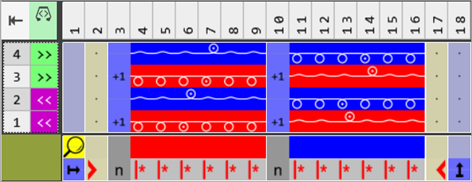
- 17
- Draw the desired Jacquard front and back with needle actions into the 'processing area' of both yarn colors.
-
带翻针前板线圈

-
前板线圈

-
带向前自动翻针浮线

- 18
- Select the technical rows (2) and (4) additively in the CA editor.
- 19
- Select the drawing tool
 粘贴.
粘贴. - The 插入选择 tool window is opened.
- 20
- Make the following selection:
-
 空
空 - With 数量: Enter the value 1
- 21
- Enter the empty rows via the arrow up key.

- 22
- Close the tool window with X.
- One empty row is inserted at the selected positions.
- 23
- Set the missing reference numbers for the newly inserted empty rows:
-
For Additional Rows:
 保留基准行号
|
Content of additional rows |
Properties and Behavior |
|---|---|
|
With yarn color or yarn carrier color |
You have to draw-in a knitting needle action if you enter additional rows with Yarn Color or Yarn Carrier Color into a color column. |
|
Without yarn color or yarn carrier color |
You have to draw in a Transfer, Cast-off or Loop sinking needle action (not knitting) if you enter additional rows without Yarn Color or Yarn Carrier Color into a color column. |
|
Behavior:
| |
- 24
- Draw the desired needle action into the empty rows:
- For casting-off:
-
 后板脱圈
后板脱圈 -
 Cast-off at rear without dissolving stitches
 - For transferring:
-
 向前翻针
向前翻针
- 25
- If necessary, allocate a different stitch length to the
 前板线圈长度(NPv) /
  后板线圈长度(NP^) control columns of the CA.
|
CA1-Private: With Cast-off |
|
|
|
|
|
CA2-Private: With Transfer |
|
|
- 26
- Check the generated Color Arrangement on correct entries with the
 检验 button.: The knitting procedure cannot be checked!
 - 27
- If necessary, in case of a Color Arrangement already used in the design pattern, apply the changes to the basic pattern with the
 应用 button.
- or -
Close the tool window with .
. - 28
- Close the prompt with the desired button:
-
Save: Color Arrangement is saved locally in the
 颜色排列 tool window.
 - Reject: The changes will not be saved.
-
Copy: The changed Color Arrangement is saved as copy in the 颜色排列 tool window.
- 29
- Enter the generated Color Arrangement via the
 control column into the desired rows of the design pattern.
 - 30
- Start the
 Technical Processing.
 - The Color Arrangement is expanded by the technical processing.
- 31
- Generate
 Sintral.
 - 32
- Start the
 Sintral 检验.
 - 33
-
 提取 the knitting program.
 - 34
- Load knitting program into the machine.