Step by Step to 'Pattern-4'
- A pattern project with one pattern and the desired settings is created.
- 1
- To draw select any desired drawing tool under the 绘图 group.
- 2
- In the 花型颜色 tool window, select the desired pattern colors from the 纱线颜色 color palette to draw the motif:
- 3
- Draw the desired motif in the
 设计花型.
设计花型.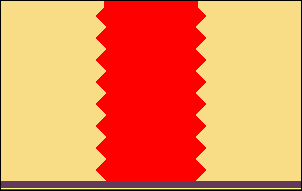
- 4
- Open the 添纱颜色 dialog box with
 in the 花型颜色 tool window.
 - 5
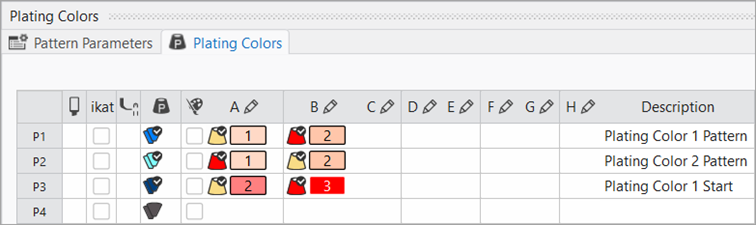
- In the tool window, enter the yarn colors used in row P1 under columns A and B.
- 6
- Under P2, also enter the yarn colors used reversed.
- 7
- If necessary, create an additional plating color for the start under P3 to assign specific plating offset values to it.
- 8
- Open the selection list with the
 next to the yarn color.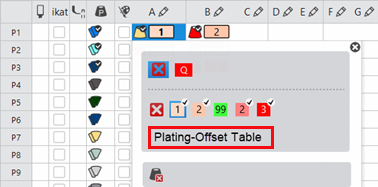
- 9
- Open the Plating Offset (YPI) table:
- The 添纱偏移 (YPI) tab of the Pattern Parameters dialog box appears.
|
| |
|
Column |
Meaning |
|
YPI |
Table of the YPI indices
|
|
Insert Position << |
Horizontal offset of the driving unit of a yarn carrier for the carriage direction to the left
Negative values: The yarn carrier is leading |
|
Height << |
Vertical offset of the yarn carrier for the carriage direction to the left
Negative values: The yarn carrier is moved downwards. |
|
Insert Position >> |
Horizontal offset of the driving unit of a yarn carrier for the carriage direction to the right
Negative values: The yarn carrier is leading |
|
Height >> |
Vertical offset of the yarn carrier for the carriage direction to the right
Negative values: The yarn carrier is moved downwards. |
|
Description |
Description of the yarn carriers, which are used when plating.
Example:
|
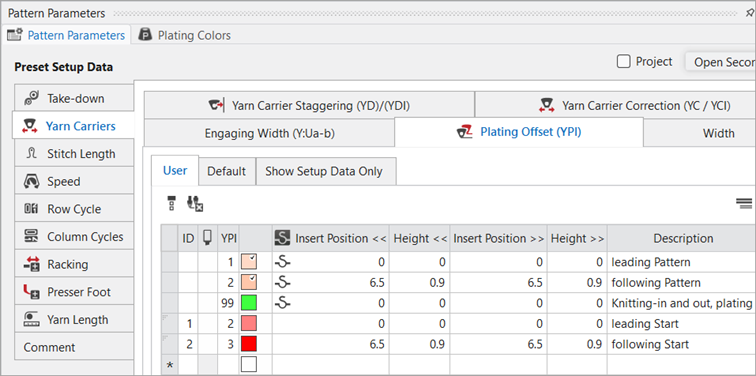
 : Index
- 10
- Select the YPI index (1) and enter it at the color below A.
- The index (1) will be allocated to the yarn color (leading yarn carrier).
Default: 0.0. - 11
- Allocate the YPI index (2) to the second yarn color (= following yarn carrier).
- 12
- Enter the settings for the selected YPI indices in the table.
- 13
- Change the order of the yarn colors for the second plating color.
 : The exchange of yarn colors in the 添纱颜色 tab determines the change (inverse plating) of the yarn carriers.
- 14
- The allocation of the YPI index keeps untouched.
- 15
- If necessary, create and assign two new entries for the plating color P3 in the table of the 添纱偏移 (YPI) tab.
|
|
|
|
|
Inverse plating (with system change) For the so called Inverse Plating (with system change), a different plating color is required for each color change. |
- 16
- Draw the plating colors P1 + P2 into the design pattern.
- 17
- Modify the knitting element 起头,1x1 by the plating color P3.

: The 起头,1x1 of the example is platted by the plating color P3.
- 18
- If desired, define a cycle for length control in the
 control column.
 - 19
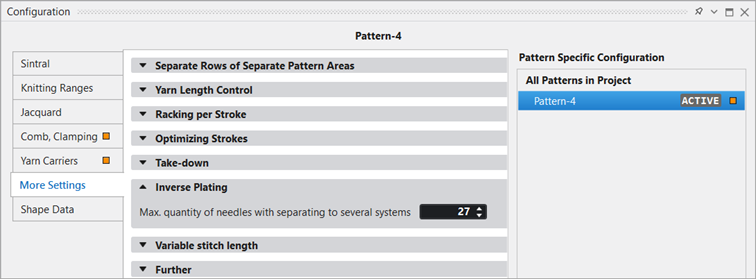
- If desired, modify the value under 反向添纱 in the 更多设置 tab of Configuration:
|
| |
|
|
Maximum quantity of needles with separating knitting rows to several systems.
|

- 20
- Carry out all the steps of processing.
|
Knitting sequence of inverse plating with exchanging systems (change between the systems): |
|
|

 : The extracted file "ADF530-32W.Pattern-4.zip" can be loaded onto the machine with an USB stick or via Ethernet.