Frame
|
|
创建一个内围框或外围框: |

In the 插入围框 dialog box you make various settings for the frame.
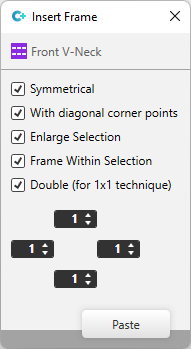
Options of the 插入围框 dialog box:
|
|
Inserts the frame symmetrically. All sides are represented with the same width. |
|
|
Draws the corner points at the diagonals. |
|
|
Extends the selection by the frame. |
|
|
Inserts the frame inside the selection. |
|
|
Doubles the width of the frame (not its height). |
|
|
Enter the frame width for left, right, top and bottom for four edit boxes. |

