Working with the knitting element type 'Color Arrangement'
Using Color Arrangements
With the help of one or more Color Arrangements you are able to manually influence the knitting process in a pattern by area or in the entire pattern.
To use Color Arrangements it is necessary to draw the areas in the pattern with different pattern colors (yarn colors, magazine colors or yarn carrier colors).
Based on the different colors you are able to influence the knitting technique of these areas using the Color Arrangement.
- No Color Arrangement in the pattern
- The knitting program is generated automatically through specifications and technical rules during the technical processing. (Automatic)
- Entire pattern with Color Arrangements
- The knitting program is generated according to the specifications of the Color Arrangements during the technical processing. (corresponds to the manual creation of a pattern)
- Combination of areas without and with Color Arrangements
- The knitting program is generated automatically in areas without Color Arrangements and according to the Color Arrangements in the areas with Color Arrangements. (Semi-automatic)
Options for generating a new Color Arrangement

-
 New Knitting Element symbol in the start window of Create Plus
 -
New Knitting Element symbol in the Knit Explorer
-
 CA tool window of the Create New Color Arrangement context menu
  : A template for a Color Arrangement (entry is independent from the pattern) is opened.
 - Selection in the
 Design Pattern: Selection
/
Design Pattern: Selection
/  Create Color Arrangement... : Out of the created row selection, the Color Arrangement editor is opened, where the pattern related information of the selection is already entered.
Example to explain working with a Color Arrangement
Behavior of a Color Arrangement using the example of a pattern with 3 color stripes
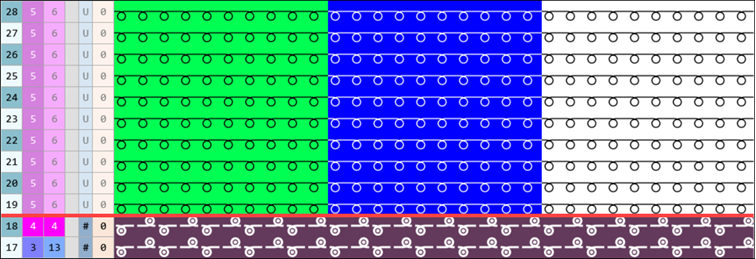
Steps to create a Color Arrangement
- A pattern project is opened.
- 1
- Draw a design pattern with the necessary colors from the different tables:
- Yarn Colors
- Magazine Colors
- Yarn Carrier Colors
: E.g. 3 color stripes with any desired Yarn Colors
- 2
- In the Pattern Row control column, select the first 2 pattern rows.
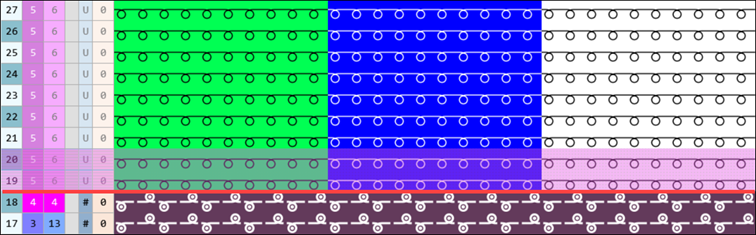
- 3
- Position the cursor in the pattern area.
- 4
- Open the context menu and select Selection
/ Create Color Arrangement:
.
- or -
Click directly the button in the ribbon. - The Color Arrangement Editor is opened displaying the 'Default knitting process for Intarsia' from the selected pattern rows.
|
Color Arrangement Editor |
|
|
|
|
|
Search Area |
|
CREATE PLUS searches for existing colors in the selected pattern rows from left to right.
|
|
|
|
Processing Area |
|
These colors plus the The knitting process of the processing colors (= yarn carrier) corresponds with an Intarsia knitting sequence. |
|
|

 will be set below the search color by default, to repeat the information according to the information from the source row.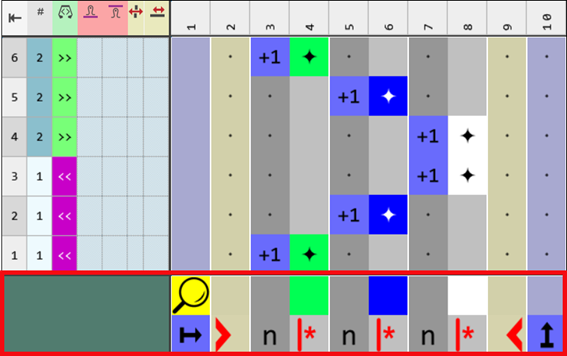


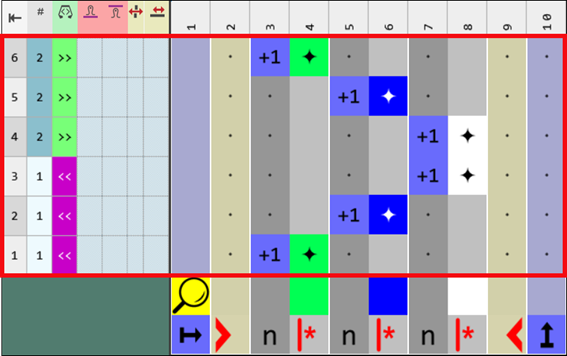
Color Arrangement Editor
|
Designation of the rows and columns in the Color Arrangement Editor (CA) | ||||
|
| ||||
|
1 |
Control Columns
|
| ||
|
2 |
Column bar with numbering
| |||
|
3 |
Row bar with numbering
| |||
|
Processing Area |
Search Area | |||
|
4 |
Reference column with reference numbers
|
8 |
Search row | |
|
5 |
Color column in the color segment
Example: |
9 |
Column and Row Attributes
| |
|
6 |
Shape column
|
10 |
Color of the color entry in the
| |
|
7 |
Column for defining a repeating of rows |
| ||
|
| ||||
|
Check Automatically |
|
No automatic check regarding the correct structure of the created knitting element.
| ||
|
|
An automatic check is executed regarding the correct structure of the created knitting element.
| |||
|
|
Button for the manual checking of the entries in the Color Arrangement | |||
|
|
Apply changes, without closing the editor. | |||
|
|
Open the Jacquards tool window. | |||

 with the search colors
 control column


Meaning and behavior of the reference row numbers in the reference column
The number in the reference column refers to a corresponding row in the source pattern (Design Pattern) or to an additional row.
Two possibilities of the reference row numbering:
-
Reference number for reference rows (blue symbols
 ) for the processing of source rows from the design pattern: all the information from the control columns is applied.
 - Working with numbers ,
 , and
, and  : Due to the use of these numbers, during the repetition, the reference rows in the source pattern are automatically increased and processed. With the first application of a CA, the '+' symbol is suppressed.
Notice:
During the troubleshooting in the processed pattern it is difficult to find the correct reference row number. - Working with the numbers from
 to
to  and bigger: The reference rows in the source pattern are set as a fixed value due to the use of these numbers. The rows in the source pattern are only incremented and processed through the repetition of the CA in the control column.
Notice:
During the troubleshooting in the processed pattern it is easier to find the correct, corresponding reference row number.
|
Content of Reference Rows |
Properties and Behavior | |
|---|---|---|
|
With yarn color or yarn carrier color |
Only color |
Needle actions and modules will be read from the reference row (source row) of the basic pattern. |
|
Color and needle actions (knitting) |
Needle actions and modules from the reference row (source row) of the basic pattern will be overwritten by the needle actions drawn in. | |
|
Different color |
Needle actions and modules will be read from the reference row (source row) of the basic pattern and knitted in the color drawn in. | |
|
Different color and needle action (knitting) |
Needle actions and modules from the reference row (source row) of the basic pattern will be overwritten by the color and needle action drawn in. | |
|
Without yarn color or yarn carrier color |
Not allowed | |
|
Behavior:
| ||
-
Reference number for additional rows (pink symbol
 ) for the use of not knitting and / or knitting additional rows in the CA (no corresponding source row available in the design pattern): No information from the control columns is applied.
Exception: Stitch lengths at front and rear - Working with numbers ,
 , and
, and  : When using these numbers there is no reference to a row from the source pattern. Using the '+' symbol, the additional rows are also increased and are inserted additionally after the corresponding source row.
 - Working with the numbers from
 to
to  and bigger: When using these numbers there is a fixed reference to a row from the source pattern after which the additional row is inserted in the design pattern.
|
Content of additional rows |
Properties and Behavior |
|---|---|
|
With yarn color or yarn carrier color |
You have to draw-in a knitting needle action if you enter additional rows with Yarn Color or Yarn Carrier Color into a color column. |
|
Without yarn color or yarn carrier color |
You have to draw in a Transfer, Cast-off or Loop sinking needle action (not knitting) if you enter additional rows without Yarn Color or Yarn Carrier Color into a color column. |
|
Behavior:
| |
CA tab in the Color Arrangement Editor
Symbols to edit a Color Arrangement

|
1 |
Column and Row Attributes | ||
|
|
Referring column |
Marking of the column for the reference numbers | |
|
|
Left Shape Area Column |
Fabric selvedge in the right of the fabric piece center
| |
|
|
Right Shape Area Column |
Fabric selvedge in the fabric piece center left
| |
|
|
Left Fabric Piece Column |
Left outer edge of a fabric piece.
| |
|
|
Right Fabric Piece Column |
Right outer edge of a fabric piece.
| |
|
2 |
CA Definition of Areas | ||
|
|
Repeating from the left pattern column |
Repeat the selected column area within the color relative to the first pattern column. | |
|
|
Repetition to the right |
Repeat the selected column area starting from the left color field edge. | |
|
|
Repeating from the right pattern column |
Repeat the selected column area within the color relative to the last pattern column. | |
|
|
Repetition to the left |
Repeat the selected column area starting from the right color field edge. | |
|
|
Excess Width, Overwriting, Repeating starting at the left pattern border |
Enter a overwriting additional column on the left relative to the first pattern column of a color area. | |
|
|
Excess Width, Overwriting |
Enter an overwriting additional column on the left and / or right of a color area. | |
|
|
Excess Width |
Do not enter an overwriting additional column on the left and / or right of a color area. | |
|
|
Excess Width, Overwriting, Repeating starting at the right pattern border |
Enter a overwriting additional column on the right relative to the last pattern column of a color area. | |
|
|
Effect of excess width:
Use:
| ||
|
|
Excess Width at Shape Edge, Overwriting, Repeating starting at the left pattern border |
Enter a overwriting additional column on the left relative to the first pattern column of a color area at the shape edge. | |
|
|
Excess Width at Shape Edge, Overwriting |
Enter an overwriting additional column on the left and / or right of a color area at the shape edge. | |
|
|
Excess width at Shape Edge |
Do not enter an overwriting additional column on the left and / or right of a color area at the shape edge. | |
|
|
Excess Width at Shape Edge, Overwriting, Repeating starting at the right pattern border |
Enter a overwriting additional column on the right relative to the last pattern column of a color area at the shape edge. | |
|
|
| ||
|
|
Left Fabric Selvedge |
Fading-out at the left fabric selvedge by the drawn-in width . | |
|
|
Right Fabric Selvedge |
Fading-out at the right fabric selvedge by the drawn-in width. | |
|
|
Repeating of rows |
For defining cycles in the
| |
|
3 |
Transfer Definitions | ||
|
|
Settings for Transferring the Shape |
Specify the pattern rows for transferring the narrowings and widenings | |
|
|
Settings for Transferring the Structure |
Specify the pattern rows for transferring the structures. | |
|
|
Structure transferring not allowed |
Specify the pattern row in which the transferring of the structure is not allowed | |
|
|
Settings for Auto Transferring |
Specify the pattern rows for auto transferring | |
|
4 |
Reference Numbers | ||
|
| |||
|
|
Keep reference row number |
The previous reference row number is retained, i. e. that the reference row number will not be incremented. | |
|
|
Increase reference row number by 1 |
Edited reference row number will be increased by 1 for further processing.
| |
|
|
Increase reference row number by 2 |
Edited reference row number will be increased by 2 for further processing, i.e. one pattern row is skipped. | |
|
|
Reference Row Number from 1 to 20 |
Selection of the reference row numbers for numbering the reference rows in the design pattern | |
|
|
|
Selection of further reference row numbers greater than 20 | |
|
| |||
|
|
Retain the number of additional row |
The previous reference row number is retained, i. e. that the reference row number will not be incremented. | |
|
|
Increase the number of additional row by 1 |
Edited reference row number will be increased by 1 for further processing. | |
|
|
Increase the number of additional row by 2 |
Edited reference row number will be increased by 2 for further processing, i.e. one pattern row is skipped. | |
|
|
Number of additional row from 1 to 20 |
Selection of the additional row number for numbering the additional rows in the Color Arrangement | |
|
|
|
Selection of further reference additional row numbers greater than 20 | |
|
5 |
Repetitions of Rows or Alternative Excess Width | ||
|
|
Repeating of rows or excess width 1 to 20 |
Numbers for defining
| |
|
|
Repeating of rows or excess width 21 and higher | ||
|
6 |
Repetitions Related to Needles | ||
|
|
Start of Repetition |
Select areas and define them according to the type of knitting element.
| |
|
|
First Repetition | ||
|
|
Following Repetition | ||
|
|
End of Repetition | ||
|
|
Delete Needle Occupancy Delete Repetition Delete Knitting-in and Out |
Delete the marked areas | |
|
7 |
Definition Colors | ||
|
to
|
For visual marking of
| ||
|
8 |
CA Placeholder Colors | ||
|
to
|
Use of the placeholder colors in the search area and in the processing area of a CA, to define the colors in both areas as 'transparent'.
| ||


 column


 to
to 


- 1
- Make the desired changes in the editor with the tools for Color Arrangements from the CA and / or Needle Actions / Colors tabs.
- 2
- Check the generated Color Arrangement on correct entries with the
 Check: button.: The knitting procedure cannot be checked!
 - 3
- If necessary, in case of a Color Arrangement already used in the design pattern, apply the changes to the basic pattern with the
 Apply button.
- or -
Close the tool window with button.
 - 4
- Close the prompt with the desired button:
-
Save: Color Arrangement is saved locally in the
 CA tool window.
 - Reject: The changes will not be saved.
-
Copy: The changed Color Arrangement is saved as copy in the CA tool window.
: The color of the Color Arrangement is entered into the first two rows of the Color Arrangement control column.
- 5
- If necessary for the processing of multiple rows from the source pattern (design pattern), enter the generated Color Arrangement over the Color Arrangement control column into the desired area of the design pattern.: The data of the CA will be used in these marked rows.
- 6
- Start the
 Technical
Processing.
Technical
Processing. - The Color Arrangement is expanded by the technical processing.
- 7
- Generate
 Sintral.
 - 8
- Start the
 Sintral Check.
 - 9
-
 Extract the knitting program.
 - 10
- Load knitting program into the machine.