Multi-piece knitting with CMS 822
Overview of the operating modes with CMS 822:
|
Possibilities of the operating modes | ||
|---|---|---|
|
Operating Mode |
Using the comb |
Number of possible fabric pieces |
|
Without tandem: |
Without Comb |
1 - 4 |
|
With Comb |
1 or 2 | |
|
With tandem |
Without Comb |
1-4 per carriage |
|
With Comb |
2 | |
I. Without Tandem - Multi-piece knitting with and without comb:
|
Possibilities with normal operation (without tandem) | |
|---|---|
|
System allocation per knitting area |
|
|
Start |
Configuration: |
|
Without Comb |
1 - 4 SEN |
|
With Comb |
1 SEN = 2 Fabrics |
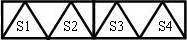
II. With Tandem - Multi-piece knitting with and without comb:
El funcionamiento de la CMS 822 equivale al funcionamiento de una CMS 933/922/422TC/433TC como tándem.
Creará el programa de tisaje para el carro izquierdo con los sistemas de tisaje S1 y S2
La selección de agujas es calculada internamente para la pieza de tisaje de la izquierda y aplicada a la pieza de tisaje de la derecha con los sistemas de tisaje S3 y S4.
- 1
- Generate new pattern.
- or -
Load the existing pattern as basic pattern. - 2
- Activate
 Servicio en tándem and select the coupling width when selecting the machine.
|
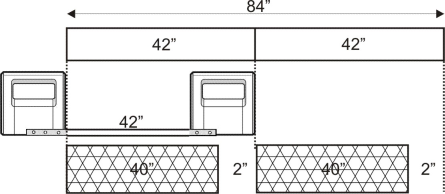
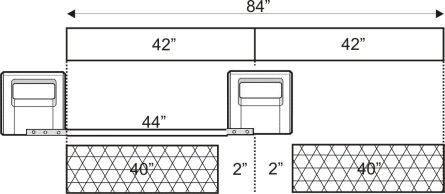
Tandem operation without comb | ||
|---|---|---|
|
System allocation |
| |
|
Start |
Coupling width |
Working width |
|
Without Comb |
42 " |
42 " |
|
| ||
|
| ||
|
Start |
Coupling width |
Working width |
|
Without Comb |
44 " |
40 " |
|
| ||

|
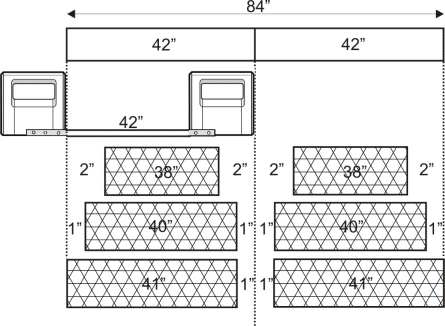
Tandem operation with comb | ||
|---|---|---|
|
System allocation |
| |
|
Start |
Coupling width |
Working width |
|
With Comb |
42 " |
42 " |
|
| ||
|
Possible positions of the working width and the intermediate space | ||
|
| ||
|
Start |
Coupling width |
Working width |
|
With Comb |
44 " |
40 " |
|
| ||
|
Possible positions of the working width and the intermediate space | ||
|
| ||

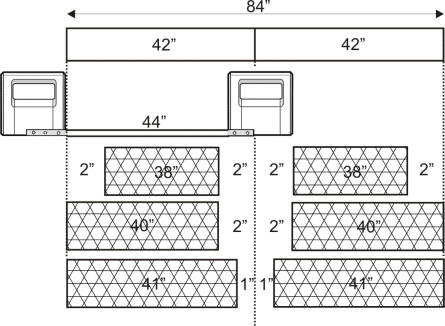

La distancia de los dos sectores de tisaje debe ser suficiente para posicionar los guiahilos utilizados.
Prestar atención a ocupaciones dobles de carriles de guiahilos.
- 1
- Call up the Sectores de tisaje tab in the Configuración tool window.
- 2
- Position the Posición de inicio de SEN1 to the left in case of a great working width.
- 3
- Activate Tisaje con varias piezas in the Tisaje con varias piezas section and set
 Distancia hasta centro del tejido (ancho de acoplamiento)
or Distancia en espacio intermedio.
Distancia hasta centro del tejido (ancho de acoplamiento)
or Distancia en espacio intermedio. - 4
- Start the Procesamiento técnico .