FlexPly Patterning
Create FlexPly Pattern
-
CREATE PLUS version V2.4. – 04/2023
or higher.
- ADF machine E 7.2 with cam box conversion for FlexPly
- 1
- Open a new pattern.
- 2
- Select an ADF machine E 7.2 with cam box conversion for FlexPly.
- 3
- Open the Atributos de máquina tab.
- 4
- Select FlexPly setting in the Funciones del sistema section under Conversión de sistema.
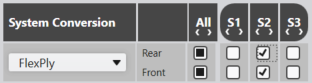
- In the Funciones del sistema section, the system functions are automatically adjusted.
- 5
- Confirm the prompt with OK.
¡La conversión del sistema para 'FlexPly' es activada!
- 6
- Open the Colores de vanisado tool window.
 Colores de vanisado
- 7
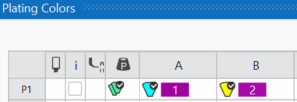
- Define a plating color by Colores de los guiahilos.
Plating Color P1:
Column A: Yarn carrier color 8 for the binding thread
Column B: Yarn carrier color 7 for the motif thread
- 8
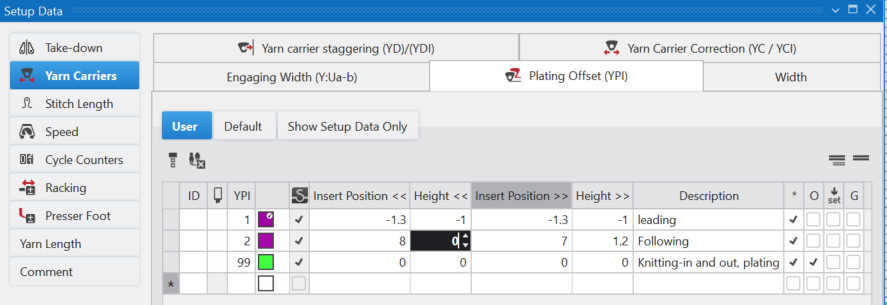
- Allocate the necessary plating index to the yarn carrier colors.
- 9
- Draw pattern.
The FlexPly motif can be done on the rear, front or on both needle beds.
Draw with plating color and the following needle action e.g:
Enter  Malla atrás only.
- Resulting "Stitch-Float"

- 10
- Or enter
 Hilo del motivo atrás and Malla atrás.
- Resulting "Stitch-Stitch"
 for motif thread and binding thread.
 - E.g. for the rear needle bed:
- 11
- Entry the FlexPly delante y atrás function in the
 Función del sistema control column.
- 12
- Execute
 Procesamiento
técnico.
Procesamiento
técnico.
- 13
- Check the knitting program with the Control Sintral Check.
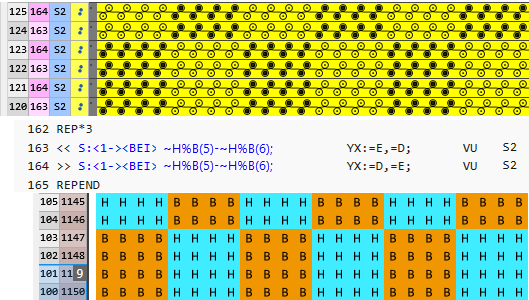
Recomendaciones para Devoré (1 sistema):
- Utilizar guiahilos de las pistas de guiahilos centrales.
Ejemplo para ADF 32: - Guiahilos 8 para el hilo de ligadura
- Guiahilos 7 para el hilo del motivo
- Ajustar el índice de vanisado (YPI) en el Editor de setup.
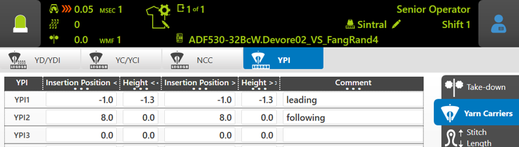
- Precedente (hilo de ligadura)
Posición de inserción: -1.0
Altura: -1.3 - Siguiente (hilo del motivo)
Posición de inserción: 8.0
Altura: 0
- Longitud flotante
No más de 1/2 pulgada