Properties (Lined Shape Project)
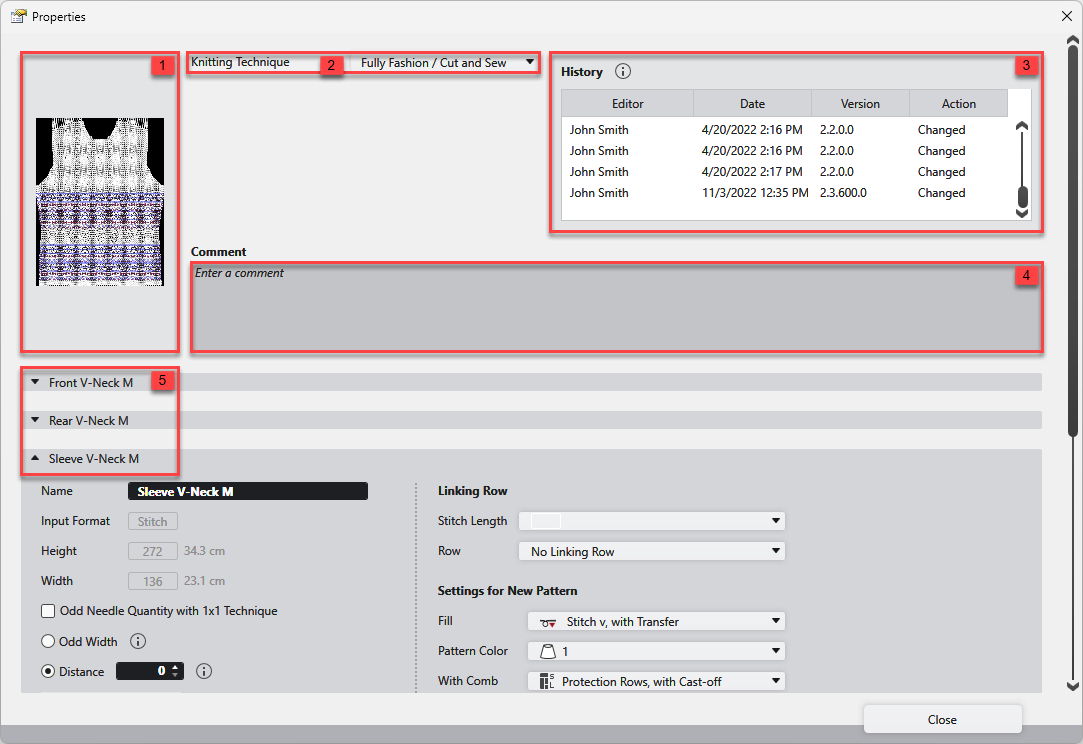
Make the following settings in the Propiedades dialog box of a lined shape project:
|
1 |
Recognition picture of the lined shape project. The following options appear when you place the cursor on the field:
Restablecer imagen
Imagen diferente... |
|
2 |
Técnica de tisaje Select the knitting technique for the lined shape project. Fully Fashion/Artículo de corte / knit and wear |
|
3 |
Historial Display of the information about the performed changes on the lined shape project. |
|
4 |
Comentario Enter a comment to the lined shape project. |
|
5 |
The Propiedades de corte for all shapes of the lined shape project are displayed. They can be opened or closed. |