Change the default settings for the stitch length
Change the specifications for the stitch lengths in the pattern:
- See and modify the default settings for the stitch lengths in the
 Dessin de conception.
 - The Longueur de la maille avant (NPv)
 / Longueur de la maille arrière (NP^)
  control columns appear.
- 1
- Open the existing Projet de dessin and save it with a new name via the Fichier / Enregistrer sous menu.
- or -
Create new Projet de dessin with an individual pattern. - 2
- Set the cursor to the Longueur de la maille avant (NPv) / Longueur de la maille arrière (NP^) control columns of the Dessin de conception document window and click the RMB.
- or -
Open the Longueur de la maille (NP) context menu in the second row of the table header containing the default settings. - The stitch lengths context menu appears.
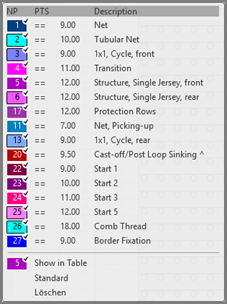
- The stitch lengths used in the pattern are displayed and are marked by the
 symbol.
 - The entries marked as favorites in the
 Longueur de la maille (NP) / Par défaut tab under the Longueur de la maille section of the Données Setup tool window are displayed.
- 3
- Select the desired stitch length and enter it in the control column.
- or -
Fill a selection.
The stitch lengths shown in the context menu correspond to the table in theDonnées Setup tool window under the Longueur de la maille section of the Longueur de la maille (NP) / Utilisateur tab.