Changing the default setting for the auxiliary take-down (W+F)
In the  control column the value W+F1 is entered by default and the value is set to 'Don't Care'. This allows for activating / deactivating the auxiliary take-down at the machine.
Enter specifications for the auxiliary take-down in the pattern:
- You see and change the default settings for the auxiliary take-down in the
 Dessin de conception.
 - The control column is displayed.
- 1
- Open the existing Projet de dessin and save it with a new name via the / menu.
- or -
Create new Projet de dessin with an individual pattern. - 2
- In the document window Dessin de conception, position the cursor on the control column and click the RMB.
- or -
Open the Auxiliary take-down context menu in the 2nd row of the table header containing the default settings with RMB. - The context menu for the auxiliary take-down (W+F) appears.
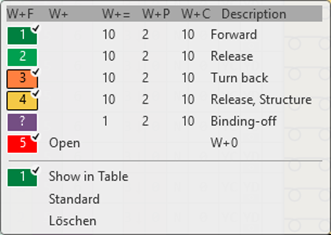
- The auxiliary take-down functions (W+F) used in the pattern are displayed and are marked by the
 symbol.
 - The entries marked as favorites in the Tirage auxiliaire (W+F) / Par défaut tab under the
 Tirage section of the Données Setup tool window are displayed.
- 3
- Select the desired auxiliary take-down value and enter it in the control column.
- or -
Fill a selection.
The auxiliary take-down values (W+F) shown in the context menu correspond to the table in the Données Setup tool window under the Tirage section of the Tirage auxiliaire (W+F) / Utilisateur tab.