Edit and modify inserted Jacquards
I. Edit the inserted Jacquards:
- In the pattern there are areas with inserted Jacquard modules.
- 1
- In the Accueil ribbon under
 Fenêtre Outils, open the
  Jacquards tool window.
- or -
Click on the Ouvrir les jacquards...
in the context menu on the pattern. - The Jacquards tool window is opened.
|
| |||
|
1 |
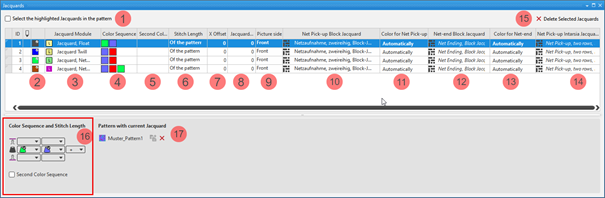
Sélectionner les entrées de tableau sélectionnées dans le dessin | ||
|
|
The Jacquards selected in the table are not displayed as selection in the pattern. | ||
|
|
The Jacquards selected in the table are displayed as selection in the pattern. | ||
|
ID |
Consecutive numbering of the Jacquard areas | ||
|
2 |
|
For drawing a Jacquard module in the pattern
| |
|
|
Index Color: Application in the search area of a Color Arrangement
| ||
|
3 |
Module jacquard
| ||
|
4 |
Ordre des couleurs Display for the color sequence for the first and second pattern row if | ||
|
5 |
Deuxième ordre des couleurs Display for the color sequence for the second pattern row if | ||
|
6 |
Longueur de la maille Specification for the stitch length which is to be used in the pattern:
| ||
|
7 |
Décalage X Décaler le point de départ de l'envers horizontalement Value in needles for the horizontal offset of a Jacquard module | ||
|
8 |
Envers plus étroit Envers plus étroit de n aiguilles par rapport à l'endroit Value in needles, regarding how much the Jacquard back side is to be narrower in relation to the picture side.
| ||
|
9 |
Endroit
| ||
|
10 |
Prise de réseau jacquard en blocs Display of the knitting elements in use for the net pick-up with continuous Jacquards | ||
|
11 |
Prise de réseau couleur Specification of the color (yarn carrier) which is used for the net pick-up knitting element | ||
|
12 |
Fin de réseau jacquard en blocs Display of the knitting elements in use for the net ending with continuous Jacquards | ||
|
13 |
Fin de réseau couleur Specification of the color (yarn carrier) which is used for the knitting element | ||
|
14 |
Prise de réseau jacquard intarsia Display of the knitting elements in use for the net pick-up with Intarsia with Jacquard back | ||
|
15 |
Supprimer les jacquards sélectionnés |
The selected Jacquard is deleted in all the pattern where it is in use.
| |
|
16 |
Séquence de couleurs et longueur de maille | ||
|
|
Display or edit box for the stitch length per color / system for rear needle bed
| ||
|
|
Display of the color sequence from the left for the Jacquard area selected in the table | ||
|
|
Display or edit box for the stitch length per color / system for front needle bed
| ||
|
|
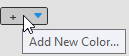
Ajouter une nouvelle couleur... | ||
|
Deuxième ordre des couleurs | |||
|
|
|
Default setting | |
|
|
Definition of the color sequence for the second pattern row is possible.
| ||
|
17 |
Dessin avec jacquard actuel List of the patterns, where the Jacquard selected in the table is in use.
| ||
|
|
Ungroup the grouped Jacquard areas.
| ||
|
|
The Jacquard module inserted in the pattern will be removed from the area in the pattern.
Result:
| ||


 (
(
 :
:




- 2
- Select the Jacquard to be changed in the table.
- 3
- Make the desired changes in the tool window.
- 4
- Close the tool window with X.
- The changes will be applied to the pattern.
II. Direct selection of a Jacquard module in the pattern:
- In the pattern there are Jacquard modules in use.
- 1
- Position the cursor in a Jacquard area with an inserted Jacquard module.
- 2
- Apply the Jacquard module with the F5 key.
- 3
- Enter the selected Jacquard module via the control columns in the entire pattern width or only in an area within the pattern.
- The selected Jacquard module is inserted.
Pay attention whether the exact same colors are in use in the area to be entered or not!
- Exactly the same colors
The Jacquard areas will be grouped. - Different Colors
A new entry is added in the table.
III. Selection of a Jacquard module in the Jacquard table:
- In the pattern there are Jacquard modules in use.
- All the Jacquard modules in use are contained in the table.
- 1
- In the Accueil ribbon under Fenêtre Outils, open the Jacquards tool window.
- 2
- Select the desired Jacquard in the Jacquards tool window in the
 column.
 : Pay attention to the Jacquard colors in use!
 - 3
- Enter the selected Jacquard module via the control columns in the entire pattern width or only in an area within the pattern.
- The following message appears:
Dans la zone où vous avez dessiné se trouve au moins une couleur qui n'est pas contenue dans le jacquard du tableau. La zone est reliée avec un jacquard correspondant. S'il n'y en a pas, un nouveau jacquard sera élaboré. - 4
- Confirm message with:
-
OK
A new Jacquard with the missing color is created in the table. -
Annuler
No Jacquard module is inserted.
IV. Adding an extra color:
The colors identified with  knit only on the Jacquard back.
- In the pattern there are Jacquard modules in use.
- All the Jacquard modules in use are contained in the table.
- The Jacquards tool window is open.
- 1
- Select a Jacquard in the first column of the Jacquards tool window.
- The color sequence is displayed in the tool window under Séquence de couleurs et longueur de maille.
- 2
- Select an additional color (additional color) in the empty edit box at the end of the displayed color sequence by the icon from the Couleurs de dessin tool window.
- The additional color is added to the color sequence and identified with .
V. Deleting an additional color marked with :
The colors identified with knit only on the Jacquard back.
- In the pattern there are Jacquard modules in use.
- All the Jacquard modules in use are contained in the table.
- The Jacquards tool window is open.
- 1
- Select a Jacquard with additional colors in the first column of the Jacquards tool window.
- The color sequence is displayed in the tool window under Séquence de couleurs et longueur de maille.
- 2
- Position the cursor on the additional color -> click the Supprimer la couleur context menu.
- The additional color is removed from the color sequence.