Multi-piece knitting with CMS 822
Overview of the operating modes with CMS 822:
|
Possibilities of the operating modes | ||
|---|---|---|
|
Operating Mode |
Using the comb |
Number of possible fabric pieces |
|
Without tandem: |
Without Comb |
1 - 4 |
|
With Comb |
1 or 2 | |
|
With tandem |
Without Comb |
1-4 per carriage |
|
With Comb |
2 | |
I. Without Tandem - Multi-piece knitting with and without comb:
|
Possibilities with normal operation (without tandem) | |
|---|---|
|
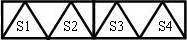
System allocation per knitting area |
|
|
Start |
Configuration: |
|
Without Comb |
1 - 4 SEN |
|
With Comb |
1 SEN = 2 Fabrics |
II. With Tandem - Multi-piece knitting with and without comb:
La méthode de travail de la CMS 822 correspond à celle d'une CMS 933/922/422TC/433TC en tandem.
Élaborer le programme de tricotage pour le chariot gauche avec les systèmes de tricotage S1 et S2.
La sélection des aiguilles est calculée en interne pour le panneau tricoté de gauche et reportée sur le panneau tricoté de droite avec les systèmes de tricotage S3 et S4.
- 1
- Generate new pattern.
- or -
Load the existing pattern as basic pattern. - 2
- Activate
 Opération en tandem and select the coupling width when selecting the machine.
|
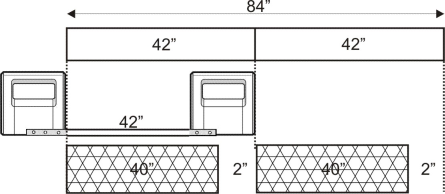
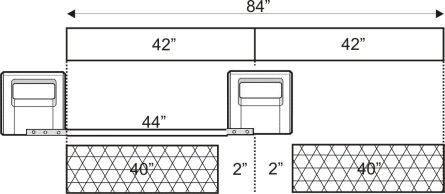
Tandem operation without comb | ||
|---|---|---|
|
System allocation |
| |
|
Start |
Coupling width |
Working width |
|
Without Comb |
42 " |
42 " |
|
| ||
|
| ||
|
Start |
Coupling width |
Working width |
|
Without Comb |
44 " |
40 " |
|
| ||

|
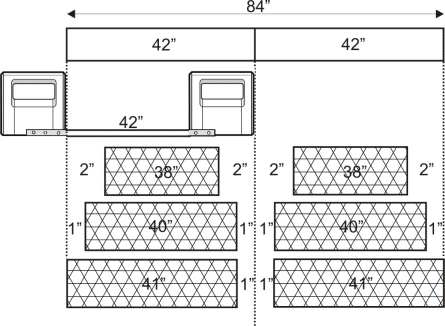
Tandem operation with comb | ||
|---|---|---|
|
System allocation |
| |
|
Start |
Coupling width |
Working width |
|
With Comb |
42 " |
42 " |
|
| ||
|
Possible positions of the working width and the intermediate space | ||
|
| ||
|
Start |
Coupling width |
Working width |
|
With Comb |
44 " |
40 " |
|
| ||
|
Possible positions of the working width and the intermediate space | ||
|
| ||

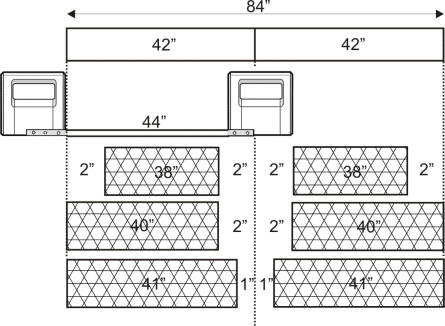

La distance entre les deux zones de tricotage doit être suffisante pour pouvoir placer les guide-fils utilisés.
Attention à la double occupation des barres de guide-fil.
- 1
- Call up the Zones de tricotage tab in the Configuration tool window.
- 2
- Position the Position de départ SEN1 to the left in case of a great working width.
- 3
- Activate Tricotage à plusieurs pièces in the Tricotage à plusieurs pièces section and set
 Distance jusqu'au milieu du panneau tricoté (largeur de couplage) or Distance dans l'espace libre.
 - 4
- Start the Élaboration technique .