Step by Step to Pattern-5
- A pattern project with one pattern and the desired settings is created.
- 1
- Generate basic pattern with:
- Couleurs de fil
- Basic Color
- Color stripe
- Actions de l'aiguille
-
 Maille avant avec report
 -
 Maille arrière avec report
 - Stoll pattern element
- Knit Explorer -> Éléments du dessin -> Éléments du dessin, toutes les aiguilles -> Éléments du dessin, Aran -> Aran ED 4
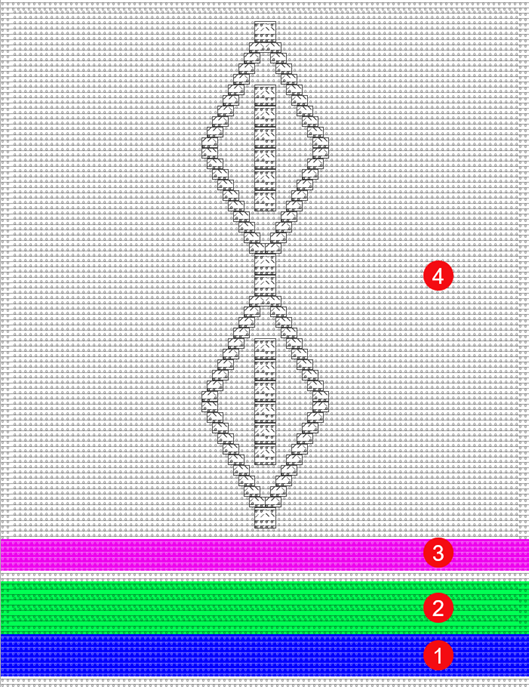
|
| ||
|
1 |
Color stripe 1 |
|
|
2 |
Color stripe 2 |
|
|
3 |
Color stripe 3 |
|
|
4 |
Color area |
|
- 2
- Display the
 Rapport (RS) control column.
 - 3
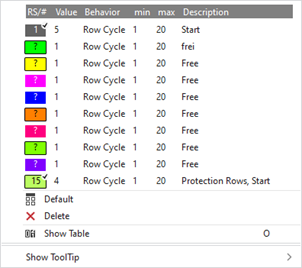
- Place the cursor in the control column and with RMB -> open the context menu.
- 4
- Select available cycle counter color+(?) directly in the context menu and draw into control column
- or -
using Afficher le tableau open the Commutateur de rapport tool window in the context menu. - 5
- Select the Utilisateur tab.
- The tool window is displayed.
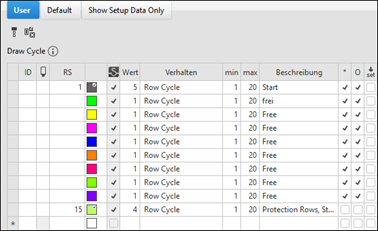
 : In the table, the cycle counters in use (from knitting elements) and the ones to be used (available) are displayed before Élaboration technique.
|
| ||
|
ID |
Running numbering and sorting of newly created entries | |
|
|
Selecting the cycle counter to enter in the | |
|
RS |
Input and display of the index for the indirect (RSn =1-39) or direct (D) cycle counter allocation | |
|
Couleur |
Display of the color to enter in the | |
|
Valeur |
| |
|
Comportement |
Rapport de rangées |
|
|
Rapport commutable (fonction) |
| |
|
| ||
|
min |
| |
|
max |
| |
|
Description |
About the use of the cycle in the fabric | |

- 6
- Select the desired available entry (color) from the Utilisateur tab and enter in the control column.
- 7
- In the RS column, indicates the desired value for RSn (n=1-39).
- 8
- Define the desired number of repeats in the Valeur column.
- 9
- Make the following selection with Comportement:
- Rapport de rangées
- Simple cycle
- Nested cycle: Entry in the control column with CTRL. + LMB
|
Simple cycles |
Nested cycles |
|
|
|
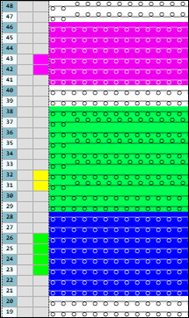
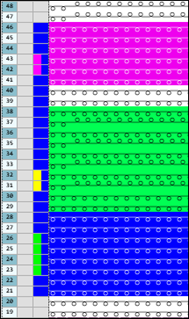
The procedure for multiple entries in control columns:
- Rapport (RS)
- Spécifications des guide-fils
- Arrêt des guide-fils
Add an entry to an existing entry:
- Add

With the Ctrl key - Select the desired location in the menu:
- Set cursor to the start position.
- Press the CTRL key.
- Press LMB and hold it until the end position.
- Release the left mouse button.
- Add

With the Ctrl key - Select the desired location in the menu:
- Set cursor to the start position.
- Press the CTRL key.
- Click left mouse button.
- Draw the cursor to the end position.
- Click left mouse button again.
Delete Entry:
- Delete
With the CTRL + ALT key - Set cursor to the start position.
- Press LMB and hold it until the end position.
- Release the left mouse button.
- Delete
With the CTRL + ALT key - Select the desired location in the menu:
- Set cursor to the start position.
- Press the CTRL + ALT keys.
- Click left mouse button.
- Draw the cursor to the end position.
- Click left mouse button again.
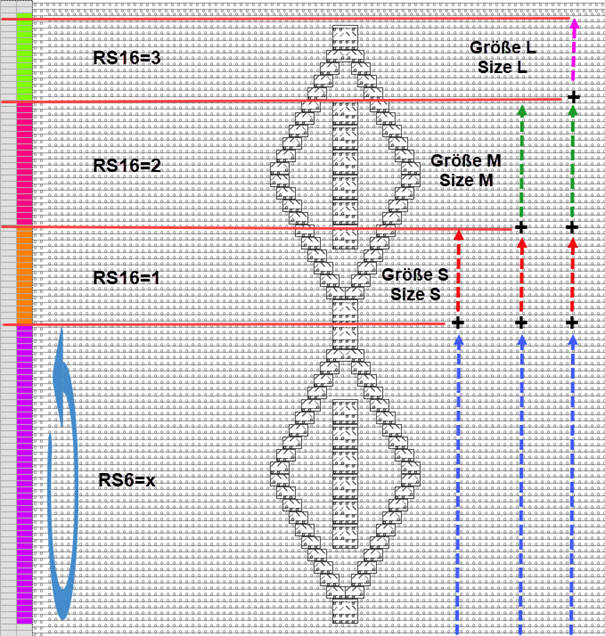
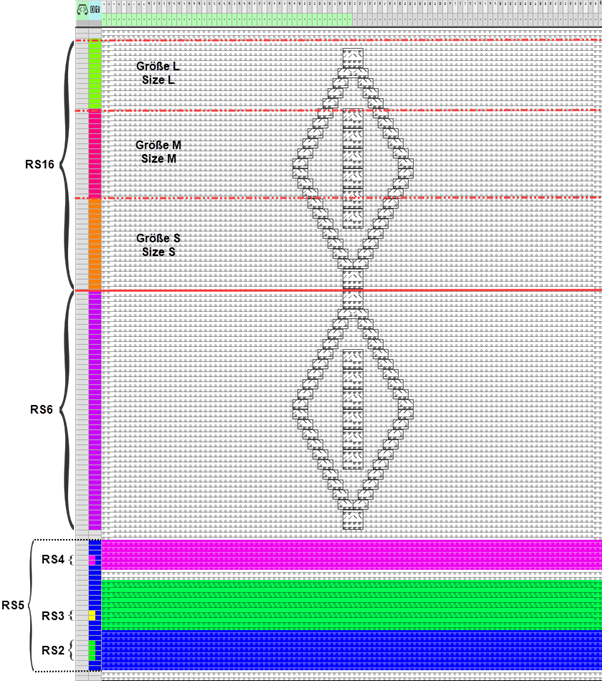
- Rapport commutable (fonction)
- Length control with a set of sizes e.g. size S to L
|
| |||||
|
RS |
Value |
Behavior |
min |
max |
Description |
|
| |||||
|
RS6 |
x |
Rapport de rangées |
1 |
20 |
Repetition of the Aran diamond (as desired) |
|
RS16 |
1 |
Rapport commutable (fonction) |
1 |
3 |
Knitting Rows for Size S |
|
RS16 |
2 |
Rapport commutable (fonction) |
2 |
3 |
Knitting Rows of Size S |
|
RS16 |
3 |
Rapport commutable (fonction) |
3 |
3 |
Knitting Rows of Size S |
|
| |||||
|
|
- 10
- If necessary, open the Vue Guide-fils via
 Guide-fil in order to position the yarn carriers on the rails.
 - 11
- Start the
 Élaboration technique:
-
 Show symbol view after Élaboration technique.
|
| |
|
RS1 – RS6 |
Cycle counter for the length of the basic pattern |
|
RS16 |
Cycle counter for the length control for the sizes S to L |
|
| |
|
RS15 |
Cycle for the extension of the protection rows in the knitting elements from the Débuts directory |
|
RS17 |
Comb on / off
|
|
RS18 |
Cycle for row compensation with the Tricoter en entrée avant le début, Float and Lock (à une pièce) technical modules |
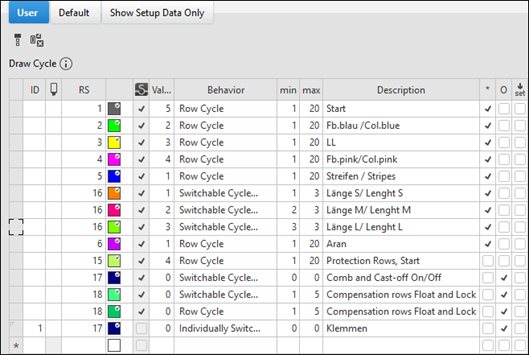
: The following cycle counters (RS) are added automatically to the Élaboration
technique in the table because of the use of the corresponding knitting elements.
|
RS1 |
Cycle for the length control of the Start knitting element |
|
RS13 |
Use of the Sintral function FF-Trans when
|
|
RS14 |
Cycle for lengthening when using special knitting elements from Rangées de protection, avec démaillage |
|
RS15 |
Cycle for the extension of the protection rows in the knitting elements from the Débuts directory |
|
RS17 |
Comb on / off
|
|
RS18 |
Cycle for row compensation with the Tricoter en entrée avant le début, Float and Lock (à une pièce) or Tricoter en entrée avant le début, Float and Lock (à deux pièces) technical modules |
|
RS19 |
IF decision for knitting elements from the Débuts directory
|
|
RS20 |
Cycle for lengthening the knitting with residual yarn until the belt take-down grasps the fabric |
|
Verwendung von Zähler # | |
|
| |
- 12
- Generate
 Sintral.
 - 13
- Start the
 Contrôle du Sintral.
-
 : In the
  Contrôle du Sintral tool window -> Compteur -> the cycle counters can be set to be checked and be displayed with the help of the graphic view.
- 14
-
 Extraire the knitting program.
- A program for the knitting machine will be created: CMS530.Pattern-5.zip.
- Load knitting program into the machine.
: The extracted file "CMS530.Pattern-5.zip" can be loaded onto the machine with an USB stick or via Ethernet.