Draw the structure
Draw a single jersey structure and a cable:
- 1
- To draw, select the desired setting in the status bar
 .
. Colore del disegno
- or - Colore del modulo
 - 2
- Draw the motif with the following drawing tools:
-
 Linea a mano libera
 -
 Linea
Linea -
 Rettangolo / Quadrato
Tracciare un rettangolo con la funzione di disegno Rettangolo e le opzioni selezionate. MAIUSC: Quadrato CTRL: Rettangolo dal centro CTRL+MAIUSC: Quadrato dal centro Nel modo eco è possibile una modifica o uno spostamento successivo.
- 3
- Select the desired needle action in the Azioni dell'ago tool window and draw it into the design pattern.
|
Needle actions in use | ||
|---|---|---|
|
Design Pattern |
Front Stitch with Transfer |
Rear Stitch with Transfer |
|
Structured single jersey |
| |


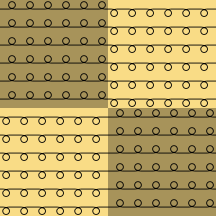
 : The
: The 
- 4
- Open STOLL Knit Explorer.
Elementi di lavoro tool window -> Accesso rapido or
Elementi di lavoro tool window -> Knit Explorer
 - 5
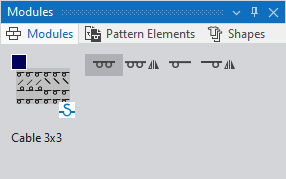
- Open the Structure Modules / Standard / Cables, Single-sided Float directory under Deposito elementi di lavoro and select the Cable 3x3 knitting element.
- The selected knitting element is shown in the Moduli tool window and is assigned to the cursor for drawing.
- 6
- Select the desired attribute before drawing into the design pattern:
-
Tutti gli aghi

-
Tutti gli aghi, speculari

-
Tecnica 1x1

-
Tecnica 1x1, speculare

Identification at the bottom of the graphic:
-
 Knitting Element from STOLL database
 - Knitting Element Name
|
Used Knitting Element | ||
|---|---|---|
|
Cable 3x3 |
|
|
|
|
| |
|
Result: | ||
|
| ||

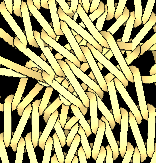
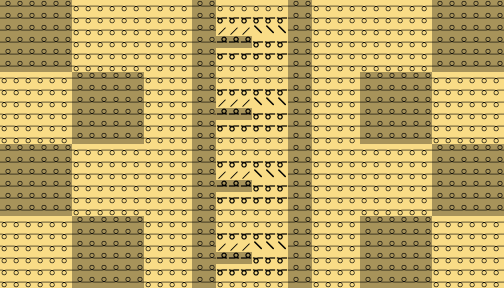
The transfer actions of the knitting elements will not be displayed in the design pattern at first.
You can open the Vista dei simboli espansa window which shows the transfer actions by  Simbolo.