Working with the auxiliary take-down (W+F) Tab
I. Open auxiliary take-down (W+F) tab and select / change the entry:
 Disegno design document window is selected.
- The
 Tirapezza ausiliario (W+F) control column is displayed.
- 1
- Open the selection list in the Avvio ribbon at
 Finestre degli strumenti
  and select
  Dati Setup.
- or -
Directly under Parametri click theDati Setup icon. - The Dati Setup tool window appears.
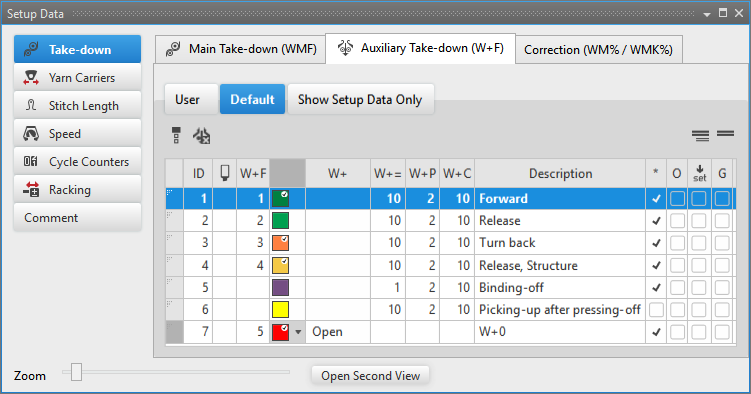
- 2
- Select the
 Tirapezza section.
 - 3
- Tirapezza ausiliario (W+F) tab / Impostazione predefinita
- or -
Select Utente. - 4
- Select the desired auxiliary take-down value in the
 column and enter it in the control column.
- The default setting will be overwritten in these design rows.
Options in the toolbar
|
|
Selecting the default value to enter in the control column |
|
|
Deleting an entry in the control column |
|
|
Show Pattern-related Values |
|
|
Hide Pattern-related Values |


Column labels of the auxiliary take-down (W+F) tool window
|
Column |
Display |
|---|---|
|
ID / IDv / ID^ |
Running numbering and sorting of the entries |
|
|
Selecting the auxiliary take-down value to enter it in the control column |
|
W+F |
Index for the indirect allocation of the auxiliary take-down value |
|
Color |
Display of colors to enter in the control columns |
|
W+ |
Open or close the auxiliary take-down |
|
W+= |
Speed of auxiliary take-down |
|
W+P |
Value for the contact pressure of the auxiliary take-down |
|
W+C |
Specification of the system number for the auxiliary take-down control |
|
Column |
Display | |
|---|---|---|
|
Description |
Comment on the use of the entry. | |
|
* |
|
Entry is not defined as favorite, meaning the entry is only within the Impostazione predefinita table available. |
|
|
Entry is defined as favorite, meaning the entry is available within the Utente table or directly via the context menu of the control columns. | |
|
O |
|
Value cannot be overwritten (Overwrite) by a value of another table. |
|
|
Value can be overwritten (Overwrite) by a value of another table. (Standard) | |
|
|
|
The entry will not be applied to the Setup data
|
|
|
The entry will be applied to the Setup data.
| |
|
G |
|
All settings of the Impostazione predefinita or Utente table are STOLL defaults (STOLL Template).
|
|
|
These settings of the Impostazione predefinita or Utente table are now User Standards (User-Template)
| |


 : All entries used in the pattern are applied by default to the Setup data.
II. Add a new entry in the auxiliary take-down (W+F) tab:
New entries can only be added in the Utente tab.
- Disegno design document window is selected.
- 1
- Open the Dati Setup tool window.
- 2
- Select the Tirapezza section.
- 3
- Select the Tirapezza ausiliario (W+F) / Utente tab.
- 4
- Set the cursor in the left table column to the row.
- 5
- With the RMB open the context menu and select .
- A new entry will be added at the end of the table.
- 6
- Make the desired specifications in the columns of the new entry.
- 7
- Close the table with
 .
.
- Changes are saved to the table and are available in the project for each order and for all of its individual patterns.
The changes will be saved to the *.spf file when saving the project.
III. Apply entry of the Auxiliary take-down (W+F) tab to the pattern:
-
Disegno design document window is selected.
- The control column is displayed.
- 1
- Open the Dati Setup tool window.
- 2
- Select the Tirapezza section.
- 3
- Select the Tirapezza ausiliario (W+F) / Utente tab.
- 4
- Select the desired auxiliary take-down value in the column.
- 5
- Enter the selected auxiliary take-down value in the control column.