Color Parameters
You can make the desired presettings for the colors used in the pattern (color areas) within the color parameter table.
I. Open the color parameters tool window:
- The document window is enabled.
- The
 Guidafili ribbon is enabled.
- 1
- Open the Guidafili tool window via
 Mostra guidafilo.
 - The tool window appears.
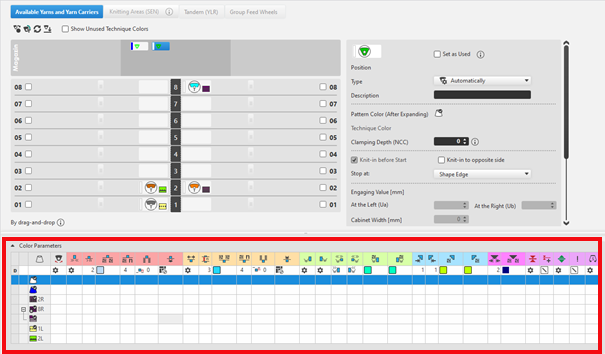
For each color in the pattern color tables used in the design pattern, a color area is created in the color parameter table. This means that you can make presettings only once for this color area.
For pattern related, different changes of a color area sub-colors must be created. You have to draw them manually in the design pattern at the point to be changed. Then, other specifications can be set in the color parameter table.
- 2
- Make the desired presettings for the corresponding color:
- Knitting-in and out
- Change the starting direction of a color (yarn carrier)
- Knot or binding at start or end of a color
- Border Processing
- etc.
- 3
- Apply the changes of the Guidafili tool window to the pattern.
Modifica group -> Applica
- or -
Modifica group -> Applica e chiudi
|
|
Sincronizza |
Trasferisce le modifiche dal disegno design nella vista Guidafili aperta e sincronizza entrambe le viste allo stato aggiornato del disegno. |
|
|
Applica |
Trasferisce le modifiche per guidafili nel disegno design. Altre modifiche (ad esempio i parametri dei colori) hanno effetto immediato. |
|
|
Applica e chiudi |
Trasferisce le modifiche per guidafili nel disegno design e chiude la vista. Altre modifiche (ad esempio i parametri dei colori) hanno effetto immediato. |
|
|
Annulla |
Ignora le modifiche e chiude la vista Guidafili. Close with Annulla if you only opened the Yarn Carrier view for control. |


II. Change the display of the columns in the color parameter table:
- 1
- Move the cursor to the first row of the table header.
- 2
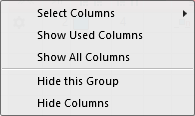
- Open the context menu with RMB.
- The context menu appears.
|
| |
|
Seleziona colonne |
Adding or closing the desired columns in the selection list. |
|
Mostra colonne utilizzate |
Display of the columns used in the pattern |
|
Mostra tutte le colonne |
Display all of the columns |
|
| |
|
Nascondi questo gruppo |
Hide all columns allocated to a group (color coded) |
|
Nascondi questa colonna |
Hide the individual column at cursor position |
III. Structure and column headers of the color parameter table:
Table header:
-
1st row:
All the symbols identifying the table columns -
2nd Row 'D'
Default settings for the respective column
Settings from the STOLL file - cannot be modified at the moment
Default settings are applied from a STOLL file and cannot be modified at the moment.
These default settings are automatically applied to all colors without specifications.
|
| ||
|
Group 1 : General | ||
|
| ||
|
1. Column |
Entry D for the definition of the 2nd row of the table | |
|
2. Column |
Display for available sub-colors | |
|
|
Colore |
Display of all the colors used in a project
|
|
|
Il guidafilo lavora un colore a più cadute |
Specifications with multi-system knitting |
|
|
Il guidafilo lavora un colore vanisé |
Specifications with plating |
|
|
Oscillazione |
Settings for the swivelling of intarsia yarn carriers or of autarkic yarn carriers |

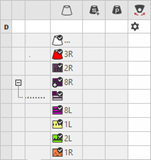

 : Visible and used within the design pattern.
 : The symbols are depending on the pattern color table they are origin.


|
Group 2 : Knitting-in | ||
|
| ||
|
|
Direzione iniziale |
Specification of the knitting direction for the first row of a color (color area) |
|
|
Numero di colonne senza immagliatura |
Quantity of columns (wales) without knitting-in module |
|
|
Modulo per immagliatura |
Specification of the knitting mode for knitting-in
|
|
|
Larghezza di ripetizione per immagliatura |
Presetting of the module width in total for the knitting mode of feeding-in the yarn carrier
|
|
|
Spostamento di ranghi per lo scarico |
Column appears automatically if a module for knitting-in with casting-off is used |
|
|
Offset ranghi per immagliatura/nodo |
Knitting-in of the yarn carrier by x rows before the beginning of the color area
|
|
|
Legatura / nodo all'inizio |
Presetting a module for knot / binding at start of a color area without knitting-in.
|
|
|
Offset colonne per immagliatura con nodo |
Move the position of a knot (module) by x columns to the left or right.
|
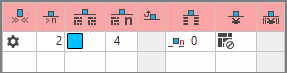


 :
:


The direction of knitting-in of a yarn carrier is always carried out from last position.
|
Group 3 : Knitting-out | ||
|
| ||
|
|
Direzione di fine lavorazione |
Preset of the direction for knitting-out of the yarn carrier at the end of a color area |
|
|
Numero di ranghi di disegno per fine lavorazione |
Preset of the distance of color areas from which on knitting-out starts. |
|
|
Modulo per fine lavorazione |
Preset of the knitting mode (module) for knitting-out
|
|
|
Larghezza di ripetizione per fine lavorazione |
Presetting of the module width in total for the knitting mode of feeding-in the yarn carrier
|
|
|
Spostamento di ranghi per lo scarico |
Column appears automatically if a module for knitting-out with casting-off is used |
|
|
Offset ranghi per fine lavorazione |
Knitting-out of the yarn carrier by x rows after the end of the color area
|
|
|
Legatura / nodo alla fine |
Presetting a module for knot / binding at end of a color area without knitting-out.
|
|
|
Offset colonne per fine lavorazione con nodo |
Move the position of a knot (module) by x columns to the left or right.
|
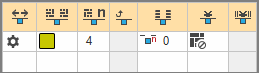


|
Group 4 : Intarsia Binding | ||
|
| ||
|
|
Legatura per intarsio a sinistra |
Presetting of a binding or no binding at the left border of the color area |
|
|
Legatura per intarsio a destra |
Presetting of a binding or no binding at the right border of the color area |
|
|
Direzione della legatura per intarsio a sinistra |
Specification for inserting the Binding module at the left border of the color area depending on the carriage direction
|
|
|
Direzione della legatura per intarsio a destra |
Specification for inserting the module Binding at the right border of the color are depending on the carriage direction
|
|
|
Modulo per legatura per intarsio a sinistra |
Presetting of the knitting mode for binding at the left border of the color area |
|
|
Modulo per legatura per intarsio a destra |
Presetting of the knitting mode for binding at the right border of the color area |
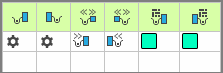


|
Group 5 : Border Processing | ||
|
| ||
|
|
Scalatura permessa senza elaborazione del bordo, a sinistra |
Maximum number of needles when widening at the left border of the color area without automatic border processing.
|
|
|
Scalatura permessa senza elaborazione del bordo, a destra |
Maximum number of needles when widening at the right border of the color area without automatic border processing.
|
|
|
Modulo per elaborazione del bordo a sinistra |
Presetting of the knitting mode for the border processing (feeding) in case of large widenings (stepping) of the color area
|
|
|
Modulo per elaborazione del bordo a destra |
Presetting of the knitting mode for the border processing (feeding) in case of large widenings (stepping) of the color area
|
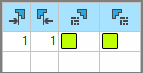


|
Group 6 : multi gauge | ||
|
| ||
|
|
Scalatura permessa dei ranghi multi gauge grossi |
Allowed number of needles when widening at the left and right border of the color area without automatic border processing.
|
|
|
Modulo per elaborazione del bordo, transizione da mg-grosso a mg-fine |
Presetting of the knitting mode for the border processing (feeding) in case of large widenings (stepping) of the color area and as transition
|


|
Group 7 : Miscellaneous | ||
|
| ||
|
|
Pinzatura |
Presetting for the yarn carrier, when it is to be clamped after knitting its color area. |
|
|
Pinzatura ritardata |
|
|
|
Apri pinza |
|
|
|
Bordo SEN |
Specifications for positioning the yarn carrier during the knitting
|
|
|
Caduta di lavoro (indipendentemente dalla direzione) |
Selection of a knitting system for the selected color area
|
|
Group 8 | ||
|
Descrizione |
Informativa sull'utilizzo della voce.
Qui è possibile immettere un testo. | |