Structure Modules
 Modulo struttura
A Modulo struttura is a knitting element, that consists of knitting and not knitting rows.
- Not knitting rows are grouped together with at least one knitting row to form a pattern row. To every pattern row belongs a design row.
The design rows are displayed in the pattern in the design view.
The technical rows (knitting and not knitting rows) are displayed in the expanded symbol view.
Design symbols are by default automatically drawn-in to the module when drawing the needle actions.
But they can also be drawn-in manually. Manually drawn-in design symbols appear with a grey M in the background.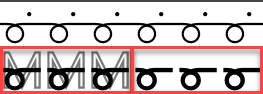
- Structure modules can consist of up to 4 variants that are displayed proportionally.
All needles or in 1x1, mirrored or not mirrored, depending on the selection or the basic fabric, the variants are applied.
 The clear identification of a structure module can be found in the properties of the knitting element under Tipo di elemento di lavoro . The specification cannot be modified.
Structure of a structure module
Click on the red-framed areas of the image to access the description directly.
|
1 |
Header In the header you can check the structure module and make the following settings: |
|
2 |
Editing area In the editing area the module is displayed and edited. For it, there are different alternatives available in the status bar, in the tool windows and through the context menu. You have access to the following settings and functions in the context menu of the module: |
|
3 |
Status Bar The status bar contains cursor indications and options for the presentation in the structure module. |
|
4 |
Symbols to draw in the structure module At the right selvedge you can find the Sistema di controllo, Design and Azioni dell'ago / colori tool windows |
Application
|
1 |
You can create a structure module in the following ways: Open the Nuovo elemento di lavoro dialog box and select In the tool window From a selection in the pattern, using the context menu, create a structure module from the selection. |
|
2 |
Examples: |
|
3 |
For that also see: |

