Color Parameters
You can make the desired presettings for the colors used in the pattern (color areas) within the color parameter table.
I. Open the color parameters tool window:
- The document window is enabled.
- The
 Guia-fios ribbon is enabled.
- 1
- Open the Guia-fios tool window via
 Exibir guia-fios.
 - The tool window appears.
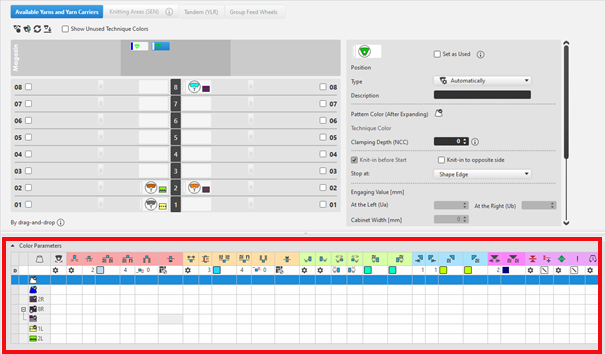
For each color in the pattern color tables used in the design pattern, a color area is created in the color parameter table. This means that you can make presettings only once for this color area.
For pattern related, different changes of a color area sub-colors must be created. You have to draw them manually in the design pattern at the point to be changed. Then, other specifications can be set in the color parameter table.
- 2
- Make the desired presettings for the corresponding color:
- Knitting-in and out
- Change the starting direction of a color (yarn carrier)
- Knot or binding at start or end of a color
- Border Processing
- etc.
- 3
- Apply the changes of the Guia-fios tool window to the pattern.
Editar group -> Aceitar
- or -
Editar group -> Aplicar e fechar
|
|
Sincronizar |
Aplica as alterações a partir da amostra de desenho para a vista de guia-fios aberta e sincroniza ambas vistas para o atual estado de amostra. |
|
|
Aceitar |
Aplica as alterações para guia-fios à amostra de desenho. Outras alterações (por exemplo, o parâmetro de cor) tem efeito imediatamente. |
|
|
Aplicar e fechar |
Aplica as alterações para guia-fios à amostra de desenho e fecha a vista. Outras alterações (por exemplo, o parâmetro de cor) tem efeito imediatamente. |
|
|
Cancelar |
Rejeita as alterações e fecha a vista de guia-fios. Close with Cancelar if you only opened the Yarn Carrier view for control. |


II. Change the display of the columns in the color parameter table:
- 1
- Move the cursor to the first row of the table header.
- 2
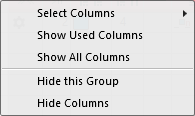
- Open the context menu with RMB.
- The context menu appears.
|
| |
|
Selecionar colunas |
Adding or closing the desired columns in the selection list. |
|
Exibir colunas utilizadas |
Display of the columns used in the pattern |
|
Exibir todas as colunas |
Display all of the columns |
|
| |
|
Ocultar este grupo |
Hide all columns allocated to a group (color coded) |
|
Ocultar esta coluna |
Hide the individual column at cursor position |
III. Structure and column headers of the color parameter table:
Table header:
-
1st row:
All the symbols identifying the table columns -
2nd Row 'D'
Default settings for the respective column
Settings from the STOLL file - cannot be modified at the moment
Default settings are applied from a STOLL file and cannot be modified at the moment.
These default settings are automatically applied to all colors without specifications.
|
| ||
|
Group 1 : General | ||
|
| ||
|
1. Column |
Entry D for the definition of the 2nd row of the table | |
|
2. Column |
Display for available sub-colors | |
|
|
Cor |
Display of all the colors used in a project
|
|
|
Guia-fios tece uma cor de sistemas múltiplas |
Specifications with multi-system knitting |
|
|
Guia-fios tece uma cor de vanizagem |
Specifications with plating |
|
|
Bascular |
Settings for the swivelling of intarsia yarn carriers or of autarkic yarn carriers |

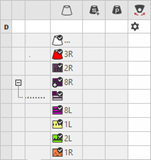

 : Visible and used within the design pattern.
 : The symbols are depending on the pattern color table they are origin.


|
Group 2 : Knitting-in | ||
|
| ||
|
|
Direção de início |
Specification of the knitting direction for the first row of a color (color area) |
|
|
Número de colunas sem Entrar tecendo |
Quantity of columns (wales) without knitting-in module |
|
|
Módulo para entrar tecendo |
Specification of the knitting mode for knitting-in
|
|
|
Largura de repetição para entrar tecendo |
Presetting of the module width in total for the knitting mode of feeding-in the yarn carrier
|
|
|
Deslocamento de fileiras para desprender |
Column appears automatically if a module for knitting-in with casting-off is used |
|
|
Fileiras de offset para entrar tecendo |
Knitting-in of the yarn carrier by x rows before the beginning of the color area
|
|
|
Nó / Conexão no início |
Presetting a module for knot / binding at start of a color area without knitting-in.
|
|
|
Offset de coluna para entrar tecendo com nó |
Move the position of a knot (module) by x columns to the left or right.
|
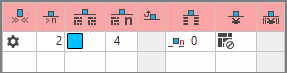


 :
:


The direction of knitting-in of a yarn carrier is always carried out from last position.
|
Group 3 : Knitting-out | ||
|
| ||
|
|
Direção de saída da tricotagem |
Preset of the direction for knitting-out of the yarn carrier at the end of a color area |
|
|
Número de fileiras para sair tecendo |
Preset of the distance of color areas from which on knitting-out starts. |
|
|
Módulo para sair tecendo |
Preset of the knitting mode (module) for knitting-out
|
|
|
Largura de repetição para sair tecendo |
Presetting of the module width in total for the knitting mode of feeding-in the yarn carrier
|
|
|
Deslocamento de fileiras para desprender |
Column appears automatically if a module for knitting-out with casting-off is used |
|
|
Offset de fileira para sair tecendo |
Knitting-out of the yarn carrier by x rows after the end of the color area
|
|
|
Nó / Conexão no final |
Presetting a module for knot / binding at end of a color area without knitting-out.
|
|
|
Offset de coluna para sair tecendo com nó |
Move the position of a knot (module) by x columns to the left or right.
|
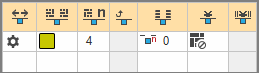


|
Group 4 : Intarsia Binding | ||
|
| ||
|
|
Conexão intarsia à esquerda |
Presetting of a binding or no binding at the left border of the color area |
|
|
Conexão intarsia à direita |
Presetting of a binding or no binding at the right border of the color area |
|
|
Direção da conexão intarsia à esquerda |
Specification for inserting the Binding module at the left border of the color area depending on the carriage direction
|
|
|
Direção da conexão intarsia à direita |
Specification for inserting the module Binding at the right border of the color are depending on the carriage direction
|
|
|
Módulo para conexão intarsia à esquerda |
Presetting of the knitting mode for binding at the left border of the color area |
|
|
Módulo para conexão intarsia à direita |
Presetting of the knitting mode for binding at the right border of the color area |
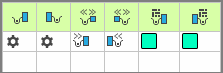


|
Group 5 : Border Processing | ||
|
| ||
|
|
Escalonamento permitido sem processamento de ourelas, lado esquerdo |
Maximum number of needles when widening at the left border of the color area without automatic border processing.
|
|
|
Escalonamento permitido sem processamento de ourelas, lado direito |
Maximum number of needles when widening at the right border of the color area without automatic border processing.
|
|
|
Módulo para processamento de ourelas à esquerda |
Presetting of the knitting mode for the border processing (feeding) in case of large widenings (stepping) of the color area
|
|
|
Módulo para processamento de ourelas à direita |
Presetting of the knitting mode for the border processing (feeding) in case of large widenings (stepping) of the color area
|
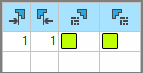


|
Group 6 : multi gauge | ||
|
| ||
|
|
Escalonamento permitido das fileiras multi gauge |
Allowed number of needles when widening at the left and right border of the color area without automatic border processing.
|
|
|
Módulo para processamento de ourelas, transição mg grosso para mg fino |
Presetting of the knitting mode for the border processing (feeding) in case of large widenings (stepping) of the color area and as transition
|


|
Group 7 : Miscellaneous | ||
|
| ||
|
|
Pinçar |
Presetting for the yarn carrier, when it is to be clamped after knitting its color area. |
|
|
Pinçamento com retraso |
|
|
|
Abrir pinça |
|
|
|
Ourela SEN |
Specifications for positioning the yarn carrier during the knitting
|
|
|
Sistema (independente da direção) |
Selection of a knitting system for the selected color area
|
|
Group 8 | ||
|
Descrição |
Nota para a utilização da entrada.
Aqui você pode entrar um texto. | |