Step by Step to Pattern-5
- A pattern project with one pattern and the desired settings is created.
- 1
- Generate basic pattern with:
- Cores de fio
- Basic Color
- Color stripe
- Ações da agulha
-
 Malha à frente com transferência
 -
 Malha atrás com transferência
 - Stoll pattern element
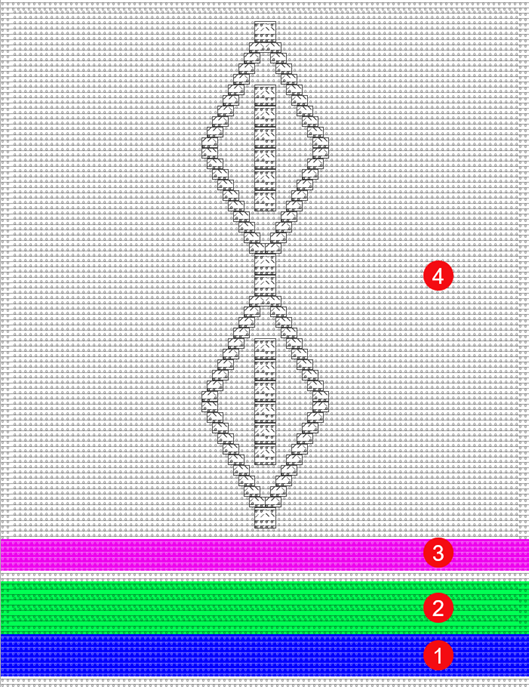
- Knit Explorer -> Partes de amostra -> Partes de amostra, todas as agulhas -> Partes de amostra, Aran -> Aran parte de amostra 4
|
| ||
|
1 |
Color stripe 1 |
|
|
2 |
Color stripe 2 |
|
|
3 |
Color stripe 3 |
|
|
4 |
Color area |
|
- 2
- Display the
 Ciclo (RS) control column.
 - 3
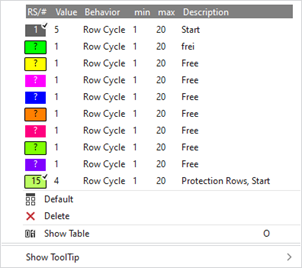
- Place the cursor in the control column and with RMB -> open the context menu.
- 4
- Select available cycle counter color+(?) directly in the context menu and draw into control column
- or -
using Exibir tabela open the Comutadores de ciclos tool window in the context menu. - 5
- Select the Usuário tab.
- The tool window is displayed.
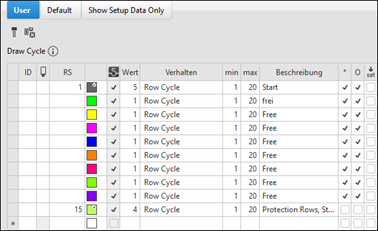
 : In the table, the cycle counters in use (from knitting elements) and the ones to be used (available) are displayed before Processamento técnico.
|
| ||
|
ID |
Running numbering and sorting of newly created entries | |
|
|
Selecting the cycle counter to enter in the | |
|
RS |
Input and display of the index for the indirect (RSn =1-39) or direct (D) cycle counter allocation | |
|
Cor |
Display of the color to enter in the | |
|
Valor |
| |
|
Comportamento |
Ciclo de fileiras |
|
|
Ciclo comutável (função) |
| |
|
| ||
|
mín |
| |
|
máx |
| |
|
Descrição |
About the use of the cycle in the fabric | |

- 6
- Select the desired available entry (color) from the Usuário tab and enter in the control column.
- 7
- In the RS column, indicates the desired value for RSn (n=1-39).
- 8
- Define the desired number of repeats in the Valor column.
- 9
- Make the following selection with Comportamento:
- Ciclo de fileiras
- Simple cycle
- Nested cycle: Entry in the control column with CTRL. + LMB
|
Simple cycles |
Nested cycles |
|
|
|
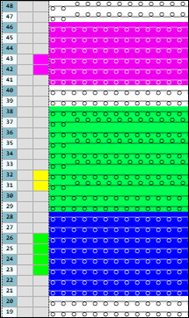
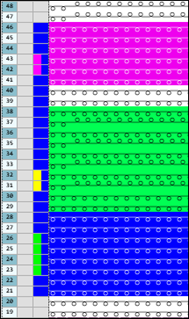
The procedure for multiple entries in control columns:
- Ciclo (RS)
- Predefinições dos guia-fios
- Parada de guia-fios
Add an entry to an existing entry:
- Add

With the Ctrl key - Select the desired location in the menu:
- Set cursor to the start position.
- Press the CTRL key.
- Press LMB and hold it until the end position.
- Release the left mouse button.
- Add

With the Ctrl key - Select the desired location in the menu:
- Set cursor to the start position.
- Press the CTRL key.
- Click left mouse button.
- Draw the cursor to the end position.
- Click left mouse button again.
Delete Entry:
- Delete
With the CTRL + ALT key - Set cursor to the start position.
- Press LMB and hold it until the end position.
- Release the left mouse button.
- Delete
With the CTRL + ALT key - Select the desired location in the menu:
- Set cursor to the start position.
- Press the CTRL + ALT keys.
- Click left mouse button.
- Draw the cursor to the end position.
- Click left mouse button again.
- Ciclo comutável (função)
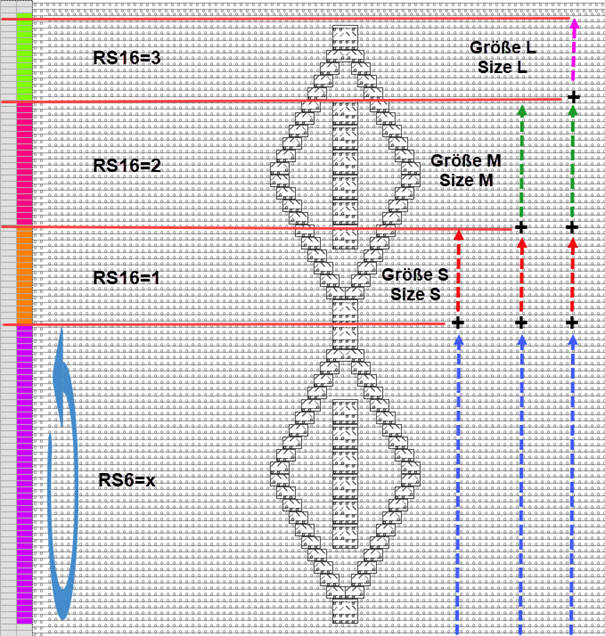
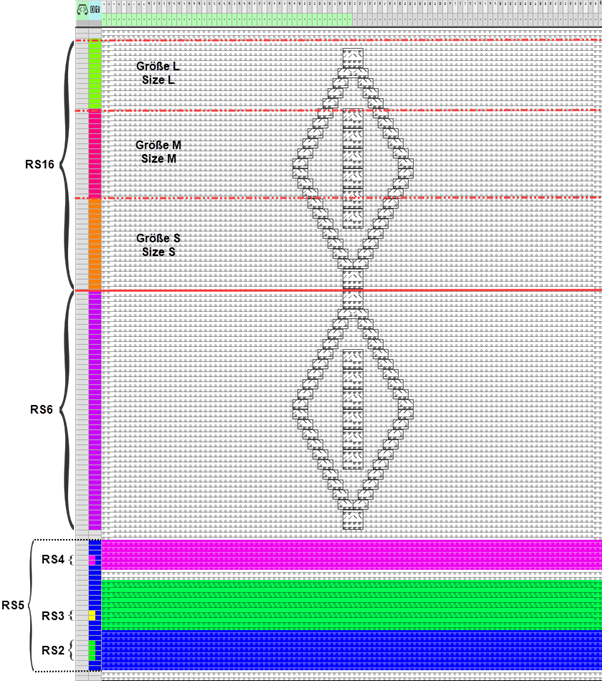
- Length control with a set of sizes e.g. size S to L
|
| |||||
|
RS |
Value |
Behavior |
min |
max |
Description |
|
| |||||
|
RS6 |
x |
Ciclo de fileiras |
1 |
20 |
Repetition of the Aran diamond (as desired) |
|
RS16 |
1 |
Ciclo comutável (função) |
1 |
3 |
Knitting Rows for Size S |
|
RS16 |
2 |
Ciclo comutável (função) |
2 |
3 |
Knitting Rows of Size S |
|
RS16 |
3 |
Ciclo comutável (função) |
3 |
3 |
Knitting Rows of Size S |
|
| |||||
|
|
- 10
- If necessary, open the Vista de guia-fios via
 Guia-fios in order to position the yarn carriers on the rails.
 - 11
- Start the
 Processamento técnico:
-
 Show symbol view after Processamento técnico.
|
| |
|
RS1 – RS6 |
Cycle counter for the length of the basic pattern |
|
RS16 |
Cycle counter for the length control for the sizes S to L |
|
| |
|
RS15 |
Cycle for the extension of the protection rows in the knitting elements from the Começos directory |
|
RS17 |
Comb on / off
|
|
RS18 |
Cycle for row compensation with the Entrar tecendo antes do começo, Float and Lock (1 peça) technical modules |
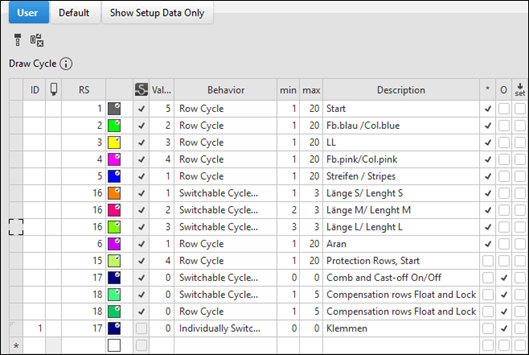
: The following cycle counters (RS) are added automatically to the Processamento
técnico in the table because of the use of the corresponding knitting elements.
|
RS1 |
Cycle for the length control of the Start knitting element |
|
RS13 |
Use of the Sintral function FF-Trans when
|
|
RS14 |
Cycle for lengthening when using special knitting elements from Fileiras de proteção, com desprender |
|
RS15 |
Cycle for the extension of the protection rows in the knitting elements from the Começos directory |
|
RS17 |
Comb on / off
|
|
RS18 |
Cycle for row compensation with the Entrar tecendo antes do começo, Float and Lock (1 peça) or Entrar tecendo antes do começo, Float and Lock (2 peças) technical modules |
|
RS19 |
IF decision for knitting elements from the Começos directory
|
|
RS20 |
Cycle for lengthening the knitting with residual yarn until the belt take-down grasps the fabric |
|
Verwendung von Zähler # | |
|
| |
- 12
- Generate
 Sintral.
 - 13
- Start the
 Controle Sintral.
-
 : In the
  Controle Sintral tool window -> Contadores -> the cycle counters can be set to be checked and be displayed with the help of the graphic view.
- 14
-
 Extrair the knitting program.
- A program for the knitting machine will be created: CMS530.Pattern-5.zip.
- Load knitting program into the machine.
: The extracted file "CMS530.Pattern-5.zip" can be loaded onto the machine with an USB stick or via Ethernet.