Context menu of the pattern layer
Make the following settings in the context menu of the pattern layer:
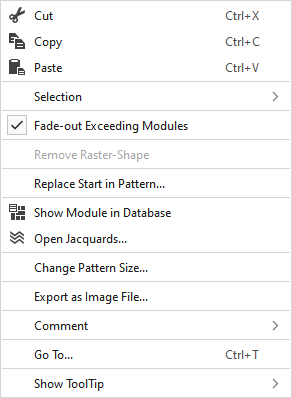
|
|
Elimina o conteúdo da seleção e copia o mesmo na área de transferência. | |
|
|
Copia o conteúdo da seleção para a área de transferência. | |
|
|
Cola elementos copiados ou cortados na posição selecionada. | |
|
Seleção |
Criar um Jacquard... |
I. Generate a Jacquard area in the selected area. |
|
|
Create a pattern element from the selection. Cria uma nova parte de amostra da seleção existente e adiciona ela na janela de ferramentas 'Partes de amostra'. | |
|
Select |
The functions of the menu bar Seleção are also available in the context menu. | |
|
Proteger |
A selection can be protected from interventions. | |
|
|
Ocultar módulos do tecido base que são cortados da largura de ocultação duma linha de corte ou duma marcação. | |
|
Remover forma de retícula |
If a .spf pattern with raster-shape is imported, this function can be used to remove the raster-shape from the pattern.
| |
|
Substituir começo na amostra... |
Chamar a caixa de diálogo Substituir começo, para selecionar o começo desejado. | |
|
|
Shows the module at the cursor position in the database. | |
|
|
Opens the tool window Jacquards and shows in it the Jacquard of the cursor position. | |
|
Alterar tamanho da amostra... |
Opens the dialog box where you can change the height and width of the pattern. | |
|
Exportar como ficheiro de imagem... |
Save the design view off the whole pattern as image file. | |
|
Comentário |
Place a pin, comment, or graphic anywhere in the pattern. | |
|
Ir para... |
Opens the Ir para dialog box. | |
|
Exibir descrição |
Make settings for the tooltip. | |


 You cannot edit a raster-shape in
