Color Parameters
You can make the desired presettings for the colors used in the pattern (color areas) within the color parameter table.
I. Open the color parameters tool window:
- The document window is enabled.
- The
 导纱器 ribbon is enabled.
- 1
- Open the 导纱器 tool window via
 显示导纱器.
 - The tool window appears.
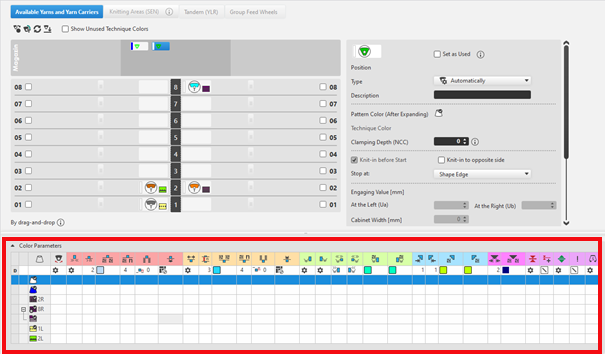
For each color in the pattern color tables used in the design pattern, a color area is created in the color parameter table. This means that you can make presettings only once for this color area.
For pattern related, different changes of a color area sub-colors must be created. You have to draw them manually in the design pattern at the point to be changed. Then, other specifications can be set in the color parameter table.
- 2
- Make the desired presettings for the corresponding color:
- Knitting-in and out
- Change the starting direction of a color (yarn carrier)
- Knot or binding at start or end of a color
- Border Processing
- etc.
- 3
- Apply the changes of the 导纱器 tool window to the pattern.
编辑 group -> 应用
应用
- or -
编辑 group -> 应用并关闭
应用并关闭
|
|
同步 |
将设计花型中的更改应用到导纱器视图上并把两个视图同步到花型的当前状态。 |
|
|
应用 |
将导纱器更改应用到设计花型上。其他更改(例如颜色参数)将一次应用。 |
|
|
应用并关闭 |
将导纱器更改应用到设计花型上然后关闭视图。其他更改(例如颜色参数)将一次应用。 |
|
|
取消 |
忽略更改并关闭导纱器视图。 Close with 取消 if you only opened the Yarn Carrier view for control. |


II. Change the display of the columns in the color parameter table:
- 1
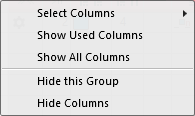
- Move the cursor to the first row of the table header.
- 2
- Open the context menu with RMB.
- The context menu appears.
|
| |
|
选择列 |
Adding or closing the desired columns in the selection list. |
|
显示使用列 |
Display of the columns used in the pattern |
|
显示所有行 |
Display all of the columns |
|
| |
|
隐藏该组 |
Hide all columns allocated to a group (color coded) |
|
隐藏该列 |
Hide the individual column at cursor position |
III. Structure and column headers of the color parameter table:
Table header:
-
1st row:
All the symbols identifying the table columns -
2nd Row 'D'
Default settings for the respective column
Settings from the STOLL file - cannot be modified at the moment
Default settings are applied from a STOLL file and cannot be modified at the moment.
These default settings are automatically applied to all colors without specifications.
|
| ||
|
Group 1 : General | ||
|
| ||
|
1. Column |
Entry D for the definition of the 2nd row of the table | |
|
2. Column |
Display for available sub-colors | |
|
|
颜色 |
Display of all the colors used in a project
|
|
|
导纱器编织一个多系统颜色 |
Specifications with multi-system knitting |
|
|
导纱器编织一个添纱颜色 |
Specifications with plating |
|
|
摆动 |
Settings for the swivelling of intarsia yarn carriers or of autarkic yarn carriers |

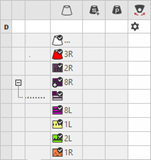

 : Visible and used within the design pattern.
 : The symbols are depending on the pattern color table they are origin.


|
Group 2 : Knitting-in | ||
|
| ||
|
|
开始方向 |
Specification of the knitting direction for the first row of a color (color area) |
|
|
无编织带入列数 |
Quantity of columns (wales) without knitting-in module |
|
|
编织带入模块 |
Specification of the knitting mode for knitting-in
|
|
|
编织带入重复宽度 |
Presetting of the module width in total for the knitting mode of feeding-in the yarn carrier
|
|
|
移动脱布行 |
Column appears automatically if a module for knitting-in with casting-off is used |
|
|
编织带入的行偏移 |
Knitting-in of the yarn carrier by x rows before the beginning of the color area
|
|
|
起头处锁定或打结 |
Presetting a module for knot / binding at start of a color area without knitting-in.
|
|
|
打结编织带入的列偏移 |
Move the position of a knot (module) by x columns to the left or right.
|
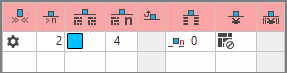


 :
:


The direction of knitting-in of a yarn carrier is always carried out from last position.
|
Group 3 : Knitting-out | ||
|
| ||
|
|
编织带出方向 |
Preset of the direction for knitting-out of the yarn carrier at the end of a color area |
|
|
Quantity of Pattern Rows for Knitting-out |
Preset of the distance of color areas from which on knitting-out starts. |
|
|
编织带出模块 |
Preset of the knitting mode (module) for knitting-out
|
|
|
编织带出重复宽度 |
Presetting of the module width in total for the knitting mode of feeding-in the yarn carrier
|
|
|
移动脱布行 |
Column appears automatically if a module for knitting-out with casting-off is used |
|
|
编织带出的行偏移 |
Knitting-out of the yarn carrier by x rows after the end of the color area
|
|
|
结束处锁定或打结 |
Presetting a module for knot / binding at end of a color area without knitting-out.
|
|
|
打结编织带出的列偏移 |
Move the position of a knot (module) by x columns to the left or right.
|
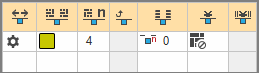


|
Group 4 : Intarsia Binding | ||
|
| ||
|
|
左侧嵌花锁定 |
Presetting of a binding or no binding at the left border of the color area |
|
|
右侧嵌花锁定 |
Presetting of a binding or no binding at the right border of the color area |
|
|
左侧嵌花锁定方向 |
Specification for inserting the Binding module at the left border of the color area depending on the carriage direction
|
|
|
右侧嵌花锁定方向 |
Specification for inserting the module Binding at the right border of the color are depending on the carriage direction
|
|
|
左侧嵌花锁定模块 |
Presetting of the knitting mode for binding at the left border of the color area |
|
|
右侧嵌花锁定模块 |
Presetting of the knitting mode for binding at the right border of the color area |
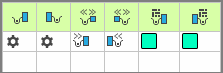


|
Group 5 : Border Processing | ||
|
| ||
|
|
左侧无边界处理的允许收放针 |
Maximum number of needles when widening at the left border of the color area without automatic border processing.
|
|
|
右侧无边界处理的允许收放针 |
Maximum number of needles when widening at the right border of the color area without automatic border processing.
|
|
|
左侧边界处理模块 |
Presetting of the knitting mode for the border processing (feeding) in case of large widenings (stepping) of the color area
|
|
|
右侧边界处理模块 |
Presetting of the knitting mode for the border processing (feeding) in case of large widenings (stepping) of the color area
|
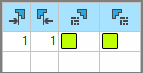


|
Group 6 : multi gauge | ||
|
| ||
|
|
允许的粗针多针距行收放针 |
Allowed number of needles when widening at the left and right border of the color area without automatic border processing.
|
|
|
多针距从粗到细的边界处理模块 |
Presetting of the knitting mode for the border processing (feeding) in case of large widenings (stepping) of the color area and as transition
|


|
Group 7 : Miscellaneous | ||
|
| ||
|
|
夹持 |
Presetting for the yarn carrier, when it is to be clamped after knitting its color area. |
|
|
延迟夹纱 |
|
|
|
打开夹纱装置 |
|
|
|
SEN 边缘 |
Specifications for positioning the yarn carrier during the knitting
|
|
|
系统(与方向无关) |
Selection of a knitting system for the selected color area
|
|
Group 8 | ||
|
说明 |
有关条目应用的注释。 您可以在这里输入文本。 | |