Creating Multiple System Color and Draw it into the Design Pattern
Multi-system knitting by multiple system colors
Related to an individual pattern, it may be necessary to enlarge the number of yarn carriers per color in order to increase its productivity
You can use up to 6 yarn carriers for one individual color.
Presetting of CREATE PLUS is one yarn carrier per color.
Create multiple system colors for multi-system knitting:
- 1
- Open the dialog box with
 花型颜色 in the 多系统颜色 tool window.
 - The tool window appears.
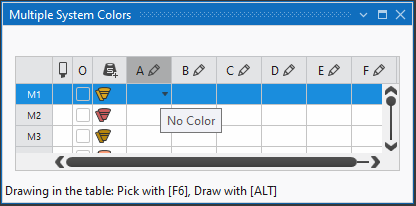
- 2
- Under M1 (Multiple system color 1) in the columns A to D, allocate the desired colors depending on the desired type of machine (system count).
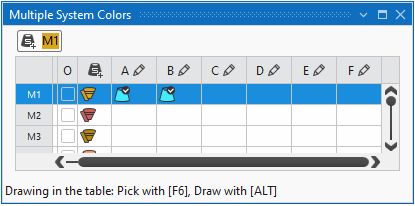
- In the Index color column under M1 the automatically generated multiple system color is displayed.
The maximum quantity of yarn carriers per color is 6 yarn carriers.
This means that it is possible to knit with a maximum of 6 yarn carriers (= 6 systems) in one area.
- 3
- If necessary change the color in the column via the

 menu.
menu. - 4
- Position the cursor in the 1st column with the M1 label.
- 5
- Open the context menu and select the desired system sequence:
- 统一系统顺序
- 优化系统顺序
- 6
- Select the M1 entry in the
 column.
- The selected multiple system color can be drawn-in.
- 7
- Close the tool window.
Drawing the multiple system color as colored stripes:
- 1
- Select the
 花型颜色 setting in the
  status bar to draw the colored stripes.
 - The basic pattern will shown by 纱线颜色 / 库颜色 / 导纱器颜色.
- 2
- Draw-in the selected multiple system color into the desired rows of the design pattern.
|
|
1 |
Area with 1 yarn carrier = by one system |
|
2 |
Area with 2 yarn carriers = by two systems |

如果可能,将一个颜色画入花型时要画偶数行。