Staggering of yarn carriers at the fabric selvedge (YD/YDI)
I. Enter staggering of yarn carriers at the fabric selvedge (YD/YDI):
In the Configuration dialog box under / is activated by default for all patterns  按行优化 YD (YDopt) and the specifications for calculating the distances are predefined.
-
 设计花型 appears.
 - The
 导纱器交错排列 (YD)/(YDI) control column is displayed.
 - Presetting of Configuration will be displayed: OPT (YD optimized)
- 1
- Open the 配置 tool window.
起头 ribbon -> 配置 group -> 配置
配置 - 2
- In the 配置 tool window at the left in the selection panel select the desired pattern via the selection list.
- 3
- Select the 优化 tab.
- 4
- Deactivate the
 按行优化 YD (YDopt) function under the 动程优化 sector.
 - Working with YD / YDI in the control column is possible now.
- 5
- Close the tool window.
- 6
- Position the cursor on the control column.
- 7
- Open the context menu with the RMB.
- The context menu appears.
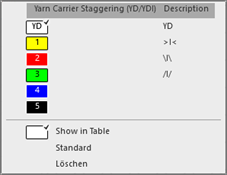
- 8
- Select the desired YDI index (color).
- 9
- Enter the selected index (color) in the desired pattern rows of the 导纱器交错排列 (YD)/(YDI)control column.
- or –
Select the 在表中显示 context menu to make the new entries in the 导纱器交错排列 (YD)/(YDI) tool window and enter them in the control column.
|
| ||
|
1 |
| |
|
4 |
|
Selecting the default value to enter in the control column |
|
|
Delete the entry from the control column
| |
|
5 |
Table with default tables for the yarn carrier staggering
| |
|
6 |
Table of the YDI indexes
YDIn: n = 1-20 | |
|
7 |
Display of the yarn carrier rails with the yarn carriers left / right and the allocated values for staggering
| |
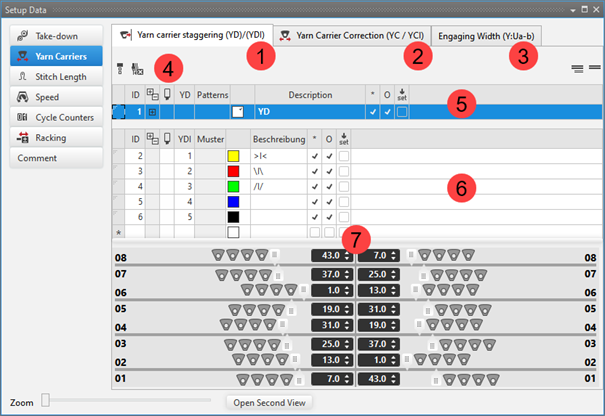


 : In a special case entries from knitting elements also can be entered.
 : In each table there can be defined other values for the staggering process of the yarn carriers.
如果在花型中需要使用不同距离表,则在控制列区域输入不同的索引(颜色)。
II. Create a pattern-related YD table:
- The 导纱器交错排列 (YD)/(YDI) tool window is open.
- The 按行优化 YD (YDopt) function is disabled for the desired pattern.
- 1
- Move cursor to the first column of the upper table (5).
- 2
- Open the context menu with the RMB.
- 3
- Select the desired pattern for the new YD table via 插入用于花型相关数值的行
 .
. - Additional row will be inserted.
- 4
- Select additional row.
- The view of yarn carrier rails appears.
- 5
- Move the yarn carriers by the slider graphically.
- or –
Enter the values in the edit box. - 6
- Select a new entry in the
 column.
 - 7
- Make entry into the control column of the desired rows.
III. Working with YDI Indexes:
In the table with the YDI indexes (6) there are 3 STOLL templates which can be used directly.
- 1
- Select the existing YDI index and enter it in the control column.
- or -
Call-up the context menu in the * cell of the table. - 2
- Select 添加表行....
- A new line is inserted.
- 3
- Enter an index number in the YDI column.
- 4
- If necessary, change the color of the YDI index.
- 5
- Select the row.
- The view of yarn carrier rails appears.
- 6
- Move the yarn carriers by the slider graphically.
- or –
Enter the values in the edit box. - 7
- Select an entry in the column.
- 8
- Enter the desired rows into the control column.
IV. Create a pattern-related YDI table:
- The 导纱器交错排列 (YD)/(YDI) tool window is open.
- The 按行优化 YD (YDopt) function is disabled for the desired pattern.
- 1
- Move cursor to the first column of the table (6).
- 2
- Open the context menu with the RMB.
- 3
- Select the desired pattern for the new YDI table via 插入用于花型相关数值的行 .
- Additional row will be inserted.
- 4
- Select additional row.
- The view of yarn carrier rails appears.
- 5
- Move the yarn carriers by the slider graphically.
- or –
Enter the values in the edit box. - 6
- Select an entry in the column.
- 7
- Enter the desired rows into the control column.