Multi-piece knitting with CMS 822
Overview of the operating modes with CMS 822:
|
Possibilities of the operating modes | ||
|---|---|---|
|
Operating Mode |
Using the comb |
Number of possible fabric pieces |
|
Without tandem: |
Without Comb |
1 - 4 |
|
With Comb |
1 or 2 | |
|
With tandem |
Without Comb |
1-4 per carriage |
|
With Comb |
2 | |
I. Without Tandem - Multi-piece knitting with and without comb:
|
Possibilities with normal operation (without tandem) | |
|---|---|
|
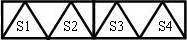
System allocation per knitting area |
|
|
Start |
Configuration: |
|
Without Comb |
1 - 4 SEN |
|
With Comb |
1 SEN = 2 Fabrics |
II. With Tandem - Multi-piece knitting with and without comb:
CMS 822 的工作流程与 CMS 933/922/422TC/433TC 分机头相对应。
生成用于左机头编织系统 S1 和 S2的编织程序。
系统自动计算左侧衣片的选针并且自动转到右侧衣片所用系统 S3 和 S4上。
- 1
- Generate new pattern.
- or -
Load the existing pattern as basic pattern. - 2
- Activate
 分机头模式 and select the coupling width when selecting the machine.
|
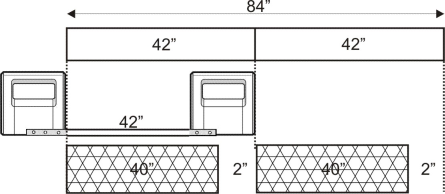
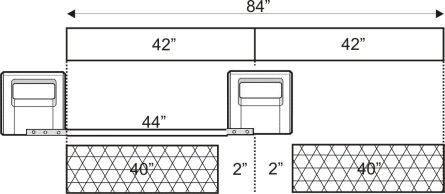
Tandem operation without comb | ||
|---|---|---|
|
System allocation |
| |
|
Start |
Coupling width |
Working width |
|
Without Comb |
42 " |
42 " |
|
| ||
|
| ||
|
Start |
Coupling width |
Working width |
|
Without Comb |
44 " |
40 " |
|
| ||

|
Tandem operation with comb | ||
|---|---|---|
|
System allocation |
| |
|
Start |
Coupling width |
Working width |
|
With Comb |
42 " |
42 " |
|
| ||
|
Possible positions of the working width and the intermediate space | ||
|
| ||
|
Start |
Coupling width |
Working width |
|
With Comb |
44 " |
40 " |
|
| ||
|
Possible positions of the working width and the intermediate space | ||
|
| ||

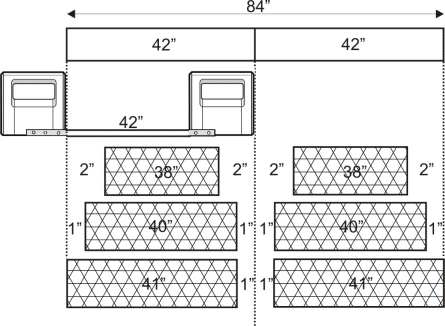
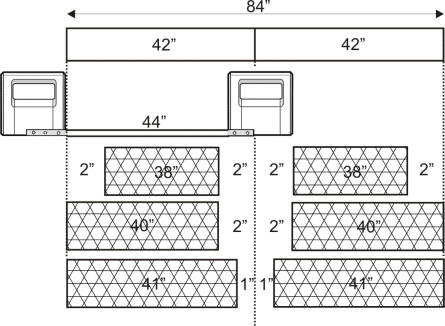

两个编织区域的距离必须足够安排使用中的导纱器。
请注意导纱器轨道的双重分配。
- 1
- Call up the 编织区域颜色 tab in the 配置 tool window.
- 2
- Position the 开始位置 SEN1 to the left in case of a great working width.
- 3
- Activate 多片编织 in the 多片编织 section and set
 到织片中心的距离(连接宽度) or 中间间距.
 - 4
- Start the 工艺 处理 .