Quick access toolbar for lined shape projects
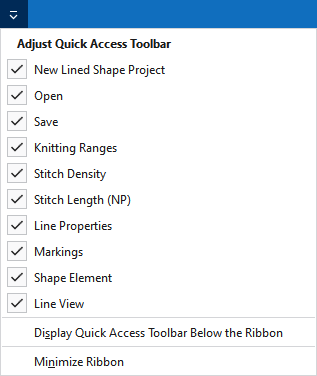
In the quick access toolbar you have access at any time to the following commands:
 The quick access toolbar can be found at the left border of the title bar.

Using the drop-down menu you can display and hide the commands in the quick access toolbar and make settings.
|
|
创建一个线模型项目(*.slsf)。 |
|
|
打开文件(花型,编织元素,模型) |
|
|
保存 |
|
|
撤销之前操作。 |
|
|
重复之前操作。 |
|
|
显示定义的编织区域表。 |
|
|
显示线圈密度表。 |
|
|
显示NP值表。 |
|
|
Show 线属性. |
|
|
显示带标记点属性的工具窗口。 |
|
|
Show 模型元素属性. |
|
|
Show 线视图. |
|
更多指令 |
Add more commands to the quick access toolbar. |
|
在功能区下方显示快速访问工具栏 |
Display the quick access toolbar under or above the ribbon. |
|
功能区最小化 |
Show or hide the ribbon. |


